Oracle Solutions We believe in delivering tangible results for our customers in a cost-effective manner
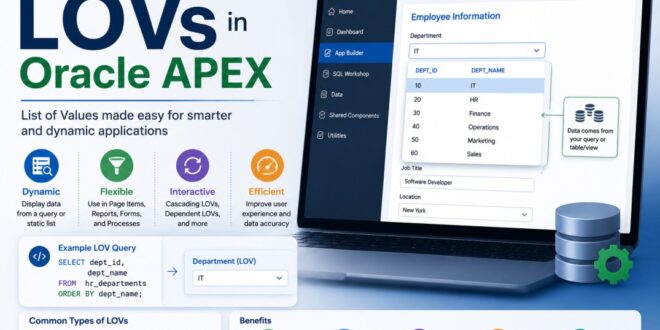
One of the first things users interact with in an Oracle APEX application is a form. Whether they are selecting a department, choosing a city, assigning a vehicle, or picking a date, they are constantly making selections. Imagine if users had to type every value manually—it would not only be slow but would also increase the chances of spelling mistakes and invalid data.
This is where List of Values (LOVs) come in.
When I first started working with Oracle APEX, I used LOVs simply to populate dropdown lists. As I gained more experience, I realized they are much more than that. LOVs help enforce data consistency, improve user experience, and make applications easier to maintain.
In this blog, I’ll explain what LOVs are, the different types available in Oracle APEX, and share practical examples and best practices that I frequently use in real-world applications.
What is an LOV?
An LOV (List of Values) is a predefined list of options that users can select from instead of typing values manually.
Instead of entering text like:
- Finance
- Human Resources
- Sales
- IT
users simply choose the required option from a list.
This reduces typing errors and ensures only valid values are stored in the database.
LOVs provide users with predefined options, making data entry faster and more accurate.
Why Use LOVs?
LOVs improve both the developer experience and the user experience.
They help:
- Reduce typing mistakes
- Maintain consistent data
- Speed up data entry
- Improve form usability
- Simplify application maintenance
For example, instead of asking users to type a department name, they simply select it from a dropdown list.
Choosing from predefined values improves accuracy and creates a better user experience.
Types of LOVs in Oracle APEX
Oracle APEX provides several ways to create Lists of Values depending on your application needs.
- Static LOV
A Static LOV contains fixed values that rarely change.
Example:
|
Display Value |
Return Value |
|
Active |
Y |
|
Inactive |
N |
Static LOVs are ideal for:
- Gender
- Status
- Yes / No
- Payment Method
- User Role
Since these values rarely change, they can be created directly inside Oracle APEX without querying the database. Static LOVs are best for fixed options that remain the same over time.
- Dynamic LOV
A Dynamic LOV retrieves its values from the database using a SQL query.
Example:
SELECT department_name AS display_value,
department_id AS return_value
FROM departments
ORDER BY department_name;
Whenever a new department is added to the table, it automatically appears in the LOV without changing the application.
Dynamic LOVs are commonly used for:
- Departments
- Employees
- Routes
- Vehicles
- Customers
- Products
Dynamic LOVs retrieve the latest data directly from the database, keeping applications up to date.
- Shared LOV
Instead of creating the same LOV repeatedly on multiple pages, Oracle APEX allows developers to create a Shared LOV.
Once created, it can be reused throughout the application.
For example, if multiple pages require a Department LOV, create it once under Shared Components and reference it wherever needed.
Benefits include:
- Less duplicate work
- Easier maintenance
- Consistent values across pages
Shared LOVs allow developers to create once and reuse across the application.
- Cascading LOV
Sometimes one selection depends on another.
For example:
Country → City
When the user selects Pakistan, only cities from Pakistan should appear.
Example SQL:
SELECT city_name,
city_id
FROM cities
WHERE country_id = :P10_COUNTRY_ID;
The City LOV refreshes automatically whenever the Country changes.
This is known as a Cascading LOV.
It provides a cleaner interface and prevents users from selecting invalid combinations.
Cascading LOV based on another item
One important concept in Oracle APEX LOVs is understanding the difference between Display Value and Return Value.
For example:
|
Display Value |
Return Value |
|
Finance |
10 |
|
Sales |
20 |
|
IT |
30 |
The user sees:
Finance
But Oracle APEX stores:
10
This approach improves database design because numeric IDs are stored instead of descriptive text. Display Value and Return Value in an LOV. Users see meaningful text while the database stores efficient and consistent identifiers.
Best Practices
- Use Shared LOVs for Repeated Lists
If the same LOV appears on multiple pages, create it once under Shared Components.
This saves time and ensures consistency. Shared LOVs reduce duplication and simplify future updates.
- Return IDs Instead of Names
Whenever possible, store the primary key instead of descriptive text.
For example:
Display:
Finance
Return:
10
This supports proper database relationships and improves performance. Returning primary keys keeps data normalized and improves application performance.
- Keep SQL Queries Efficient
Dynamic LOVs should retrieve only the required data.
Avoid:
SELECT *
Instead, select only the display and return columns.
This improves query performance. And Efficient SQL queries make Dynamic LOVs faster and more scalable.
- Sort Values Logically
Always use an ORDER BY clause so users can quickly find what they need.
Example:
ORDER BY department_name;
A sorted list improves usability, especially when many options are available. Ordered lists help users locate values more quickly.
- Use Cascading LOVs for Large Datasets
Instead of displaying thousands of values in one dropdown, narrow the list using another selection.
This improves performance and makes the form easier to use.
Cascading LOVs reduce unnecessary data and provide more relevant choices to users.
Common Mistakes to Avoid
Some common mistakes developers make include:
- Creating duplicate LOVs instead of using Shared LOVs.
- Returning descriptive text instead of primary keys.
- Forgetting to sort values using ORDER BY.
- Using SELECT * in Dynamic LOV queries.
- Loading thousands of records into a single LOV when a Cascading LOV would be more appropriate.
Avoiding these mistakes will improve both performance and maintainability.
LOVs may seem like a small feature in Oracle APEX, but they have a significant impact on the quality of an application. They improve data accuracy, simplify user input, and help developers create consistent, maintainable solutions. Whether you’re using a Static LOV for fixed values, a Dynamic LOV for database-driven lists, a Shared LOV for reusability, or a Cascading LOV for dependent selections, understanding when to use each type will make your applications more efficient and user-friendly.
From my experience working with Oracle APEX, well-designed LOVs make forms cleaner, reduce user errors, and save development time. They’re a simple feature, but one that you’ll use in almost every Oracle APEX project.