Oracle Solutions We believe in delivering tangible results for our customers in a cost-effective manner
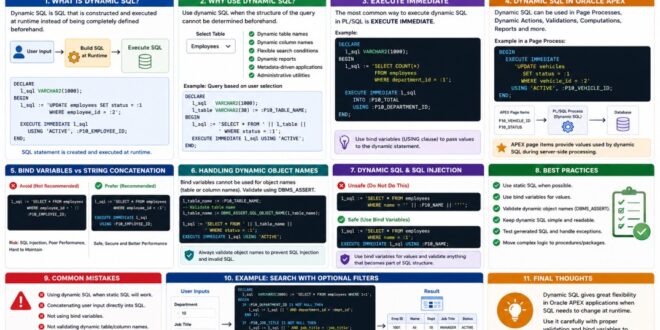
In most Oracle APEX applications, static SQL is enough for reports, LOVs, validations, and database operations. But sometimes the SQL statement itself needs to change based on user input or application requirements.
This is where Dynamic SQL becomes useful.
Dynamic SQL allows developers to construct and execute SQL statements at runtime. It can be especially helpful when table names, column names, or query conditions need to be determined dynamically.
What Is Dynamic SQL?
Dynamic SQL is SQL that is created and executed during runtime instead of being completely defined beforehand.
A simple PL/SQL example is:
DECLARE
l_sql VARCHAR2(1000);
BEGIN
l_sql := ‘UPDATE employees
SET status = :1
WHERE employee_id = :2′;
EXECUTE IMMEDIATE l_sql
USING ‘ACTIVE’, :P10_EMPLOYEE_ID;
END;
Here, the SQL statement is stored in a variable and executed using EXECUTE IMMEDIATE.
Executing Dynamic SQL using EXECUTE IMMEDIATE
Dynamic SQL allows SQL statements to be created and executed at runtime.
Why Use Dynamic SQL?
Dynamic SQL is useful when the structure of a query cannot be determined beforehand.
For example, an application may allow users to select which table should be queried:
Select Table:
[ Employees ▼ ]The application can then construct the required SQL statement based on the user’s selection.
Other common use cases include:
1. Dynamic table names
2. Dynamic column names
3. Flexible search conditions
4. Dynamic reports
5. Metadata-driven applications
6. Administrative utilities
7. Dynamic SQL based on user selection
Dynamic SQL can provide flexibility when the SQL structure depends on application requirements.
EXECUTE IMMEDIATE
The most common way to execute Dynamic SQL in PL/SQL is:
EXECUTE IMMEDIATE
For example:
DECLARE
l_sql VARCHAR2(1000);
BEGIN
l_sql := ‘SELECT COUNT(*)
FROM employees
WHERE department_id = :1′;
EXECUTE IMMEDIATE l_sql
INTO :P10_TOTAL
USING :P10_DEPARTMENT_ID;
END;
The USING clause allows values to be passed as bind variables.
Bind variables separate user values from the SQL statement and should be preferred whenever possible.
Dynamic SQL in Oracle APEX
Dynamic SQL can be used in several APEX scenarios, including:
1. Page Processes
2. Dynamic Actions
3. PL/SQL Validations
4. Computations
5. Reports
6. Administrative tools
For example, a Dynamic Action can execute PL/SQL that builds a query based on the current page item values.
BEGIN
EXECUTE IMMEDIATE
‘UPDATE vehicles
SET status = :1
WHERE vehicle_id = :2′
USING ‘ACTIVE’, :P10_VEHICLE_ID;
END;
APEX page items can provide values used by Dynamic SQL during server-side processing.
Bind Variables vs String Concatenation
One of the most important rules when writing Dynamic SQL is to use bind variables whenever possible.
Avoid:
l_sql := ‘SELECT * FROM employees
WHERE employee_id = ‘ || :P10_EMPLOYEE_ID;
Prefer:
l_sql := ‘SELECT * FROM employees
WHERE employee_id = :1′;
EXECUTE IMMEDIATE l_sql
USING :P10_EMPLOYEE_ID;
Bind variables improve security, readability, and performance.
Handling Dynamic Object Names
Sometimes bind variables cannot be used for database object names such as table or column names.
For example:
l_sql := ‘SELECT * FROM ‘ || l_table_name;
This requires extra care because the value becomes part of the SQL statement itself.
Oracle provides DBMS_ASSERT to help validate identifiers.
For example:
l_table_name := DBMS_ASSERT.SQL_OBJECT_NAME(l_table_name);
This is particularly important when the value originates from user input.
Dynamic object names require validation to reduce the risk of SQL injection and invalid SQL statements.
Dynamic SQL and SQL Injection
Dynamic SQL must be handled carefully.
Never blindly concatenate user input into a SQL statement.
For example, this approach is risky:
l_sql := ‘SELECT * FROM employees
WHERE name = ”’ || :P10_NAME || ””;
Instead, use bind variables:
l_sql := ‘SELECT * FROM employees
WHERE name = :1′;
EXECUTE IMMEDIATE l_sql
USING :P10_NAME;
The basic rule is:
Use bind variables for values and validate anything that must become part of the SQL structure.
Best Practices
1. Use Static SQL When Possible
Dynamic SQL should not be the default. If a query can be written using static SQL, static SQL is usually simpler and easier to maintain.
2. Use Bind Variables
Avoid concatenating user-provided values directly into SQL.
3. Validate Dynamic Object Names
Use appropriate validation such as DBMS_ASSERT when table or column names must be dynamic.
4. Keep Dynamic SQL Simple
If a statement becomes difficult to understand, consider moving the logic into a reusable procedure or package.
5. Test Generated SQL
When debugging Dynamic SQL, print or inspect the generated statement carefully and test it independently when appropriate.
Common Mistakes
Some common Dynamic SQL mistakes include:
1. Using Dynamic SQL when static SQL would work.
2. Concatenating user input directly into SQL.
3. Forgetting bind variables.
4. Not validating dynamic table or column names.
5. Creating very large SQL strings that are difficult to maintain.
6. Ignoring datatype and quoting issues.
Dynamic SQL is a powerful Oracle feature that gives APEX developers flexibility when SQL needs to change at runtime. However, flexibility should always be balanced with security, performance, and maintainability.
From my experience, the best approach is simple:
Use static SQL whenever possible. Use Dynamic SQL when the requirement genuinely needs it, and always handle it carefully.
When used correctly, Dynamic SQL can make Oracle APEX applications much more flexible without compromising their reliability.