Oracle Solutions We believe in delivering tangible results for our customers in a cost-effective manner

Oracle Flashback Database : A Practical Recovery Demonstration
Introduction
Oracle Flashback Database is a database recovery feature that allows a database to be rewound to an earlier point in time. It can be useful when an unwanted change occurs, such as an incorrect deployment or an accidental data operation.
Unlike a traditional restore and recovery process, Flashback Database can, in suitable situations, allow a DBA to return the database to an earlier state without restoring the entire database from an RMAN backup. Flashback Database uses flashback logs maintained in the Fast Recovery Area (FRA).
- When Can Flashback Database Be Useful?
|
Initial state |
| ↓ |
|
Valid application data |
| ↓ |
|
Unwanted change |
|
↓ |
|
Identify required recovery point |
| ↓ |
|
Flashback Database |
| ↓ |
|
Verify previous state |
Consider a controlled example where a DBA makes an unwanted change to a database and needs to return the database to its previous state.
For example:
One important distinction is that Flashback Database operates at the database level. It should not be confused with features such as Flashback Table or Flashback Query, which address different recovery requirements.
- Check the Database Configuration
Before enabling or testing Flashback Database, check the current configuration.
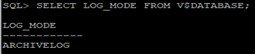
Check ARCHIVELOG mode
SELECT LOG_MODE FROM V$DATABASE;
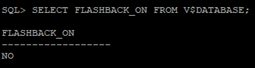
Check Flashback status
SELECT FLASHBACK_ON FROM V$DATABASE;
Check FRA configuration
SHOW PARAMETER DB_RECOVERY_FILE_DEST;

Check FRA usage
SELECT NAME, SPACE_LIMIT, SPACE_USED, SPACE_RECLAIMABLE FROM V$RECOVERY_FILE_DEST;

Check flashback retention target
SHOW PARAMETER DB_FLASHBACK_RETENTION_TARGET;

- Enable Flashback Database
If Flashback Database is not already enabled, the database needs to be mounted.
SHUTDOWN IMMEDIATE;
STARTUP MOUNT;
Then: => ALTER DATABASE FLASHBACK ON;
Open the database: => ALTER DATABASE OPEN;
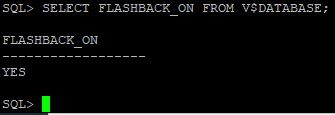
Verify: => SELECT FLASHBACK_ON FROM V$DATABASE;
Expected status:
FLASHBACK_ON
————
YES
- Create a Controlled Test
This should be the main practical part of your blog.
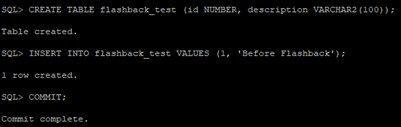
Create a test table:
CREATE TABLE flashback_test (id NUMBER, description VARCHAR2(100));
Insert the initial record:
INSERT INTO flashback_test VALUES (1, ‘Before Flashback’);
COMMIT;
Check the data:
SELECT * FROM flashback_test;
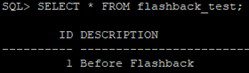
Then record the current time:
SELECT SYSTIMESTAMP FROM DUAL;
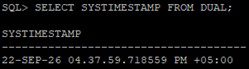
Now introduce a controlled unwanted change:
INSERT INTO flashback_test VALUES (2, ‘Unwanted Change’);
COMMIT;
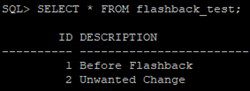
Verify: => SELECT * FROM flashback_test;
At this point you should have:
|
ID |
DESCRIPTION |
|
1 |
Before Flashback |
|
2 |
Unwanted Change |
- Identify the Flashback Point
Record the timestamp before performing the unwanted change.
For example:
SELECT SYSTIMESTAMP FROM DUAL;
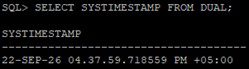
You can also use an SCN when appropriate.
The important point is to use the actual timestamp/SCN from your test, not a sample timestamp.
- Perform Flashback Database
Shut down and mount the database:
SHUTDOWN IMMEDIATE;
STARTUP MOUNT;
Then flash back to your recorded point:
FLASHBACK DATABASE TO TIMESTAMP TO_TIMESTAMP(’22-SEP-26 04.37.59.718559 PM’);

- Verify Before Opening RESETLOGS
Instead of immediately doing:
ALTER DATABASE OPEN RESETLOGS;
first verify the flashed-back database.
Open it read-only:
ALTER DATABASE OPEN READ ONLY;
Then check: SELECT * FROM flashback_test;
Your expected result, if your actual test produced this result,
would be:
|
ID |
DESCRIPTION |
|
1 |
Before Flashback |
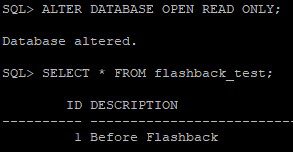
The unwanted second row should no longer be present.
- Open the Database Normally
After verifying that the database has returned to the desired point:
SHUTDOWN IMMEDIATE;
STARTUP MOUNT;
Then: ALTER DATABASE OPEN RESETLOGS;
Verify: SELECT OPEN_MODE, DATABASE_ROLE FROM V$DATABASE;
- Check the Flashback Window
A useful additional DBA check is:
SELECT OLDEST_FLASHBACK_TIME FROM V$FLASHBACK_DATABASE_LOG;
Also mention:
SHOW PARAMETER DB_FLASHBACK_RETENTION_TARGET;
The retention target is a target, not a guarantee that the database can always flash back exactly that far. Actual available flashback history depends on factors including available flashback logs and FRA space.
- Flashback Database vs RMAN Restore/Recovery
|
Flashback Database |
RMAN Restore/Recovery |
|
Rewinds the database to an earlier point |
Restores database files from backup |
|
Uses Flashback Logs and redo |
Uses RMAN backups and redo/archive logs |
|
Useful for suitable logical-error scenarios |
Useful for backup-based recovery scenarios |
|
Requires Flashback Database configuration |
Requires valid RMAN backups |
|
Does not replace RMAN backups |
Remains an essential recovery mechanism |
Important limitation
Flashback Database is not a replacement for RMAN backups.
For example, if database files are physically lost or a media failure occurs, Flashback Database is not the same as restoring those missing files from an RMAN backup.
- What I Learned From This Test
a) What did you check before enabling Flashback?
- ARCHIVELOG mode – to confirm the database is running in ARCHIVELOG mode.
- Flashback status – using V$DATABASE to check whether Flashback was already enabled.
- FRA configuration – checked DB_RECOVERY_FILE_DEST and DB_RECOVERY_FILE_DEST_SIZE.
- FRA usage – checked V$RECOVERY_FILE_DEST to make sure there was sufficient space for Flashback Logs.
b) How did you determine the recovery point?
- I determined the recovery point by recording the timestamp during the controlled test, before making the unwanted change. I then used that timestamp as the target for the Flashback Database operation.
c) How long did the Flashback operation take?
- I did not record the exact duration of the Flashback operation during my test. The operation completed successfully, and I verified that the unwanted change was rolled back.
d) What happened to your test data?
- The test data was rolled back to the state before the unwanted change. The “Unwanted Change” row was removed, while the original “Before Flashback” row remained.
e) Did you face any issue?
- No major issue was encountered during the test. The Flashback operation completed successfully, and the test data was restored to the expected point.
f) What did you learn about FRA/Flashback Logs?
- I learned that Flashback Database depends on Flashback Logs stored in the FRA. Therefore, proper FRA configuration and sufficient space are important for maintaining the Flashback recovery window.
g) Why would you choose Flashback instead of RMAN in this particular scenario?
- In this scenario, I would choose Flashback because the issue was an unwanted logical change, and I wanted to quickly return the database to an earlier point. RMAN would involve restoring from backup and applying recovery, which is more suitable for scenarios such as lost or corrupted datafiles.