Oracle Solutions We believe in delivering tangible results for our customers in a cost-effective manner
Extending APEX Applications Beyond Declarative Features
One of the things I like about Oracle APEX is that many application requirements can be handled without writing code. Dynamic Actions, validations, processes, and built-in components cover a large number of common use cases.
But sometimes an application needs something more specific.
Maybe a button needs custom behavior, a region needs to be manipulated dynamically, or the user interface needs to respond in a way that is not available through the standard APEX options.
This is where Custom JavaScript becomes useful.
JavaScript allows developers to extend Oracle APEX and add custom behavior while still working within the APEX framework.
Where Can JavaScript Be Used?
Oracle APEX provides several places where JavaScript can be added, including:
– Page-level JavaScript
– Application-level JavaScript
– Dynamic Actions
– JavaScript expressions
– Interactive components
Choosing the right location is important because application-level code can affect many pages, while page-level code is usually limited to a specific page.
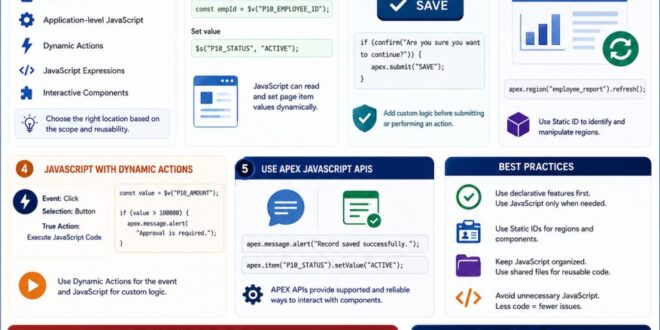
Oracle APEX provides multiple locations for adding JavaScript depending on the scope of the functionality.
1. Accessing Page Items
One of the most common uses of JavaScript in APEX is reading or changing page item values.
For example:
const employeeId = $v(“P10_EMPLOYEE_ID”);
Here, “$v()” retrieves the current value of the page item.
To set a value:
$s(“P10_STATUS”, “ACTIVE”);
These APEX JavaScript APIs make it easier to work with page items.
JavaScript can interact with APEX page items to read and update values dynamically.
2. Adding Custom Button Behavior
Sometimes the built-in button actions are not enough.
For example, you may want to display a confirmation before performing an action.
if (confirm(“Are you sure you want to continue?”)) {
apex.submit(“SAVE”);
}
This allows developers to add custom behavior while still using APEX’s page processing capabilities.
Custom JavaScript can extend button functionality and provide additional interaction before submitting a page.
3. Working with APEX Regions
JavaScript can also be used to interact with regions.
For example, you may need to refresh a report after performing an action:
apex.region(“employee_report”).refresh();
The important part is assigning a Static ID to the region.
This allows JavaScript to identify the specific region you want to work with.
Static IDs provide a reliable way to identify and manipulate specific APEX region
4. Using JavaScript with Dynamic Actions
Custom JavaScript and Dynamic Actions work very well together.
Instead of writing a complete JavaScript-based solution, you can use a Dynamic Action for the event and JavaScript only for the part that requires customization.
For example:
Event: Click
Selection: Button
True Action: Execute JavaScript Code
const value = $v(“P10_AMOUNT”);
if (value > 100000) {
apex.message.alert(“Approval is required.”);
}
This approach keeps the application declarative where possible while still providing flexibility when custom behavior is needed.
Dynamic Actions provide a convenient way to execute custom JavaScript when a specific event occurs.
5. Using APEX JavaScript APIs
Oracle APEX provides its own JavaScript APIs for common application tasks.
For example:
apex.message.alert(“Record saved successfully.”);
or:
apex.item(“P10_STATUS”).setValue(“ACTIVE”);
Using APEX APIs is generally better than manipulating the underlying HTML directly because the APIs are designed to work with APEX components.
APEX JavaScript APIs provide supported ways to interact with application components.
Best Practices
1. Use Declarative Features First
Before writing JavaScript, check whether APEX already provides a built-in feature or Dynamic Action.
If the requirement can be solved declaratively, that is often the simpler approach.
Use JavaScript when you actually need custom behavior.
Use APEX’s built-in declarative features where possible and introduce custom JavaScript when additional flexibility is required.
2. Use Static IDs
When JavaScript needs to reference an APEX region, button, or other component, give it a meaningful Static ID.
For example:
employee_report
Then:
apex.region(“employee_report”).refresh();
This is much more reliable than depending on generated HTML IDs.
Meaningful Static IDs make JavaScript references more reliable and easier to maintain.
3. Keep JavaScript Organized
Avoid placing large amounts of JavaScript directly inside individual Dynamic Actions.
For reusable functionality, consider organizing your JavaScript in application-level files or shared JavaScript resources.
This makes the code easier to maintain as the application grows.
Well-organized JavaScript makes large APEX applications easier to maintain and update.
4. Avoid Unnecessary JavaScript
Just because JavaScript can solve a problem doesn’t mean it should.
For example, don’t write JavaScript to show or hide an item if a standard Dynamic Action can handle it.
Less custom code generally means:
– Easier maintenance
– Fewer bugs
– Simpler debugging
– Better readability
Common Mistakes to Avoid
Some common mistakes when using JavaScript in APEX include:
– Writing JavaScript for functionality already available declaratively.
– Depending on automatically generated element IDs.
– Adding large scripts directly to individual pages.
– Forgetting that JavaScript runs on the client side.
– Mixing too much JavaScript with SQL and PL/SQL logic.
– Not testing JavaScript after APEX theme or component changes.
Custom JavaScript is a powerful way to extend Oracle APEX when the built-in declarative features are not enough.
The goal, however, should not be to write JavaScript everywhere. A good APEX developer knows when to use Dynamic Actions and declarative features, and when custom JavaScript is the better solution.
From my experience, the best approach is to keep the application as declarative as possible and introduce JavaScript only where it provides real value. This results in applications that are flexible without becoming unnecessarily complicated.
Once you understand how to work with page items, regions, Dynamic Actions, and APEX JavaScript APIs, JavaScript becomes a useful extension of Oracle APEX rather than something separate from it.
The goal is not more code. The goal is the right code.