Oracle Solutions We believe in delivering tangible results for our customers in a cost-effective manner
Oracle APEX makes it possible to build applications with little code, but when an application needs business logic, database processing, validations, or complex operations, PL/SQL becomes an essential part of development.
For me, PL/SQL is one of the areas where Oracle APEX becomes especially powerful. Instead of moving complex logic to the frontend, we can keep important business rules close to the database and execute them securely on the server.
What is PL/SQL?
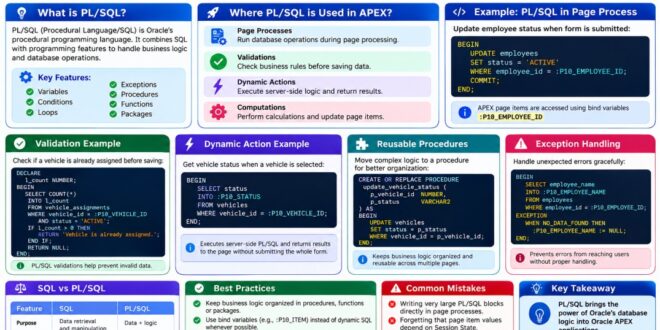
PL/SQL (Procedural Language/SQL) is Oracle’s procedural programming language. It combines SQL with programming features such as:
1. Variables
2. Conditions
3. Loops
4. Exceptions
5. Procedures
6. Functions
7. Packages
In Oracle APEX, PL/SQL can be used in processes, validations, Dynamic Actions, computations, and database objects.
PL/SQL allows APEX developers to implement database operations and business logic directly on the server.
1. Execute PL/SQL in Page Processes
One of the most common uses of PL/SQL in APEX is a Page Process.
For example, when a user submits a form, a process can perform additional database operations:
BEGIN
UPDATE employees
SET status = ‘ACTIVE’
WHERE employee_id = :P10_EMPLOYEE_ID;
COMMIT;
END;
The values of APEX page items can be accessed using bind variables such as:
:P10_EMPLOYEE_ID
Page Processes allow PL/SQL to execute during page processing and perform server-side operations.
2. Use PL/SQL for Validations
PL/SQL is also useful when a validation requires database-level logic.
For example, before creating a new vehicle assignment, we may want to check whether the vehicle is already assigned.
DECLARE
l_count NUMBER;
BEGIN
SELECT COUNT(*)
INTO l_count
FROM vehicle_assignments
WHERE vehicle_id = :P10_VEHICLE_ID
AND status = ‘ACTIVE’;
IF l_count > 0 THEN
RETURN ‘Vehicle is already assigned.’;
END IF;
RETURN NULL;
END;
This allows business rules to be checked before the record is saved.
PL/SQL validations can check database conditions and prevent invalid data from being submitted.
3. Use PL/SQL with Dynamic Actions
Dynamic Actions can also execute server-side PL/SQL.
For example, when a user selects a vehicle, APEX can retrieve its current status:
BEGIN
SELECT status
INTO :P10_STATUS
FROM vehicles
WHERE vehicle_id = :P10_VEHICLE_ID;
END;
This is useful when the application needs database information without submitting the entire page.
Executing PL/SQL through a Dynamic Action
Dynamic Actions can execute server-side PL/SQL and return database results to the page.
4. Use Procedures and Functions
When PL/SQL logic becomes larger or is used in multiple places, it is better to move it into a procedure or function.
For example:
CREATE OR REPLACE PROCEDURE update_vehicle_status (
p_vehicle_id NUMBER,
p_status VARCHAR2
) AS
BEGIN
UPDATE vehicles
SET status = p_status
WHERE vehicle_id = p_vehicle_id;
END;
APEX can then call the procedure when required.
This keeps page processes smaller and makes business logic easier to reuse.
Reusable procedures keep complex business logic organized and reduce duplicate code.
5. Handle Exceptions
Database operations can fail for many reasons. PL/SQL provides exception handling to deal with unexpected situations.
BEGIN
SELECT employee_name
INTO :P10_EMPLOYEE_NAME
FROM employees
WHERE employee_id = :P10_EMPLOYEE_ID;
EXCEPTION
WHEN NO_DATA_FOUND THEN
:P10_EMPLOYEE_NAME := NULL;
END;
Proper exception handling prevents unexpected errors from becoming confusing experiences for users.
Exception handling allows developers to manage unexpected database conditions gracefully.
PL/SQL vs SQL
SQL is mainly used to retrieve and manipulate data, while PL/SQL allows us to combine SQL with programming logic.
For example:
SQL
SELECT status
FROM vehicles
WHERE vehicle_id = :P10_VEHICLE_ID;
PL/SQL
BEGIN
IF :P10_STATUS = ‘ACTIVE’ THEN
— additional business logic
NULL;
END IF;
END;
In real APEX applications, SQL and PL/SQL often work together.
Best Practices
1. Keep Business Logic Organized
If the same logic is used across multiple pages, consider moving it into procedures, functions, or packages.
2. Use Bind Variables
Use APEX items such as:
:P10_EMPLOYEE_ID
instead of constructing SQL statements dynamically whenever possible.
3. Handle Exceptions Properly
Don’t allow unexpected database errors to reach users without meaningful handling.
4. Avoid Unnecessary Commits
Transaction control should be planned carefully. Let the appropriate APEX process or application layer manage transactions instead of adding COMMIT everywhere.
5. Keep Page Processes Simple
If a process becomes too large, move reusable logic into database procedures or packages.
Common Mistakes
Some common mistakes when using PL/SQL in APEX include:
1. Writing very large PL/SQL blocks directly in page processes.
2. Forgetting that APEX page item values depend on Session State.
3. Not submitting required items before server-side processing.
4. Using dynamic SQL when static SQL is sufficient.
5. Poor exception handling.
6. Adding unnecessary commits.
7. Duplicating the same business logic across multiple pages.
PL/SQL is one of the most important skills for Oracle APEX developers because it connects the application layer with Oracle’s powerful database capabilities.
From simple validations and updates to complex business rules and reusable packages, PL/SQL allows APEX applications to handle much more than basic data entry.
From my experience, the real advantage comes from knowing where to put the logic. Simple operations can stay within APEX processes, while reusable and complex business rules can be moved into procedures, functions, or packages.
APEX provides the application layer, while PL/SQL provides the database logic that makes the application powerful.