Oracle Solutions We believe in delivering tangible results for our customers in a cost-effective manner
Finding Problems Faster with the Right Debugging Approach
Every Oracle APEX developer eventually faces a situation where a page, report, process, or Dynamic Action does not behave as expected. Sometimes the error is obvious, while other times the application simply doesn’t produce the expected result.
The important thing is not just finding the error, but understanding where the problem is occurring and why.
Oracle APEX provides several built-in tools that make this process much easier.
1. Use Debug Mode
The first step when troubleshooting an APEX application is often enabling Debug Mode.
Debug information can help identify:
– Which processes are running
– SQL and PL/SQL execution
– Dynamic Actions
– Page rendering
– Session State values
– Execution time
Instead of guessing what happened, debug information gives you a view of what APEX is doing behind the scenes.
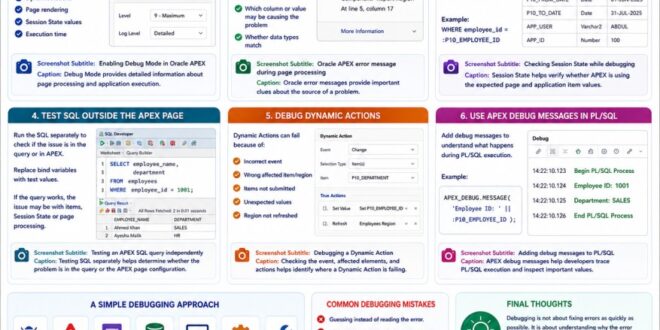
Debug Mode provides detailed information about page processing and application execution.
2. Check the Error Message Carefully
An Oracle error message is often the first useful clue.
For example:
ORA-00932: inconsistent datatypes
or:
ORA-01722: invalid number
Instead of immediately changing the query, first understand what the error is telling you.
Check:
– Which component generated the error
– Which SQL statement was executed
– Which column or value may be causing the problem
– Whether the data types match
A good debugging process starts with understanding the error rather than simply trying random fixes.
Oracle error messages provide important clues about the source of a problem.»
3. Check Session State
Many APEX issues are caused by an unexpected or missing item value.
For example:
WHERE employee_id = :P10_EMPLOYEE_ID
If “P10_EMPLOYEE_ID” is NULL or contains an old value, the query may not return the expected result.
Check Session State to verify that the values being used by your SQL and PL/SQL are correct.
Session State helps verify whether APEX is using the expected page and application item values.
4. Test SQL Outside the APEX Page
When a report or process is not working, isolate the SQL query and test it separately.
For example, instead of debugging the entire APEX page, run the query in SQL Developer or another Oracle SQL environment.
Replace APEX bind variables with test values:
SELECT employee_name,
department
FROM employees
WHERE employee_id = 1001;
If the query works independently, the problem may be related to APEX items, Session State, or page processing.
This simple approach can save a lot of debugging time.
Testing SQL separately helps determine whether the problem is in the query or the APEX page configuration.»
5. Debug Dynamic Actions
Dynamic Actions can sometimes fail because:
– The event is incorrect.
– The affected item or region is wrong.
– Required items were not submitted.
– The server-side code received an unexpected value.
– The affected region was not refreshed.
When debugging a Dynamic Action, check each step individually instead of assuming the entire action is working.
Checking the event, affected elements, and actions helps identify where a Dynamic Action is failing.
6. Use APEX Debug Messages in PL/SQL
When working with PL/SQL, developers can add debugging messages to understand what is happening during execution.
For example:
APEX_DEBUG.MESSAGE(
‘Employee ID: ‘ || :P10_EMPLOYEE_ID
);
This can be useful for checking variable values and following the execution flow of a process.
However, debug messages should be used thoughtfully and should not expose sensitive information.
APEX debug messages help developers trace PL/SQL execution and inspect important values.
A Simple Debugging Approach
When something doesn’t work, I find it useful to follow a simple sequence:
Reproduce → Read the Error → Check Debug → Check Session State → Test SQL/PLSQL → Check APEX Configuration → Fix → Test Again
This approach is much more effective than changing multiple things at once.
Common Debugging Mistakes
Avoid:
– Guessing instead of reading the error.
– Changing multiple things at the same time.
– Ignoring Session State.
– Assuming the SQL is correct without testing it.
– Debugging only the frontend when the issue is server-side.
– Leaving unnecessary debug messages in production.
Debugging is not about fixing errors as quickly as possible. It is about understanding why the error happened.
Oracle APEX provides powerful debugging capabilities through Debug Mode, Session State, error messages, SQL testing, and PL/SQL debug messages. Learning how to use these tools effectively can turn a frustrating problem into a structured troubleshooting process.
From my experience, the biggest improvement in debugging comes from replacing guessing with investigation. Once you learn to identify whether an issue is related to SQL, PL/SQL, Session State, Dynamic Actions, or APEX configuration, solving problems becomes much easier.
Good debugging is not just about fixing today’s error—it is about learning how to prevent tomorrow’s.