Oracle Solutions We believe in delivering tangible results for our customers in a cost-effective manner
Part I — Understanding the Building Blocks
1.1 Procedures and Functions
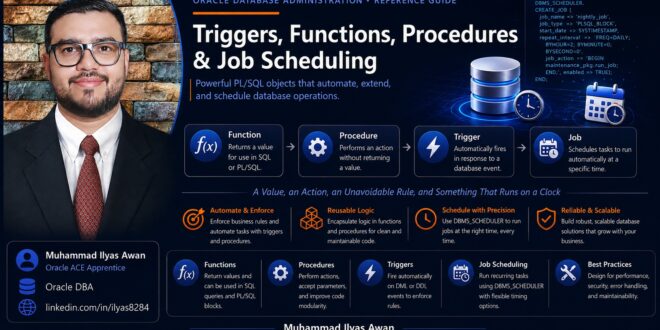
A stored procedure is a named block of PL/SQL, compiled and stored inside the database, that performs an action. A function is the same idea, but it always returns exactly one value and can therefore be used directly inside a SQL expression, wherever a value is expected. Both live in the data dictionary once compiled, both accept parameters, and both can be called from SQL*Plus, an application, another PL/SQL block, a trigger, or a scheduled job.
1.2 Procedures vs. Functions — Choosing Between Them
- Use a function when the caller needs exactly one value back and wants to use it inside a query, a CHECK constraint, or another expression
- Use a procedure when the goal is an action inserting rows, calling other procedures, returning zero, one, or many values through OUT parameters
- A function called from SQL should avoid side effects (DML, sequence reads) unless that is genuinely the intent a value-returning call that quietly changes data surprises the next developer every time
1.3 What Is a Trigger?
A trigger is PL/SQL that the database fires automatically in response to an event a DML statement against a table, a DDL statement, or a system event such as logon rather than being called explicitly. Because a trigger runs without being asked, it is the right tool for rules that must always hold (an audit trail, a derived column, a validation) and the wrong tool for anything the caller should be able to see and control directly.
1.4 Trigger Types
- BEFORE / AFTER: whether the trigger fires before or after the triggering DML actually happens
- Row-level vs. statement-level: row-level fires once per affected row (with access to :OLD and :NEW); statement-level fires once per statement regardless of row count
- INSTEAD OF: fires in place of DML against a non-updatable view, letting the trigger decide how the underlying tables actually get updated
- Compound triggers: one trigger body with separate sections for each timing point, sharing state between them without the mutating-table restrictions a row-level trigger runs into
- System and DDL triggers: fire on database-level events such as LOGON, SERVERERROR, or CREATE, useful for auditing schema changes or session setup
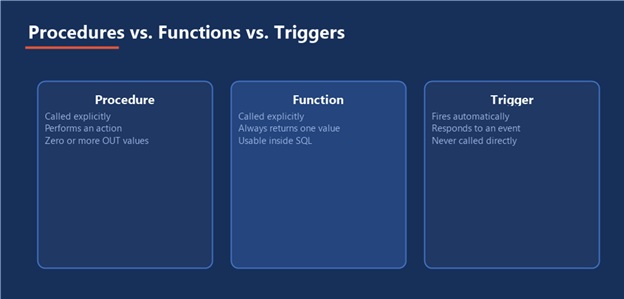
Figure 1 — Three related tools, three different ways of being invoked
Client / App → Procedure or Function → Table DML → Trigger Fires → Scheduler Runs Jobs Independently
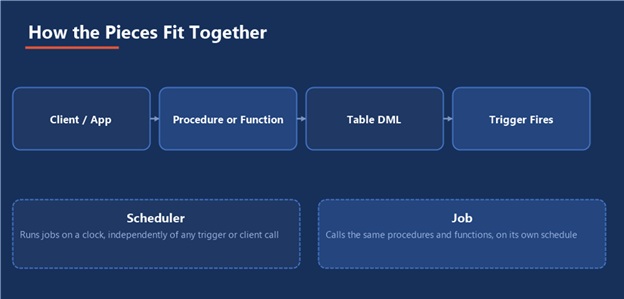
Figure 2 — The triggered path and the scheduled path never depend on each other
Five tools, one job: Keep business logic where it is easiest to see: a value computation belongs in a function, an action belongs in a procedure, an unavoidable rule belongs in a trigger, and anything that runs on a clock belongs in a scheduled job, not bolted onto a trigger that was never meant to wait.
Part II — Building Procedures and Functions
2.1 Creating a Stored Procedure
CREATE OR REPLACE PROCEDURE apply_discount ( p_order_id IN NUMBER, p_pct IN NUMBER, p_new_total OUT NUMBER ) IS BEGIN UPDATE orders SET total_amount = total_amount * (1 – p_pct/100) WHERE order_id = p_order_id RETURNING total_amount INTO p_new_total; COMMIT; END apply_discount; /
2.2 Creating a Function
CREATE OR REPLACE FUNCTION order_total ( p_order_id IN NUMBER ) RETURN NUMBER IS v_total NUMBER; BEGIN SELECT total_amount INTO v_total FROM orders WHERE order_id = p_order_id; RETURN v_total; END order_total; / SELECT order_id, order_total(order_id) AS total FROM orders WHERE order_date >= TRUNC(SYSDATE);
2.3 Parameters and Modes
- IN: The default; the caller passes a value in, the procedure or function cannot change what the caller sees
- OUT: The procedure sets a value the caller receives back; the incoming value (if any) is ignored
- IN OUT: The caller’s value is read, and may be overwritten and passed back
2.4 Exception Handling
BEGIN UPDATE orders SET total_amount = total_amount * 0.9 WHERE order_id = p_order_id; IF SQL%ROWCOUNT = 0 THEN RAISE_APPLICATION_ERROR(-20001, ‘Order ‘ || p_order_id || ‘ not found’); END IF; EXCEPTION WHEN OTHERS THEN ROLLBACK; RAISE; END;
Catch specific exceptions where you can actually do something useful about them; let everything else propagate rather than swallowing it silently with a bare WHEN OTHERS THEN NULL, which turns real failures invisible.
2.5 Grouping into Packages
Once related procedures and functions accumulate, group them into a package: one specification listing what is public, one body holding the implementation and any private helpers. Packages compile as a unit, let you overload procedure names with different parameter lists, and keep session state alive across calls within the same session none of which a loose collection of standalone procedures gives you.
Part III — Building Triggers
3.1 A Simple Audit Trigger
CREATE OR REPLACE TRIGGER trg_orders_audit AFTER UPDATE OF total_amount ON orders FOR EACH ROW BEGIN INSERT INTO orders_audit ( order_id, old_amount, new_amount, changed_by, changed_at ) VALUES ( :NEW.order_id, :OLD.total_amount, :NEW.total_amount, USER, SYSTIMESTAMP ); END; /
3.2 INSTEAD OF Triggers
CREATE OR REPLACE TRIGGER trg_active_customers_iof INSTEAD OF UPDATE ON active_customers_view FOR EACH ROW BEGIN UPDATE customers SET status = :NEW.status WHERE customer_id = :OLD.customer_id; END; /
3.3 Compound Triggers
A row-level trigger that tries to query the same table it is firing on raises ORA-04091: table is mutating. A compound trigger avoids this by collecting state during the row-level section and doing the aggregate work once, after the statement completes:
CREATE OR REPLACE TRIGGER trg_orders_compound FOR UPDATE OF total_amount ON orders COMPOUND TRIGGER TYPE t_ids IS TABLE OF orders.order_id%TYPE; g_changed_ids t_ids := t_ids(); AFTER EACH ROW IS BEGIN g_changed_ids.EXTEND; g_changed_ids(g_changed_ids.COUNT) := :NEW.order_id; END AFTER EACH ROW; AFTER STATEMENT IS BEGIN FOR i IN 1 .. g_changed_ids.COUNT LOOP recalc_customer_total(g_changed_ids(i)); END LOOP; END AFTER STATEMENT; END trg_orders_compound; /
3.4 Trigger Pitfalls
- Recursive triggers: A trigger that updates its own table can re-fire itself; guard with a package-level flag or restructure as a compound trigger
- Mutating-table errors on anything that queries or modifies the triggering table from a row-level trigger
- Hidden business logic: A trigger nobody remembers exists is the single most common cause of “but I didn’t change that column” support tickets
- Expensive work in a row-level trigger on a high-volume table, multiplying the cost of every single-row DML by whatever the trigger body does
3.5 Statement Lifecycle
BEFORE STATEMENT → BEFORE EACH ROW → (the DML itself) → AFTER EACH ROW → AFTER STATEMENT
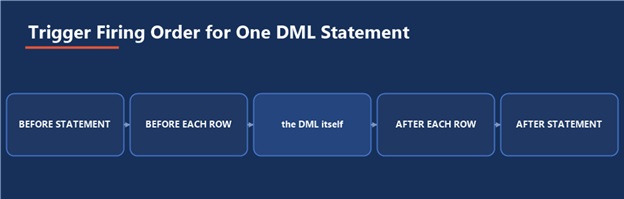
Figure 3 — Five firing points around one statement, in the order they actually run
Part IV — Jobs and Job Scheduling
4.1 What Is DBMS_SCHEDULER?
DBMS_SCHEDULER is Oracle’s built-in job scheduling engine, the modern replacement for the older DBMS_JOB package. It separates what runs (a program, or inline PL/SQL) from when it runs (a schedule), so the same schedule can drive many jobs and the same job definition can be reused across environments.
4.2 Creating a Simple Job
BEGIN DBMS_SCHEDULER.CREATE_JOB ( job_name => ‘REFRESH_ORDER_SUMMARY’, job_type => ‘PLSQL_BLOCK’, job_action => ‘BEGIN refresh_order_summary; END;’, start_date => SYSTIMESTAMP, repeat_interval => ‘FREQ=HOURLY; INTERVAL=1’, enabled => TRUE ); END; /
4.3 Named Schedules
A named schedule can be reused across many jobs, and changed once to reschedule everything that references it:
BEGIN DBMS_SCHEDULER.CREATE_SCHEDULE ( schedule_name => ‘NIGHTLY_0200’, start_date => SYSTIMESTAMP, repeat_interval => ‘FREQ=DAILY; BYHOUR=2; BYMINUTE=0’, comments => ‘Runs once a day at 2 AM’ ); DBMS_SCHEDULER.CREATE_JOB ( job_name => ‘NIGHTLY_CLEANUP’, job_type => ‘PLSQL_BLOCK’, job_action => ‘BEGIN purge_old_sessions; END;’, schedule_name => ‘NIGHTLY_0200’, enabled => TRUE ); END; /
4.4 Programs and Job Chains
A program separates the action from the job that runs it, the same way a named schedule separates the timing. A job chain goes further, sequencing multiple steps run step A, and only run step B if A succeeded which is the built-in alternative to hand-rolling that logic inside one large procedure. Chains are created with DBMS_SCHEDULER.CREATE_CHAIN, populated with DEFINE_CHAIN_STEP and DEFINE_CHAIN_RULE, then run as a job just like any single program.
4.5 Monitoring Jobs
SELECT job_name, status, log_date, run_duration FROM dba_scheduler_job_run_details WHERE status = ‘FAILED’ ORDER BY log_date DESC; SELECT job_name, enabled, state, next_run_date FROM dba_scheduler_jobs;
Schedule → Program → Job → Job Run → Run History
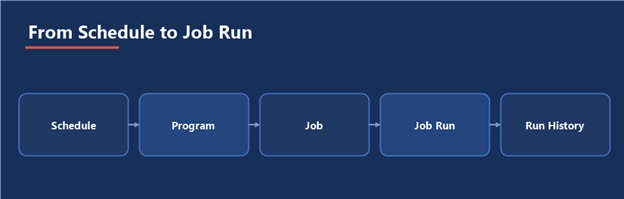
Figure 4 — The path from a named schedule to a row in the run history
A job that never reports failure is not the same as a job that never fails check dba_scheduler_job_run_details on a schedule of its own; a silently disabled or broken job looks identical to a healthy one until someone goes looking.
Part V — Practical Guidance
5.1 A Sample End-to-End Build
Write the Procedure → Add a Trigger That Calls It Where Needed → Wrap Recurring Work in a Job → Attach a Named Schedule → Monitor Run History
5.2 Common Pitfalls
- Putting scheduled, time-based work inside a trigger instead of a job, because “it was easier to add here”
- Leaving WHEN OTHERS handlers that swallow every exception, turning real failures into silent no-ops
- Never checking dba_scheduler_job_run_details, so a job has been failing quietly for weeks
- Writing a row-level trigger that does expensive work on a high-volume table without measuring the per-row cost first
- Letting a schema accumulate triggers and jobs nobody has documented, until “what actually happens when I insert here” requires archaeology
5.3 Where This Fits in the Series
All five of these objects run on the same Oracle Database 19c environment used throughout this series, and every one of them shows up directly in the Database Health Check guide: invalid procedures, functions, and triggers are exactly what the object-integrity check catches, and failed or disabled scheduler jobs are exactly what the daily job check is for. Building these objects well and checking on them regularly are two halves of the same discipline.
The Most Important Point
Match the tool to the trigger, literally. A value goes in a function, an action goes in a procedure, an unavoidable rule goes in a trigger, and anything that runs on a clock goes in a job. Every time one of these gets used to do another one’s job, the resulting system gets harder to reason about for the next person who has to touch it including you, in six months.
- Triggers, Functions, Procedures complete guide
Triggers, Functions, Procedures complete guide