Oracle Solutions We believe in delivering tangible results for our customers in a cost-effective manner
Part I — Understanding Database Links
1.1 What Is a Database Link?
A database link is a schema object that stores the connection details needed to reach another database, so that SQL and PL/SQL running in the local database can refer to objects in a remote database as if they were local. Once a link exists, a remote table is addressed simply by appending @linkname to the table name, and Oracle handles the network connection, authentication, and SQL translation transparently.
1.2 How a Database Link Works
A query against a linked object follows a predictable path from the local session all the way to the remote instance:
Local Session → Database Link → SQL*Net / TNS → Remote Listener → Remote Database
The link itself resolves to a connect string, either a full tnsnames.ora entry or an Easy Connect string, plus a set of credentials that depend on the link type. The remote database sees the connection exactly like any other client session and enforces its own privileges on whatever the link’s session tries to do a database link never bypasses the remote side’s own security.
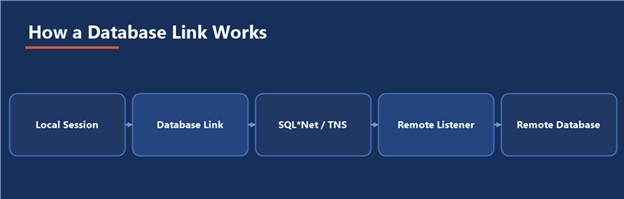
Figure 1 — The path a linked query takes from your session to the remote instance
1.3 Types of Database Links
- Private, fixed-user: Owned by one schema, always connects to the remote side as one specific remote user; the most common type
- Public: Usable by any user in the local database, still connects as one fixed remote user; convenient, but widens the blast radius of that one remote credential
- Current-user: Connects to the remote side as the currently logged-in user, via a matching proxy account on the remote database; no fixed password embedded anywhere
- Connected-user: Created without any credentials at all; the remote side must have an account with exactly the same username and authentication as the local user, and grants global by matching identity rather than a stored password
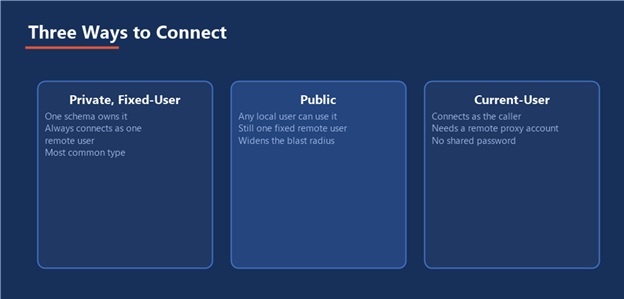
Figure 2 — Private fixed-user, public, and current-user links, side by side
1.4 When to Use (and Not Use) Database Links
Database links are the right tool for occasional or moderate-volume cross-database queries, reference-data lookups, and administrative scripts that need to touch two databases in one statement. They are the wrong tool for high-volume, latency-sensitive application paths every row fetched over a link pays a network round trip that a local query never pays, and heavy reliance on links tends to hide a data architecture problem that would be better solved with replication, a materialized view, or moving the data.
A link is a bridge, not a merger: The remote database keeps its own privileges, its own performance characteristics, and its own availability. A database link only ever adds a dependency; it never removes one.
Every database link is a promise that a remote database will always be reachable, fast enough, and unchanged and every one of those three eventually breaks that promise at least once.
Part II — Creating and Configuring Database Links
2.1 Prerequisites
- A working network path and a resolvable connect string to the remote database — a ora entry or an Easy Connect string such as host:port/service_name
- The CREATE DATABASE LINK privilege for a private link, or CREATE PUBLIC DATABASE LINK for a public one
- A remote account with exactly the privileges the link is meant to use never grant more remotely than the link actually needs
2.2 Creating a Private Fixed-User Link
CREATE DATABASE LINK sales_remote CONNECT TO sales_reader IDENTIFIED BY “StrongPassword#1” USING ‘salesdb_high’;
2.3 Creating a Public Link
CREATE PUBLIC DATABASE LINK finance_ro CONNECT TO fin_reporting IDENTIFIED BY “StrongPassword#2” USING ‘financedb_high’;
2.4 Creating a Current-User Link
This requires a matching proxy user already configured on the remote database, so the remote side can authenticate the connecting identity without a shared password:
CREATE DATABASE LINK hr_current_user CONNECT TO CURRENT_USER USING ‘hrdb_high’;
2.5 Testing a Link
SELECT * FROM dual@sales_remote; SELECT sysdate FROM dual@sales_remote;
A successful SELECT … FROM dual@linkname confirms the network path, the TNS resolution, and the authentication all work, before you ever point the link at a real table.
Least privilege on the remote side: The remote account behind a link should hold exactly the grants the link needs to do its job, nothing more. A link created for one reporting query should never connect as a schema owner.
Part III — Using Database Links
3.1 Querying Remote Tables
SELECT customer_id, customer_name FROM customers@sales_remote WHERE region = ‘EAST’;
3.2 Distributed Queries and Joins
A single statement can join local and remote tables directly. The optimizer decides where to run each part, but it does not always guess correctly which side should drive the join:
SELECT /*+ DRIVING_SITE(c) */ o.order_id, c.customer_name FROM local_orders o JOIN customers@sales_remote c ON o.customer_id = c.customer_id WHERE o.order_date >= TRUNC(SYSDATE) – 7;
The DRIVING_SITE hint tells the optimizer which database should execute the join, which matters enormously once one side of the join is much larger than the other or one side has far better indexing for the join condition.
3.3 Distributed Transactions and the Two-Phase Commit
Any transaction that modifies data through a database link becomes a distributed transaction, coordinated by a two-phase commit: Oracle first asks every participating database to prepare the change, and only issues the final commit once every participant has confirmed it can commit. This guarantees that a distributed update either applies everywhere or nowhere it never partially applies, even if a network failure happens mid-commit.
Prepare Local → Prepare Remote → All Prepared? → Commit Everywhere (or Roll Back Everywhere)
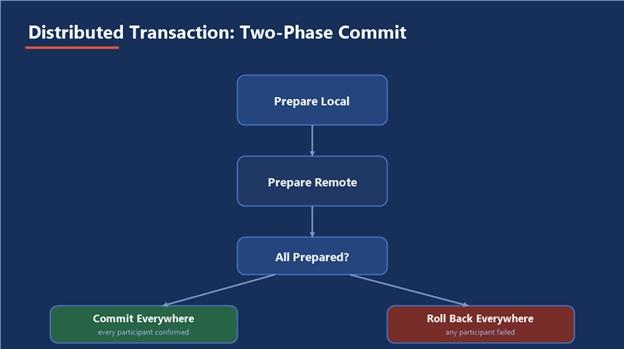
Figure 3 — Why a distributed update either applies everywhere or nowhere
3.4 Synonyms Over Database Links
Hide the link name behind a synonym so application code never hardcodes it, and so the target can be repointed later without touching a single line of SQL:
CREATE SYNONYM remote_customers FOR customers@sales_remote; SELECT * FROM remote_customers WHERE region = ‘EAST’;
3.5 Remote PL/SQL Calls
A database link can also call a remote procedure or function directly, which is useful for triggering remote logic without duplicating it locally:
BEGIN remote_pkg.refresh_summary@sales_remote(p_region => ‘EAST’); END; /
Part IV — Performance, Security, and Troubleshooting
4.1 Common Performance Pitfalls
- Row-by-row fetching a cursor loop that pulls one remote row at a time pays a network round trip per row; rewrite as a single set-based statement wherever possible
- Letting the optimizer guess the driving site on a lopsided join, instead of hinting it explicitly once you know which side should drive
- Applying filters after the fact locally instead of pushing them into the remote query, dragging far more rows across the network than the final result actually needs
4.2 Diagnosing a Slow or Broken Link
|
Error |
Likely Cause and Fix |
|
ORA-12154 |
TNS could not resolve the connect identifier check the connect string in the link definition and that tnsnames.ora is on the search path |
|
ORA-02019 |
No such database link found for this user confirm the link is private vs public, and that it was created in the schema you expect |
|
ORA-02085 |
Database link name and the remote database’s global name do not match either rename the link to match, or set global_names=false locally |
|
ORA-01017 |
Invalid username or password on the remote side the remote account’s password changed or expired since the link was created |
|
ORA-02068 |
Error occurred at the remote database the real error is one level deeper; check the remote instance’s own alert log and privileges |
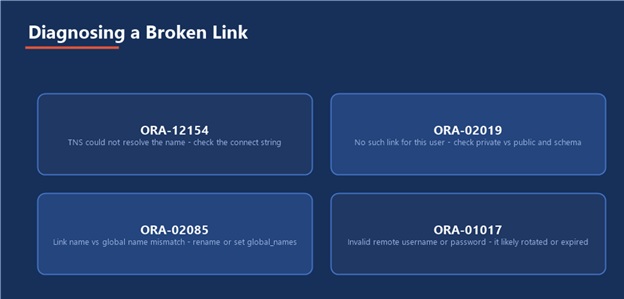
Figure 4 — The four errors that account for almost every database link incident
4.3 Monitoring Distributed Transactions
A distributed transaction that fails partway through commit can leave a pending transaction behind on one side, holding locks until it is resolved:
SELECT local_tran_id, global_tran_id, state FROM dba_2pc_pending; COMMIT FORCE ‘1.2.3’; or ROLLBACK FORCE ‘1.2.3’;
4.4 Security Considerations
- Fixed-user links store a real credential; rotate that remote password on the same schedule as any other privileged account, not never
- Prefer current-user links over fixed-user links wherever the remote side supports proxy authentication, so no single shared password exists to leak
- Audit public links specifically every local user inherits whatever the remote credential behind a public link can do
- Review dba_db_links periodically for links nobody remembers creating an orphaned link is both a security and a change-management risk
Part V — Practical Guidance
5.1 A Sample End-to-End Setup
Confirm Network Path → Create Least-Privilege Remote Account → Create Link → Test with dual@link → Wrap in a Synonym → Point Application Code at the Synonym
5.2 Common Pitfalls
- Hardcoding the link name throughout application code instead of hiding it behind a synonym, so a future re-point touches dozens of files
- Creating a public link for a one-off script, then leaving it in place as a permanent, forgotten shared credential
- Never checking dba_2pc_pending, so a stuck distributed transaction quietly holds locks for days
- Treating a database link as free every additional link is another database whose availability now affects yours
- Building a high-volume application path on a link instead of solving the underlying data-placement problem
5.3 Where This Fits in the Series
Database links run on the same Oracle Database 19c environment used throughout this series, and they are exactly the kind of object a routine health check should never skip: an orphaned public link, a stuck distributed transaction, or a link whose remote password just expired are all findings that belong in the object-and-security section of the Database Health Check guide, right alongside invalid objects and locked accounts.
The Most Important Point
A database link is a dependency you chose to add, not one you were forced to accept. Give it exactly the privilege it needs, hide it behind a synonym, and check on it as part of your regular health check the same discipline you would apply to any other piece of production infrastructure.
- Oracle_Database_Links_Complete_Guide
Oracle_Database_Links_Complete_Guide