Oracle Solutions We believe in delivering tangible results for our customers in a cost-effective manner
Part I — Understanding OCI Integration
1.1 Why an On-Premises Database Needs OCI at All
A database does not have to run in the cloud to benefit from it. Shipping RMAN backups to Object Storage gets them off-site without a second data center; storing TDE keys in Vault removes the wallet file as a single point of failure; a standby database in OCI gives a disaster-recovery site with no hardware to rack. None of this requires migrating the database itself it requires the database to reach OCI over the network, and the identity to prove it is allowed to.
1.2 The OCI Services a DBA Actually Uses
- Object Storage: Durable, S3-compatible storage; the destination for RMAN backups and Data Pump exports
- Vault: Manages encryption keys and secrets centrally, in hardware-backed storage, instead of a wallet file or a password in a script
- Identity and Access Management (IAM): Controls exactly which users, groups, and resources can call which OCI service, and is the permission model behind every integration in this guide
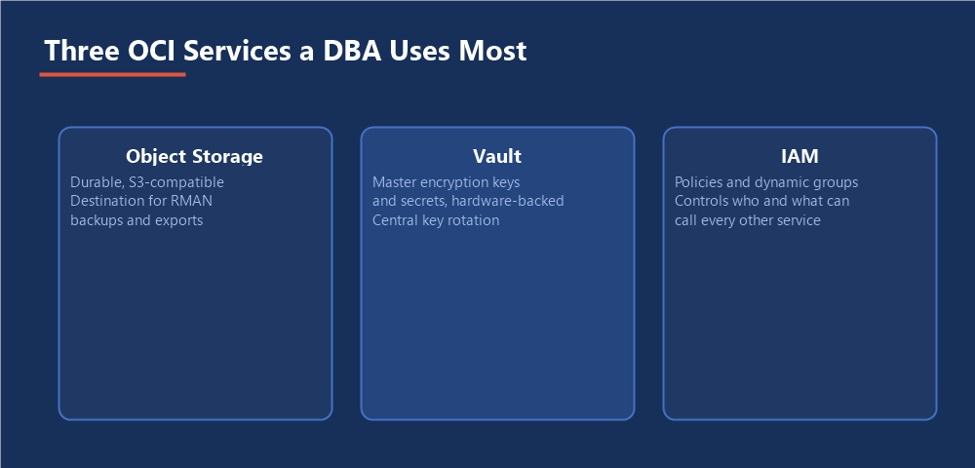
Figure 1: Storage, keys, and access the three services almost every integration in this guide touches.
1.3 Connecting the Two Worlds
On-Premises Database → VPN or FastConnect → OCI Region → Object Storage / Vault / IAM
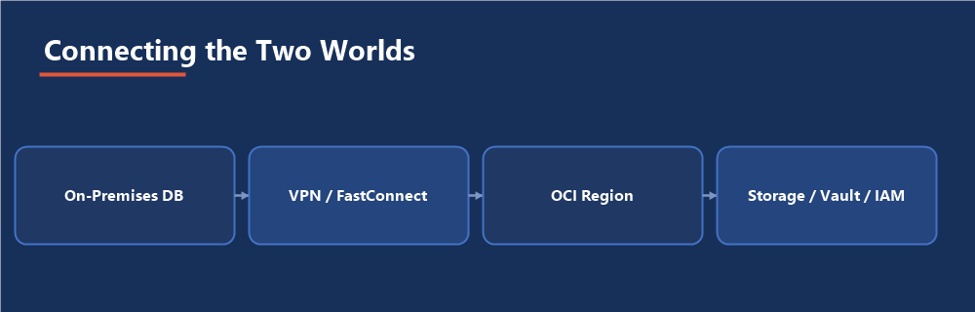
Figure 2: The same four hops, whichever OCI service is on the receiving end
A Site-to-Site VPN is quick to stand up and encrypted by default, running over the public internet. FastConnect is a private, dedicated connection between an on-premises network and OCI, chosen when bandwidth and latency need to be predictable rather than best-effort. Either path terminates at a Dynamic Routing Gateway attached to the target Virtual Cloud Network, and from there OCI services are reachable the same way regardless of which connection type carried the traffic.
1.4 How Authentication Works
Every call into an OCI service is signed with a key pair, not a password. A named user authenticates with an API signing key generated in the OCI Console; a compute instance running in OCI can instead use an instance principal, which needs no stored key at all because OCI itself vouches for the calling instance’s identity. For an on-premises database reaching out to OCI, the API key is the practical starting point instance principals only apply once the calling resource is itself inside OCI.
Integration adds a dependency, deliberately: Every service in this guide is optional, and every one you adopt makes OCI’s availability part of your database’s availability story. That trade is usually worth it; it is never free.
Part II — Running an Oracle Database in OCI
2.1 Three Ways to Host a Database in OCI
Everything in Part I applies whether the database lives on-premises or already runs inside OCI. For a database being deployed into OCI for the first time, or being considered for migration, OCI offers three fundamentally different hosting models, trading off how much Oracle manages against how much control the DBA keeps.
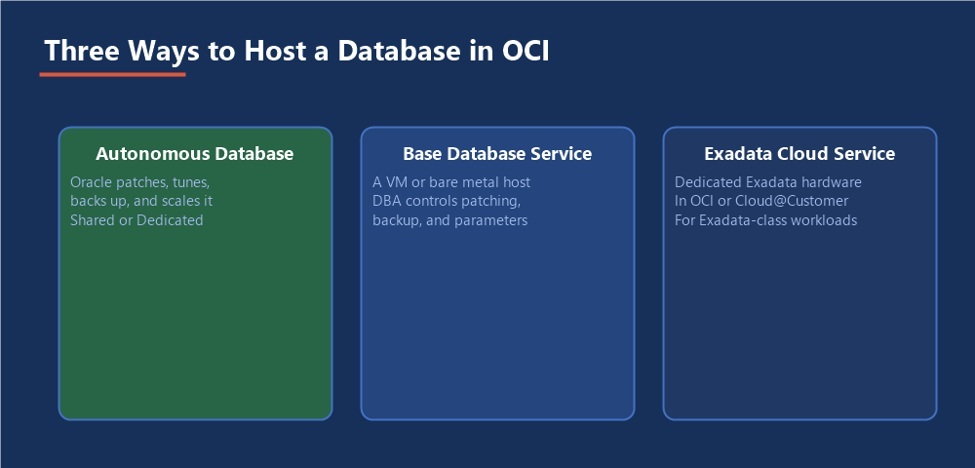
Figure 3: Less management overhead on the left, more control on the right
2.2 Autonomous Database
Autonomous Database patches, tunes, backs up, and scales itself, with Oracle managing the infrastructure and most of the database administration that would otherwise fall to a DBA. It comes in a Shared deployment, running on infrastructure Oracle manages across many tenants, and a Dedicated deployment, running on infrastructure reserved for one customer for stricter isolation and configuration control. The trade for that automation is reduced access to the operating system and a narrower set of database parameters a DBA can touch directly.
2.3 Base Database Service
The Base Database Service (often called a DB System) provisions a virtual machine or bare metal host with Oracle Database already installed, but leaves patching schedules, backup configuration, and every init.ora parameter under direct DBA control everything in the RMAN, Data Guard, and health check guides already in this series applies to a Base Database Service exactly as written, because underneath it is simply Oracle Database running on a host you can reach.
2.4 Exadata Cloud Service and Exadata Cloud@Customer
Exadata Cloud Service runs on dedicated Exadata hardware inside an OCI data center, for workloads that need Exadata’s storage-offload performance without operating the hardware directly. Exadata Cloud@Customer places that same Exadata hardware physically inside the customer’s own data center while OCI still manages it remotely the choice between the two usually comes down to data residency and network requirements rather than anything about the database engine itself.
2.5 Choosing Between Them
- Choose Autonomous Database when the team wants Oracle to own patching, tuning, and backup, and the application does not need OS-level access
- Choose the Base Database Service when existing DBA practices, custom parameters, or third-party agents require full control over the host
- Choose Exadata Cloud Service or Cloud@Customer when the workload’s performance profile genuinely needs Exadata, not just a larger VM shape
The hosting decision does not change the discipline whichever model runs the database, the backup, security, and monitoring habits in the rest of this series still apply. Autonomous Database automates more of the mechanics; it does not remove the DBA’s responsibility to verify the result.
Part III — Backing Up to OCI Object Storage
3.1 Why Object Storage for Backups
An RMAN backup written to Object Storage is automatically off-site the moment it completes, durable across multiple copies Oracle manages for you, and reachable from anywhere with the right credentials the same properties a second physical data center exists to provide, without the second data center.
3.2 Object Storage Tiers
Object Storage is not one uniform pool three tiers trade cost against retrieval speed, and a backup strategy should map deliberately onto them rather than leaving everything in the default tier indefinitely.
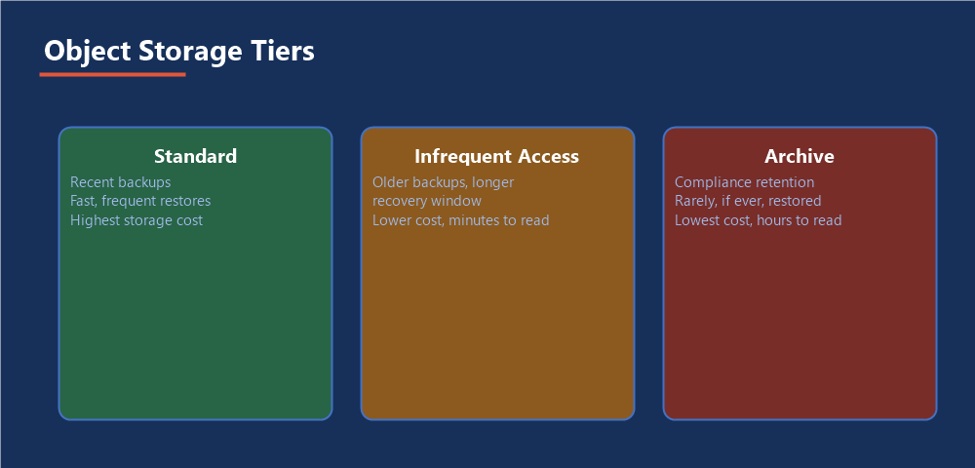
Figure 4: Recent backups stay fast to restore; older ones can afford to be slow and cheap
A sensible default: recent backups needed for a fast restore stay in Standard; backups kept only to satisfy a longer recovery window move to Infrequent Access after a set number of days; backups retained purely for compliance, unlikely to ever be restored, move to Archive, where retrieval can take hours rather than seconds. A lifecycle policy on the bucket automates these transitions so nobody has to move objects by hand.
3.3 Setting Up Credentials
Generate an API signing key pair for the account RMAN will authenticate as, upload the public key in the OCI Console, and record the resulting configuration values (tenancy, user, fingerprint, region) these feed directly into the backup module configuration in the next step.
3.4 Configuring RMAN for Object Storage
Oracle’s OCI Object Storage backup module (installed via the opc_install.jar utility) registers an SBT library RMAN can allocate a channel against, the same way it would against a physical tape library:
java -jar opc_install.jar -serviceEndpoint https://objectstorage.us-ashburn-1.oraclecloud.com -tenantId ocid1.tenancy.oc1..exampleuniqueID -userId ocid1.user.oc1..exampleuniqueID -pubFingerprint aa:bb:cc:dd:ee:ff -walletDir /u01/app/oracle/wallet
3.5 Running a Backup and Setting a Lifecycle Policy
RUN { ALLOCATE CHANNEL c1 DEVICE TYPE SBT_TAPE PARMS ‘SBT_LIBRARY=/u01/app/oracle/lib/libopc.so, ENV=(OPC_PFILE=/u01/app/oracle/wallet/opcORCL.ora)’; BACKUP DATABASE PLUS ARCHIVELOG; RELEASE CHANNEL c1; } oci os object-lifecycle-policy put –bucket-name rman_backups –items ‘[{“name”:”age-to-ia”,”action”:”ARCHIVE”,”timeAmount”:30, “timeUnit”:”DAYS”,”isEnabled”:true}]’
3.6 Verifying and Restoring
RMAN> LIST BACKUP SUMMARY; RMAN> RESTORE DATABASE VALIDATE;
A backup to Object Storage is still just an RMAN backup, and everything from the RMAN guide already in this series about testing restores applies here unchanged RESTORE DATABASE VALIDATE confirms the backup pieces in the cloud are actually readable without touching the live database. If a backup has moved to Archive, request its retrieval ahead of when it will actually be needed a validate run against an Archive-tier piece can fail simply because the object has not finished rehydrating yet, not because anything is wrong with the backup.
Part IV — OCI Vault for Keys and Secrets
4.1 What Vault Actually Stores
Vault holds two related but distinct things: master encryption keys, generated and protected in hardware security modules, and secrets arbitrary sensitive text such as a database password or a wallet passphrase, encrypted at rest by a Vault key and released only to callers with the right IAM permission.
4.2 TDE with a Customer-Managed Key
Instead of a local software wallet holding the database’s master encryption key, the key itself can live in Vault, with the database calling out to Vault to use it for encrypt and decrypt operations. This removes the wallet file as a single artifact that, if lost, takes every encrypted tablespace with it, and centralizes key rotation and access auditing in one place shared across every database configured this way.
4.3 Storing Database Credentials as Secrets
A connection password used by a scheduled job, a monitoring agent, or an application’s own database link should live in Vault as a secret rather than in a script or a configuration file in clear text. The script retrieves the current secret value at run time instead of storing the password itself, so rotating the password means updating one secret, not hunting down every place it was ever copied.
4.4 Retrieving a Secret
oci secrets secret-bundle get –secret-id ocid1.vaultsecret.oc1..exampleuniqueID –query “data.”secret-bundle-content”.content” –raw-output | base64 –decode
Wrap a call like this inside the script or wallet-init logic that needs the credential, so the actual secret value is never written to disk in the calling script itself, only held in memory for as long as the script runs.
A secret you cannot rotate is not a secret: The entire value of moving a password into Vault comes from being able to change it in one place. If a script still hardcodes the old value as a fallback, rotation has quietly failed even though Vault reports success.
Part V — Identity, Networking, Security, and Monitoring
5.1 IAM Policies and Dynamic Groups
An IAM policy is a plain-language statement granting a group a verb (read, manage) against a resource type, in a compartment. A dynamic group extends that same model to compute instances themselves, matched by a rule rather than a fixed membership list, which is what lets a database host authenticate as an instance principal instead of holding a static API key at all:
Allow group DBA_Backup_Operators to manage objects in compartment Database-Prod Allow dynamic-group DB-Hosts to use secret-family in compartment Database-Prod
5.2 Connecting On-Premises to OCI
- Site-to-Site VPN: Fastest to provision, encrypted over the public internet, a reasonable starting point for most integrations in this guide
- FastConnect: A private, dedicated circuit through a provider or a direct cross-connect, chosen when Data Guard redo transport or high-volume backups need consistent, predictable bandwidth
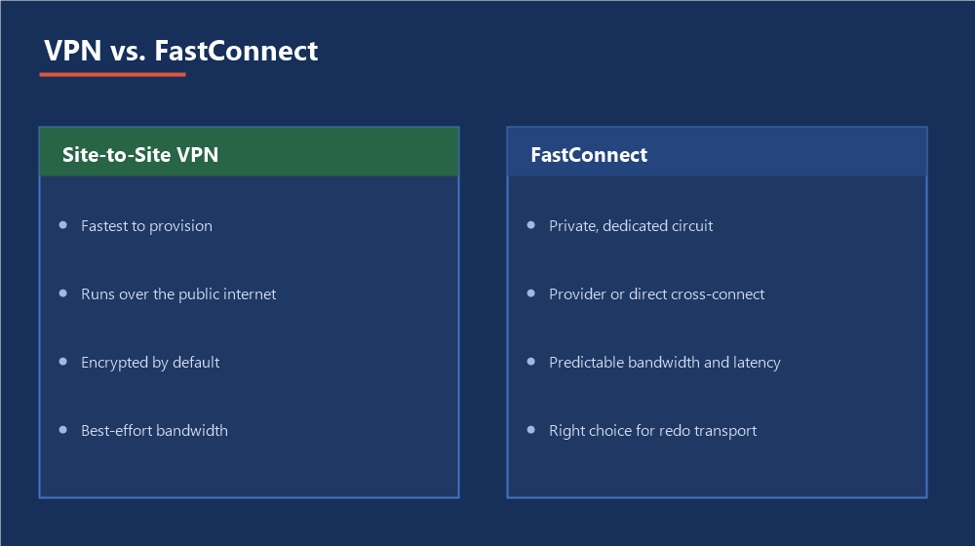
Figure 5: Start with VPN; move to FastConnect once bandwidth actually matters
5.3 A Standby Database in OCI
Everything in the Data Guard guide already in this series applies directly here: a physical standby, redo transport, the Broker, switchover and failover all work identically whether the standby sits in a second on-premises data center or in an OCI Virtual Cloud Network. What changes is only the network path redo travels over VPN or FastConnect instead of a private on-premises link and the security lists or network security groups that have to permit it.
5.4 Defense in Depth
No single OCI control is meant to carry the whole security story on its own. A request that reaches the database in OCI passes through several independent layers, and each one has to fail before the request should ever touch real data.
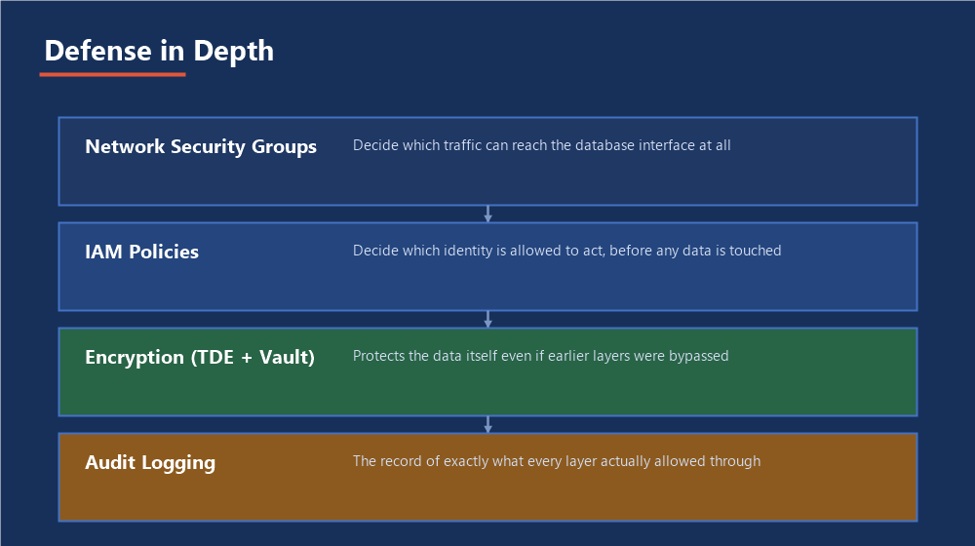
Figure 6: A request has to get past every layer, not just the first one
- Network Security Groups: The perimeter; decide which traffic can even reach the database’s network interface
- IAM Policies: Decide which identity is allowed to act at all, before any data is touched
- Encryption (TDE plus Vault): Protects the data itself even if every earlier layer were somehow bypassed
- Audit Logging: The record that proves, after the fact, exactly what every layer actually allowed through
5.5 Monitoring the Integration Itself
The database health check routine already covers the database side; the OCI side deserves the same discipline. OCI Monitoring collects metrics from every resource automatically, OCI Logging captures service and audit events, and an alarm defined against either one can trigger a notification before a human ever has to go looking for a problem.
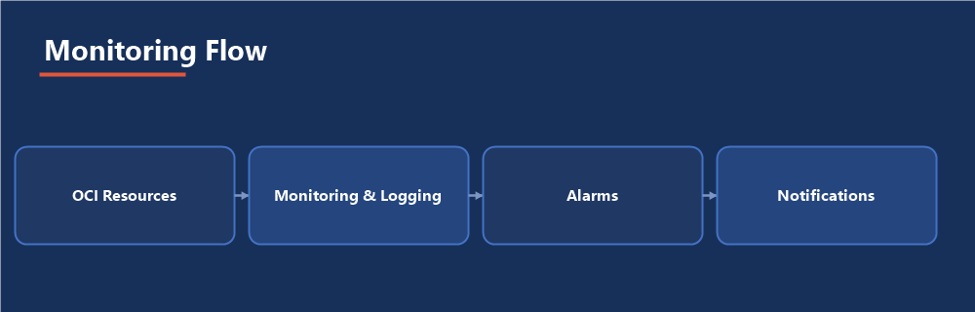
Figure 7: Watch VPN tunnels, FastConnect circuits, and Vault key state the same way you watch the database
Watch VPN tunnel status, FastConnect circuit health, and Vault key state through OCI’s own monitoring, since a database can be perfectly healthy while the path to its backups or its standby has quietly gone down.
Part VI — Practical Guidance
6.1 A Realistic Build Order
Set Up IAM & API Keys → Establish Networking → Connect RMAN to Object Storage → Move Keys/Secrets to Vault → Test Every Path
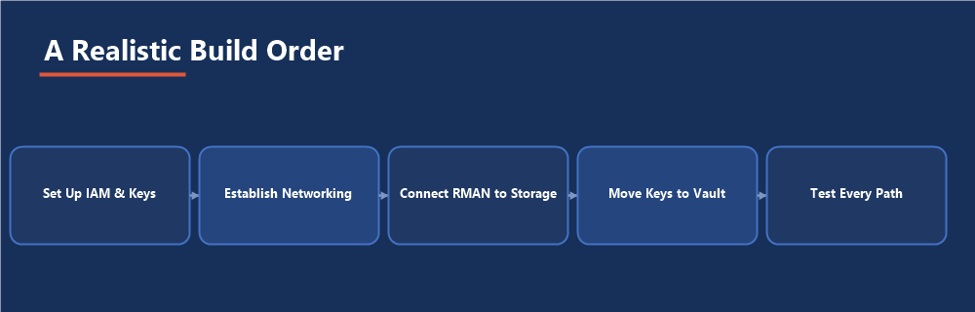
Figure 8: The last step is not optional; it is what tells you the first four actually worked
6.2 Common Pitfalls
- Granting an IAM policy far broader than the one integration actually needs, because the broad version was faster to write
- Standing up a VPN and never testing failover of the tunnel itself, only the happy path
- Storing a secret in Vault, then leaving the original plaintext copy sitting in an old script nobody deleted
- Backing up to Object Storage and never once running a validated restore from it, the exact pitfall the RMAN guide already warns about, just with a different destination
- Leaving every backup in the Standard tier indefinitely, paying for fast retrieval on data nobody will ever urgently need again
- Treating OCI’s availability as someone else’s problem once the integration is live, instead of monitoring it as part of the database’s own health
6.3 An Integration Readiness Checklist
- The hosting model (Autonomous, Base Database Service, or Exadata) was chosen deliberately, not by default
- Every IAM policy grants exactly the access one specific integration needs, scoped to a compartment, not the tenancy
- A restore from an Object Storage backup has actually been tested, not just a backup job that reported success
- A storage lifecycle policy moves aging backups toward Infrequent Access and Archive on a schedule, not by hand
- Every secret has a documented owner and a rotation plan, not just an initial value someone set once
- VPN or FastConnect health is monitored and alerted on independently of the database itself
- If a standby lives in OCI, a switchover to it has been rehearsed, exactly as the Data Guard guide recommends for any standby
6.4 Where This Fits in the Series
This guide is where the RMAN, Data Guard, and Database Health Check guides already in this series meet the cloud: the same backup discipline, the same standby rehearsal, and the same monitoring habit apply, just with OCI as one more destination, one more hosting option, and one more dependency to account for.
The Most Important Point
OCI integration should make a database’s story better, not just different. A backup that is off-site but never restored, a secret that is centralized but never rotated, or a standby that is in the cloud but never rehearsed has added a dependency without adding the resilience it was supposed to buy.
- OCI Integrations
OCI Integrations