Oracle Solutions We believe in delivering tangible results for our customers in a cost-effective manner
Part I — Understanding RMAN
1.1 What Is RMAN?
Recovery Manager (RMAN) is Oracle’s built-in utility for backing up, restoring, and recovering Oracle databases. It ships with every installation of the Oracle Database software and connects to the target database using a dedicated server session, meaning it always has an internal, block-level understanding of the data it is protecting. Unlike user-managed backups that copy operating-system files with tools such ascp or xcopy, RMAN reads the database’s own data structures directly, so it can validate every block it backs up, skip unused blocks, and automatically manage the metadata needed to restore consistently.
1.2 RMAN Architecture
An RMAN backup or recovery operation always involves the same set of components:
- Target database: The database being backed up or recovered; RMAN connects to it as SYSDBA or SYSBACKUP
- RMAN client: The command-line executable (exe) that parses commands and drives the backup and recovery operations
- Control file repository: Every target database always keeps its own RMAN metadata (backup history, configured settings) inside its control file
- Recovery catalog (optional): A separate schema, usually in its own database, that stores RMAN metadata for one or many target databases beyond what the control file alone can retain
- Channels: The server sessions RMAN opens against the target database to actually read and write backup data; each channel maps to one I/O stream
- Media: Disk or a media manager (tape library, cloud storage gateway) where the backup pieces are ultimately written
RMAN Client → Target Database (via channel) → Backup Set / Image Copy → Disk or Media Manager
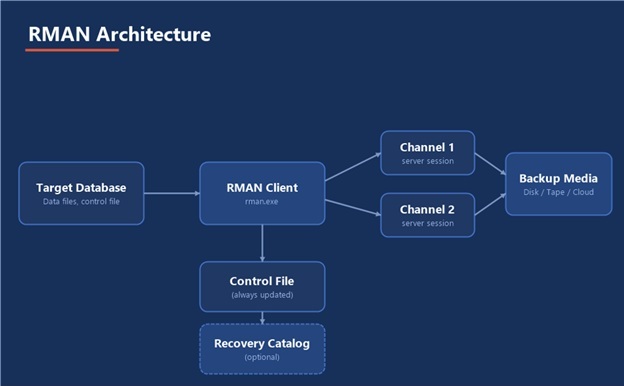
Figure 1 — RMAN architecture: target database, client, metadata, channels, and backup media
1.3 Backup Sets vs. Image Copies
RMAN can write backups in two fundamentally different formats:
- Backup sets: RMAN’s proprietary, compressed container format; multiple data files can be multiplexed into one backup piece, and unused blocks are skipped automatically
- Image copies exact, uncompressed block-for-block copies of a data file, usable directly by the database without an intervening restore step, at the cost of using as much disk space as the original file
1.4 RMAN vs. User-Managed Backup
Before RMAN, DBAs backed up databases by placing tablespaces in hot backup mode and copying the underlying operating-system files. RMAN replaces that entire workflow: it knows which blocks are actually used, validates checksums as it reads, and can back up an open, actively-changing database without ever issuingALTER TABLESPACE … BEGIN BACKUP. Because RMAN also tracks every backup it has ever taken in the control file or recovery catalog, restore and recovery operations can be scripted with a handful of commands instead of manually reconstructing which files go where.
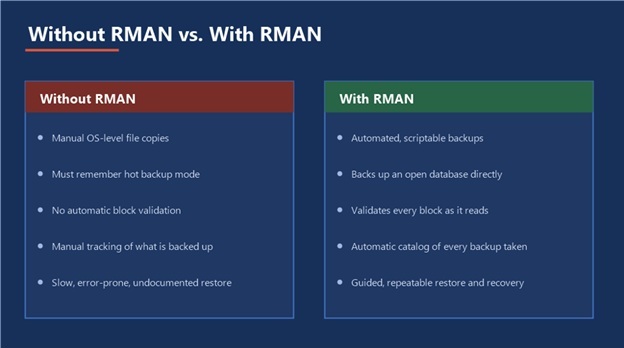
Figure 2 — What changes for a DBA once backups move from manual scripts to RMAN
1.5 Key Supporting Concepts
- Control file: Tracks the physical structure of the database and, critically for RMAN, the entire backup and recovery history
- Redo log: The online record of every change made to the database, used to roll forward changes during recovery
- Archived redo log: A copy of a filled online redo log, retained so that changes can be replayed further back than the online logs alone allow this is what makes point-in-time recovery possible
- SCN (System Change Number): The internal clock RMAN and the database use to identify exactly which point in time a backup, or a recovery, corresponds to
A backup you have never tested restoring is not a backup, it is an assumption.
Part II — Configuration & Setup
2.1 Connecting to the Target Database
RMAN is launched from the command line and connects to the target database using an operating-system or password-file authenticated SYSDBA (or the more restricted SYSBACKUP) connection:
rman target /
For a remote target database, connect with a net service name and credentials:
rman target sys/password@orcl19c
2.2 Configuring Persistent Settings
Persistent settings are stored in the control file (or recovery catalog) and apply to every future RMAN session until changed. The settings worth configuring on day one:
CONFIGURE RETENTION POLICY TO RECOVERY WINDOW OF 7 DAYS; CONFIGURE CONTROLFILE AUTOBACKUP ON; CONFIGURE BACKUP OPTIMIZATION ON; CONFIGURE DEVICE TYPE DISK PARALLELISM 2 BACKUP TYPE TO BACKUPSET; CONFIGURE DEFAULT DEVICE TYPE TO DISK;
- Retention policy: How long backups are kept before RMAN considers them obsolete; can be a recovery window (in days) or a redundancy count (number of copies)
- Controlfile autobackup: Automatically backs up the control file and spfile after every backup and after any structural change, which is what makes a full database restore possible even without a separate catalog
- Backup optimization: Skips files RMAN can prove are already backed up to the required retention, avoiding redundant work on read-only or unchanged data files
2.3 Channel Allocation
A channel is the server process that actually performs I/O. RMAN can automatically allocate channels based on the persistent configuration, or channels can be allocated manually for a single run to control parallelism or target a specific device:
RUN { ALLOCATE CHANNEL c1 DEVICE TYPE DISK FORMAT ‘D:RMAN_BACKUPS%U’; ALLOCATE CHANNEL c2 DEVICE TYPE DISK FORMAT ‘D:RMAN_BACKUPS%U’; BACKUP DATABASE; RELEASE CHANNEL c1; RELEASE CHANNEL c2; }
2.4 Setting Up a Recovery Catalog (Optional but Recommended)
A recovery catalog is a separate schema, ideally in its own dedicated database, that stores RMAN metadata for one or many target databases with a longer and more resilient history than the control file alone can offer. On Windows Server with Oracle Database 19c:
- Create a dedicated tablespace and user for the catalog, for exampleRMAN_CATALOG
- Grant theRECOVERY_CATALOG_OWNER role to that user
- Connect and create the catalog schema objects:
rman catalog rman_catalog/password@catdb CREATE CATALOG;
- Register each target database against the catalog:
rman target / catalog rman_catalog/password@catdb REGISTER DATABASE;
Control file only is still valid: A recovery catalog is not mandatory. Many single-database environments run for years on control-file-only RMAN metadata plus controlfile autobackup. A catalog earns its keep once you manage more than a handful of databases or need retention longer than the control file’s record-keeping limits.
Part III — Backup Strategy
3.1 Backup Types
RMAN supports several backup levels, each suited to a different recovery-time and storage trade-off:
|
Backup Type |
What It Captures |
|
Full backup |
Every used block in the target files; not part of the incremental strategy, just a complete standalone copy |
|
Incremental level 0 |
Every used block, but recorded as the base of an incremental strategy so later incrementals can build on it |
|
Incremental level 1 (differential) |
Only blocks changed since the most recent level 0 or level 1 backup the default and usually the right choice |
|
Incremental level 1 (cumulative) |
Every block changed since the last “level 0” larger than a differential, but a restore only ever needs the level 0 plus one cumulative |
|
Image copy |
A full, uncompressed, block-for-block copy usable directly by the database, often paired with incremental merges for near-zero restore time |
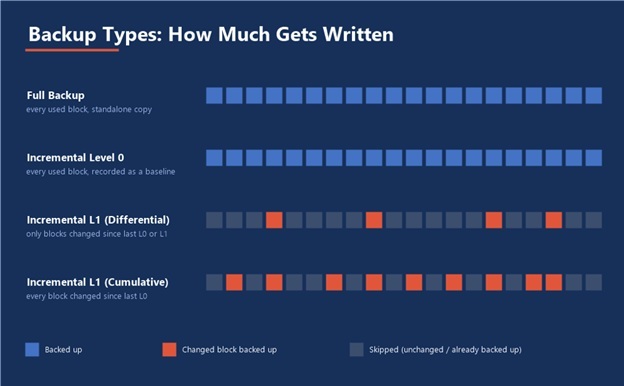
Figure 3 — How much data each backup type actually writes, block by block
3.2 What to Back Up
BACKUP DATABASE PLUS ARCHIVELOG; BACKUP CURRENT CONTROLFILE; BACKUP SPFILE; BACKUP INCREMENTAL LEVEL 1 DATABASE;
- BACKUP DATABASE PLUS ARCHIVELOG backs up every data file and every archived redo log generated since the last backup, in one consistent operation
- The control file and spfile should always be backed up, or covered by controlfile autobackup, since they are what a from-scratch restore needs first
- Archived redo logs already applied to every current backup can be purged withDELETE ARCHIVELOG once retention allows, to control disk usage
3.3 Compression and Encryption
CONFIGURE COMPRESSION ALGORITHM ‘MEDIUM’; CONFIGURE BACKUP OPTIMIZATION ON; BACKUP AS COMPRESSED BACKUPSET DATABASE;
Backup set compression trades CPU time for a smaller footprint on disk or tape, which matters most when backups are shipped off-site or retained for long recovery windows. Transparent Data Encryption can additionally be applied at the backup-set level so that backup media is unreadable outside the source environment even if it is lost or stolen.
3.4 Scheduling and Retention
A realistic schedule for a mid-sized production database on Windows Server, run through Windows Task Scheduler calling an RMAN command file:
- Weekly: Level 0 (baseline) incremental backup during a low-activity window
- Daily: Level 1 differential incremental backup
- Every 15–30 minutes, or on log switch archived redo log backup, to bound how much redo would need to be replayed after a failure
- After every backup DELETE OBSOLETE to enforce the configured retention policy and reclaim disk space
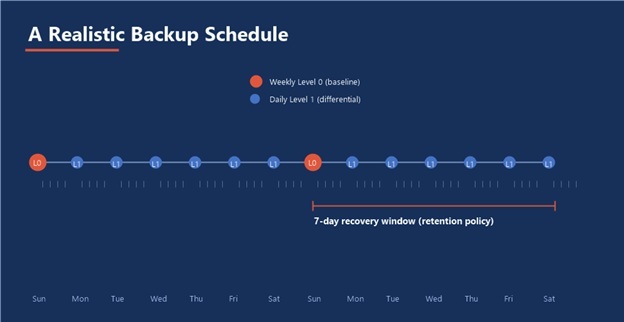
Figure 4 — A realistic weekly/daily backup cadence against a 7-day recovery window
Retention window drives everything: Set the recovery window first, based on how far back the business genuinely needs to restore, and let the level-0 frequency and archived-log retention follow from that number rather than choosing them arbitrarily.
Part IV — Recovery Scenarios
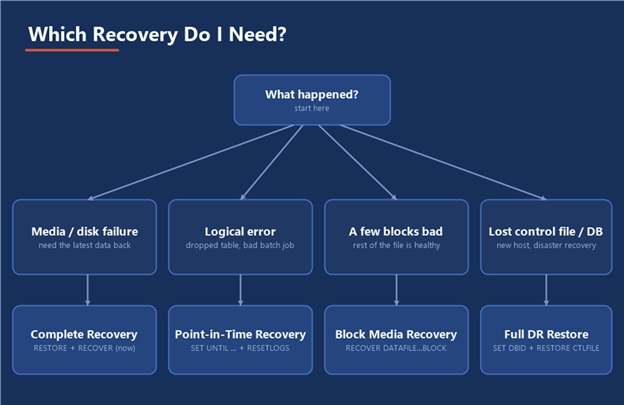
Figure 5 — Matching what went wrong to the right recovery path, before opening a single RMAN prompt
4.1 Complete Recovery
Complete recovery restores the database (or a data file) to the most current point possible, replaying every available redo log. This is the default and most common recovery path after a media failure with no data loss requirement:
STARTUP MOUNT; RESTORE DATABASE; RECOVER DATABASE; ALTER DATABASE OPEN;
4.2 Incomplete (Point-in-Time) Recovery
Used when the database must be rolled back to a specific point before a logical error, a dropped table, a bad batch job, corrupted data from an application bug rather than recovered fully:
STARTUP MOUNT; RUN { SET UNTIL TIME “TO_DATE(‘2026-08-18 09:00:00′,’YYYY-MM-DD HH24:MI:SS’)”; RESTORE DATABASE; RECOVER DATABASE; } ALTER DATABASE OPEN RESETLOGS;
Point-in-time recovery can target a timestamp (as above), an SCN with SET UNTIL SCN, or a specific log sequence with SET UNTIL SEQUENCE. Because it discards all changes after the target point, the database must always be opened with RESETLOGS, which starts a new incarnation and means a fresh full backup should be taken immediately afterward.
4.3 Block Media Recovery
When only a handful of blocks are corrupted identified through RMAN VALIDATE or reported in the alert log, RMAN can recover just those blocks without taking the data file offline:
RECOVER DATAFILE 4 BLOCK 205, 206;
4.4 Losing a Data File
If a single data file is lost (deleted, corrupted disk) but the rest of the database is healthy, the database can stay open while the affected file is restored and recovered:
SQL “ALTER DATABASE DATAFILE 4 OFFLINE”; RESTORE DATAFILE 4; RECOVER DATAFILE 4; SQL “ALTER DATABASE DATAFILE 4 ONLINE”;
4.5 Losing the Control File
With control file auto backup enabled, RMAN can locate and restore the control file even without a surviving catalog, by searching the configured backup location for the auto backup piece:
STARTUP NOMOUNT; RESTORE CONTROLFILE FROM AUTOBACKUP; ALTER DATABASE MOUNT; RESTORE DATABASE; RECOVER DATABASE; ALTER DATABASE OPEN RESETLOGS;
4.6 Losing the Entire Database
A full disaster-recovery restore new host, no existing control file, no existing files at all starts from the database’s DBID and a known backup location:
STARTUP NOMOUNT; SET DBID 1234567890; RESTORE CONTROLFILE FROM ‘D:RMAN_BACKUPSautobackup_piece.bkp’; ALTER DATABASE MOUNT; RESTORE DATABASE; RECOVER DATABASE; ALTER DATABASE OPEN RESETLOGS;
Know your DBID before you need it, a full disaster-recovery restore is the one scenario where the control file, the recovery catalog, and often the RMAN command history itself may all be gone. Keep the database’s DBID and the backup location documented somewhere outside the database being protected.
Part V — Command Reference & Practical Guidance
5.1 Command Cheat Sheet
|
Command |
Purpose |
|
BACKUP DATABASE |
Back up every data file in the database |
|
BACKUP ARCHIVELOG ALL |
Back up all archived redo logs not yet backed up |
|
RESTORE DATABASE |
Copy data files back from backup, without applying redo |
|
RECOVER DATABASE |
Apply archived and online redo to restored files to bring them current |
|
VALIDATE DATABASE |
Scan every block for corruption without restoring anything |
|
CROSSCHECK BACKUP |
Verify catalog/control-file records still match what exists on disk or media |
|
DELETE OBSOLETE |
Remove backups no longer needed to satisfy the retention policy |
|
DELETE EXPIRED BACKUP |
Remove catalog records for backups a crosscheck found missing from media |
|
LIST BACKUP SUMMARY |
Quick, one-line-per-backup inventory of everything RMAN knows about |
|
REPORT NEED BACKUP |
List files that violate the configured retention policy and need a fresh backup |
5.2 Monitoring with LIST and REPORT
LIST commands answer “what backups exist,” while REPORT commands answer “what is at risk.” Running both regularly, ideally as part of the same job that runs the nightly backup, turns backup monitoring from a manual audit into a five-second glance:
LIST BACKUP SUMMARY; REPORT NEED BACKUP DAYS 1; REPORT OBSOLETE; REPORT SCHEMA;
5.3 Common Pitfalls
- Never testing a restore a backup strategy is unverified until a full restore has actually been rehearsed, ideally on a separate host
- Leaving controlfile autobackup off without it, a lost control file with no surviving catalog can turn a routine restore into a DBID hunt
- Letting archived redo logs pile up unmanaged either filling the destination disk or, worse, being deleted manually outside of RMAN, breaking its metadata
- Storing every backup on the same disk or host as the database it protects, with no off-site or separate-failure-domain copy
- Setting a retention policy and never revisiting it as the business’s actual recovery-point requirements change
5.4 A Realistic Practice Order
Configure Persistent Settings → Full Backup → Incremental Strategy → Practice Complete Recovery → Practice Point-in-Time Recovery → Automate & Monitor
5.5 Where This Fits in the Series
This guide assumes the same Oracle Database 19c on Windows Server environment used throughout this series. RMAN protects everything else documented here the APEX repository, ORDS metadata, and any custom schemas built for H2R or P2P since all of it ultimately lives inside the same database files RMAN is backing up.
The Most Important Habit
Schedule the backup, then schedule the restore test. A backup job that has run successfully every night for a year proves nothing about whether the resulting files can actually rebuild the database only a rehearsed restore does that.
- Oracle RMAN
Oracle RMAN