Oracle Solutions We believe in delivering tangible results for our customers in a cost-effective manner

- Introduction – Oracle Database Blocking Sessions
In Oracle Database, blocking occurs when one session holds a lock on a resource (typically a row or table) and another session attempts to access the same resource, causing the second session to wait. While this is a normal part of Oracle’s concurrency control mechanism, prolonged blocking can lead to performance degradation, application timeouts, and in severe cases, a deadlock.
This guide provides a step-by-step approach to creating, identifying, diagnosing, and resolving blocking sessions in Oracle Database, along with the theoretical concepts behind each step.
What is a Lock?
A lock is a mechanism used by Oracle Database to prevent multiple sessions from simultaneously modifying the same data. Oracle automatically acquires locks when a transaction performs DML operations (INSERT, UPDATE, DELETE).
Types of Locks Relevant to Blocking
| Lock Type | Description |
|---|---|
| TX (Transaction) | Row-level locks acquired during DML operations |
| TM (DML) | Table-level locks acquired to prevent conflicting DDL operations |
| Enqueue | Internal locks for managing shared resources |
What is Blocking?
Blocking occurs when:
-
Session A acquires a lock on a row and does not commit or rollback.
-
Session B attempts to update the same row.
-
Session B enters a wait state with the event
enq: TX - row lock contention.
What is a Deadlock?
A deadlock occurs when two or more sessions are waiting for each other to release locks, creating a circular dependency. Oracle automatically detects deadlocks and resolves them by rolling back one of the sessions with the error ORA-00060: deadlock detected while waiting for resource.
Key Dynamic Performance Views
| View | Purpose |
|---|---|
V$SESSION |
Information about all current sessions |
V$LOCK |
Information about locks held and requested |
V$SQL |
SQL text and execution statistics |
V$SESSION_BLOCKERS |
Simplified view of blocking relationships |
DBA_BLOCKERS Or DBA_WAITERS |
DBA-level views for blocking analysis |
Step 1 – Create a Test Table
Purpose
To create a controlled environment for demonstrating blocking behavior.
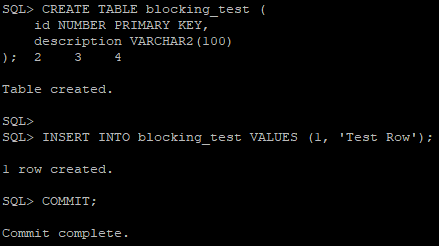
CREATE TABLE blocking_test (id NUMBER PRIMARY KEY, description VARCHAR2(100));

INSERT INTO blocking_test VALUES (1, 'Test Row');

COMMIT;
SELECT * FROM blocking_test;
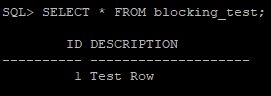
Expected Result
| ID | DESCRIPTION |
|---|---|
| 1 | Test Row |
Theoretical Note
The COMMIT statement is essential here because it releases any locks acquired during the INSERT. Without committing, the table would already be in a locked state, which would confuse the demonstration.
Step 2 – Create a Lock in Session 1
Purpose
To simulate a real-world scenario where a session holds a row lock without committing.
SQL Command (Run in Session 1)
UPDATE blocking_test SET description = 'Locked by Session 1' WHERE id = 1;
Important
Do NOT execute COMMIT or ROLLBACK in this session.
Explanation :
When the UPDATE statement executes:
-
Oracle acquires a TX lock on the row with
id = 1. -
The lock is recorded in the ITL (Interested Transaction List) of the data block.
-
The transaction remains uncommitted, meaning:
-
The lock is held indefinitely until
COMMITorROLLBACK. -
Other sessions attempting to modify the same row will be blocked.
-
This represents a pessimistic locking scenario, where the lock is held for the duration of the transaction.
Step 3 – Create Blocking from Session 2
Purpose
To demonstrate how a second session is blocked when attempting to modify a locked row.
SQL Command (Run in a New Session)
UPDATE blocking_test SET description = 'Updated by Session 2' WHERE id = 1;
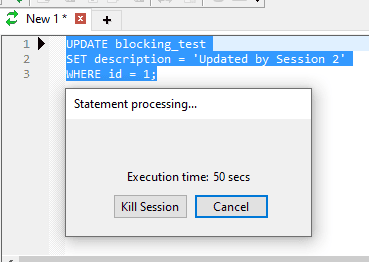
Expected Behavior :
-
The command will not complete immediately.
-
Session 2 will enter a wait state.
-
The wait event will be
enq: TX - row lock contention.
Explanation :
When Session 2 attempts the UPDATE:
-
Oracle checks whether the row is locked.
-
It finds that Session 1 holds a TX lock on the row.
-
Session 2 is placed in a wait queue for that lock.
-
The wait event
enq: TX - row lock contentionis recorded inV$SESSION.
Important: Session 2 is not terminated—it remains in a waiting state until:
-
Session 1 commits or rolls back (lock released), or
-
Session 2 is manually cancelled, or
-
A deadlock occurs (Oracle resolves it automatically).
Step 4 – Identify the Blocking Session
Purpose
To identify which session is blocking and which session is blocked.
SQL Command (Run in a Third Session)
SELECT sid, serial#, username, status, event, blocking_session, seconds_in_wait FROM v$session WHERE blocking_session IS NOT NULL;

Interpretation :
| Column | Meaning |
|---|---|
| SID 25 | The blocked session (Session 2) |
| BLOCKING_SESSION 20 | The blocking session (Session 1) |
| EVENT | The reason for the wait (enq: TX - row lock contention) |
| SECONDS_IN_WAIT | Duration for which Session 2 has been waiting |
Explanation :
The BLOCKING_SESSION column in V$SESSION is populated only when a session is waiting for a lock held by another session. This column directly identifies the root cause of the blocking chain.
Note: If multiple sessions are blocked, a single BLOCKING_SESSION value may appear multiple times, indicating a blocking tree.
Step 5 – Retrieve Details of Blocking and Blocked Sessions
5a – Blocking Session Details :
SELECT s.sid, s.serial#, s.username, s.status, s.osuser, s.machine, s.program, s.sql_id, s.prev_sql_id, s.logon_time FROM v$session s WHERE s.sid = &blocking_sid;
Expected Result :
| SID | SERIAL# | USERNAME | STATUS | OSUSER | MACHINE | PROGRAM | SQL_ID | LOGON_TIME |
|---|---|---|---|---|---|---|---|---|
| 284 | 40716 | ACTIVE | Toad.exe | 9y1fgpzt2c8w3 | 01-OCT-24 |

5b – Blocking Session SQL Text
SELECT sql_id, sql_text, executions, first_load_time, last_load_time FROM v$sql WHERE sql_id = '&sql_id';
Expected Result :
| SQL_ID | SQL_TEXT | EXECUTIONS |
|---|---|---|
| 9y1fgpzt2c8w3 | UPDATE blocking_test SET description = ‘Locked by Session 1’ WHERE id = 1 | 1 |


5c – Blocked Session Details
SELECT s.sid, s.serial#, s.username, s.status, s.event, s.blocking_session, s.seconds_in_wait, s.sql_id FROM v$session s WHERE s.blocking_session IS NOT NULL;
| SID | SERIAL# | USERNAME | STATUS | EVENT | BLOCKING_SESSION | SECONDS_IN_WAIT | SQL_ID |
|---|---|---|---|---|---|---|---|
| 284 | 40716 | ACTIVE | enq: TX – row lock contention | 53 | 517 | 9y1fgpzt2c8w3 |

5d — Blocked Session SQL Text
SELECT sql_id, sql_text FROM v$sql WHERE sql_id = '&blocked_sql_id';
Expected Result :
| SQL_ID | SQL_TEXT |
|---|---|
| def456uvw | UPDATE blocking_test SET description = ‘Updated by Session 2’ WHERE id = 1 |

Explanation :
-
V$SESSION.SQL_IDgives the SQL currently being executed by the session. -
V$SQL.SQL_TEXTprovides the actual SQL statement text. -
PREV_SQL_IDis useful when the blocking session has already completed its current SQL but still holds the lock (e.g., it is idle in transaction).
Key Insight: The blocking session (Session 1) is ACTIVE but has not committed. This is a classic “idle in transaction” scenario, which is a common cause of production blocking.
Step 6 – Identify the Blocking Tree
Purpose
To visualize multiple levels of blocking when more than two sessions are involved.
SELECT LEVEL, sid, serial#, username, blocking_session, event, seconds_in_wait FROM v$session WHERE blocking_session IS NOT NULL
START WITH blocking_session IS NULL CONNECT BY PRIOR sid = blocking_session;

Explanation :
This hierarchical query uses Oracle’s CONNECT BY clause to build a tree:
-
Root = session with
blocking_session IS NULL(the ultimate blocker) -
Children = sessions blocked by the root
-
Grandchildren = sessions blocked by children, and so on
This is extremely useful in production environments where a single blocking session can cause a cascading effect, blocking dozens of other sessions.
Step 7 – Resolve the Blocking
Option A – Commit or Rollback in the Blocking Session (Recommended)
In Session 1:
COMMIT;
-- or
ROLLBACK;
Option B – Kill the Blocking Session
ALTER SYSTEM KILL SESSION '284,40716' IMMEDIATE;
Option C – Cancel the Blocked Session
In Session 2, press Ctrl+C or use the cancel button in Toad.
Explanation :
| Resolution | Effect |
|---|---|
| COMMIT | Releases locks and makes changes permanent |
| ROLLBACK | Releases locks and undoes changes |
| KILL SESSION | Terminates the session; transaction is rolled back |
| Cancel blocked session | Removes the wait; lock remains held by blocker |
Best Practice: Always prefer COMMIT or ROLLBACK over KILL SESSION, as killing a session can leave the database in an inconsistent state and may require instance recovery.
Note on KILL SESSION IMMEDIATE: The IMMEDIATE clause instructs Oracle to terminate the session without waiting for the current transaction to complete. Without IMMEDIATE, Oracle waits for the transaction to finish.
Step 8 – Verification
Purpose
To confirm that the blocking has been resolved.
SELECT sid, serial#, username, status, event, blocking_session, seconds_in_wait FROM v$session WHERE blocking_session IS NOT NULL;
Expected Result :
No rows returned (or only legitimate waits unrelated to the test).

Explanation :
Once the blocking session commits, rolls back, or is killed, the lock is released, and the blocked session automatically resumes execution. The BLOCKING_SESSION column becomes NULL for the previously blocked session.
Conclusion
Blocking is an inherent part of Oracle’s concurrency control mechanism. While short-lived blocking is normal and expected, prolonged blocking can severely impact database performance and application availability.
By understanding the theoretical foundations and following the systematic troubleshooting steps outlined in this guide, DBAs can efficiently:
-
Identify blocking sessions using
V$SESSIONandV$SQL -
Diagnose the root cause using blocking trees and SQL text
-
Resolve blocking through commits, rollbacks, or session termination
-
Prevent future occurrences through best practices
The screenshots captured during this exercise serve as valuable evidence and reference material for both training and incident documentation.
Appendix – Quick Reference Queries
Find Blocking Sessions :
SELECT sid, serial#, username, blocking_session, event, seconds_in_wait FROM v$session WHERE blocking_session IS NOT NULL;
Find Blocking Tree :
SELECT LEVEL, sid, serial#, username, blocking_session, event FROM v$session WHERE blocking_session IS NOT NULL
START WITH blocking_session IS NULL CONNECT BY PRIOR sid = blocking_session;
Find SQL of a Session :
SELECT sql_id, sql_text FROM v$sql WHERE sql_id = (SELECT sql_id FROM v$session WHERE sid = &sid);
Kill a Session :
ALTER SYSTEM KILL SESSION '&sid,&serial#' IMMEDIATE;