 Oracle Solutions We believe in delivering tangible results for our customers in a cost-effective manner
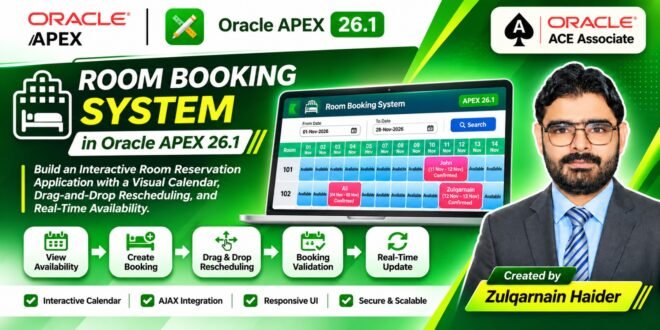
Interactive Room Availability Calendar, Booking Management, and Drag-and-Drop Rescheduling
Author: Zulqarnain Haider
Technology: Oracle APEX 26.1, Oracle Database, SQL, PL/SQL, JavaScript, HTML, and CSS
1. Introduction
Hotel room management requires an efficient way to monitor room availability, manage reservations, and handle booking changes. Traditional booking systems often rely on static reports and multiple forms, making it difficult for hotel staff to get a clear picture of room availability.
In this project, I developed a Dynamic Room Booking System using Oracle APEX 26.1. The application provides an interactive room availability calendar where users can view reservations, identify available rooms, create new bookings, and reschedule existing bookings through drag-and-drop functionality.
The main objective was to build a user-friendly reservation management interface using Oracle APEX native components, PL/SQL, JavaScript, HTML, and CSS.
2. Project Overview
The Room Booking System provides a centralized interface for managing hotel room reservations.
The application includes the following functionality:
-
Display hotel rooms in a dynamic calendar.
-
Show existing reservations against their respective rooms.
-
Highlight available and booked dates.
-
Create new reservations directly from the calendar.
-
Open a booking form in a modal dialog.
-
Reschedule reservations using drag-and-drop.
-
Validate room availability before updating a booking.
-
Prevent overlapping reservations.
-
Provide responsive styling for different screen sizes.
-
Secure application access through authentication.
The calendar is the central feature of the application, allowing users to manage room reservations visually.
3. Application Architecture
The application uses a combination of Oracle APEX components and custom frontend functionality.
Technology stack:
| Technology | Purpose |
|---|---|
| Oracle APEX 26.1 | Application development platform |
| Oracle Database | Booking and room data storage |
| SQL | Retrieving rooms and reservation information |
| PL/SQL | Server-side processing and validation |
| JavaScript | Calendar interactions and drag-and-drop |
| HTML | Dynamic calendar structure |
| CSS | Calendar styling and responsive design |
| AJAX | Asynchronous communication with server-side processes |
The application uses two main database tables:
-
HOTEL_ROOMS– Stores hotel room information. -
ROOM_BOOKINGS– Stores room reservation information.
The exported application references these tables. The complete table DDL was not included in the application export.
4. Application Page Structure
The application contains the following pages:
| Page Number | Page Name | Purpose |
|---|---|---|
| 1 | Home | Application landing page |
| 3 | Booking | Interactive room availability calendar |
| 4 | Booking Form | Create and manage room reservations |
| 9999 | Login Page | User authentication |
| 0 | Global Page | Application-wide page configuration |
The Booking page is the main operational interface, while the Booking Form page handles reservation details.
5. Home Page – Application Dashboard
The Home page serves as the starting point of the application.
It provides users with access to the room booking functionality and acts as the entry point after successful authentication.
A well-structured landing page makes navigation easier and helps users quickly access the reservation management interface.
6. Room Booking Calendar – Page 3
The most important feature of this application is the dynamic room availability calendar.
Instead of displaying reservations in a traditional report, the application generates a calendar-style layout where:
-
Each row represents a hotel room.
-
Each column represents a calendar date.
-
Booked dates display reservation information.
-
Available dates provide an option to create a new booking.
The calendar is generated using a Native Dynamic Content region on Page 3.
Region details:
| Property | Value |
|---|---|
| Page | 3 – Booking |
| Region Name | New |
| Static ID | new |
| Region Type | Native Dynamic Content |
| Start Date Item | P3_START_DATE |
| End Date Item | P3_END_DATE |
The page uses the selected start and end dates to determine the calendar range.
The default start date is the beginning of the current month, while the default end date is the last day of the current month.
The application retrieves rooms from HOTEL_ROOMS and reservation information from ROOM_BOOKINGS.
Each room is displayed as a separate row, and its reservation dates are represented visually across the calendar.
7. Visual Booking Status and Calendar Styling
To make the calendar easy to understand, custom CSS is used to differentiate booked and available dates.
The calendar uses different visual styles for:
-
Available room dates.
-
Existing reservations.
-
Selected or hovered drop targets.
-
Room columns and calendar cells.
Some of the CSS classes used in the implementation include:
| CSS Class | Purpose |
|---|---|
.booking-grid |
Main calendar grid layout |
.room-col |
Room information column |
.available |
Available date cells |
.booking |
Existing booking blocks |
.drop-hover |
Highlights a valid drag-and-drop target |
The .booking class visually represents an existing reservation, while .available identifies dates where users can initiate a new booking.
The .drop-hover class provides visual feedback when a user drags a reservation over a calendar cell.
Custom CSS also supports responsive layouts and dark-mode styling.
8. Creating a New Booking from the Calendar
Users can create a new reservation directly from an available calendar cell.
The process is designed to reduce unnecessary navigation.
Booking creation workflow:
-
Open the Booking page.
-
Select an available date for the required room.
-
The application identifies the selected room and check-in date.
-
JavaScript triggers the server-side URL preparation process.
-
The Booking Form opens as a modal dialog.
-
The selected room and check-in date are passed to the form.
-
The user enters the guest information and check-out date.
-
The reservation is saved to the database.
The application uses the cellClicked() JavaScript function to handle clicks on available calendar cells.
The function communicates with the server-side PREPARE_URL process to prepare the modal page URL.
This allows the Booking Form to open with the selected room and date already populated.
9. Booking Form – Page 4
Page 4 contains the Booking Form used to create and manage reservations.
The page is configured as a modal dialog, allowing users to enter booking information without leaving the calendar.
The form is based on the ROOM_BOOKINGS database table and uses Oracle APEX native form functionality.
Important form items:
| Page Item | Purpose |
|---|---|
P4_BOOKING_ID |
Booking primary key |
P4_ROOM_ID |
Selects the hotel room |
P4_GUEST_NAME |
Stores the guest name |
P4_CHECK_IN_DATE |
Reservation check-in date |
P4_CHECK_OUT_DATE |
Reservation check-out date |
P4_BOOKING_STATUS |
Stores booking status |
P4_COLOR_CODE |
Stores booking color |
P4_CREATED_ON |
Stores booking creation date |
The room selection item uses a List of Values based on the HOTEL_ROOMS table.
The exported application also contains a Before Header process named New, which initializes default values for new reservations:
-
Booking status:
Confirmed -
Booking color:
#4287f5 -
Creation date: Current system date and time
The page uses native Oracle APEX form initialization and DML processing for database operations.
This provides standard insert, update, and delete functionality without requiring a completely custom form-processing implementation.
<em>Suggested screenshot: Insert the Booking Form modal screenshot here.</em>
10. Drag-and-Drop Booking Rescheduling
One of the most interesting features of this application is drag-and-drop booking rescheduling.
Instead of opening a reservation form and manually changing room and date values, users can move an existing booking directly within the calendar.
The JavaScript implementation includes the following functions:
| JavaScript Function | Purpose |
|---|---|
drag() |
Starts the drag operation and stores booking information |
allowDrop() |
Allows a calendar cell to receive a dragged booking |
drop() |
Handles the booking drop operation and sends the new details to the server |
clearDropHover() |
Removes the drop-target highlighting |
cellClicked() |
Opens the Booking Form when an available cell is selected |
How drag-and-drop works:
-
The user selects an existing booking.
-
The drag operation starts.
-
The application stores the booking ID.
-
The user moves the booking over another calendar cell.
-
The target cell receives a visual highlight.
-
The user drops the booking.
-
JavaScript sends the booking ID, target room, and updated dates to the server.
-
The server validates room availability.
-
If no conflict exists, the booking is updated.
-
The calendar can then reflect the updated reservation.
The implementation uses HTML drag-and-drop events and JavaScript to provide an interactive booking experience.
<em>Suggested screenshot: Insert screenshots showing a booking before and after drag-and-drop rescheduling.</em>
11. Server-Side Booking Conflict Validation
Allowing users to move reservations without validation could result in overlapping bookings.
To address this, the application performs server-side conflict validation before updating an existing reservation.
The validation checks whether another reservation already exists for the selected room and requested date range.
The application uses four date-overlap conditions to identify conflicting reservations.
This is important because two reservations may overlap in different ways:
-
A new booking starts during an existing reservation.
-
A new booking ends during an existing reservation.
-
A new booking completely contains an existing reservation.
-
A new booking is completely contained within an existing reservation.
If a conflict is identified, the application returns an error response instead of updating the reservation.
If the validation succeeds, the existing booking is updated with the new room and date information.
Important production consideration: The exported conflict-validation logic should be reviewed before production deployment. In particular, the current booking ID should be excluded from the conflict query when checking a booking being moved. Date-range boundaries should also follow one consistent convention, and concurrent booking attempts should be protected at the database level.
12. AJAX Processes
The application uses two On-Demand AJAX processes on Page 3 to handle asynchronous server-side operations.
| AJAX Process Name | Purpose |
|---|---|
PREPARE_URL |
Prepares the APEX URL before opening the Booking Form modal dialog. |
CHECK_AND_UPDATE_BOOKING |
Checks room booking conflicts and updates an existing booking during drag-and-drop rescheduling. |
These processes are called from JavaScript using the Oracle APEX apex.server.process API.
This approach enables communication between the client-side calendar and server-side PL/SQL without requiring a traditional full-page submission.
13. Application Authentication
The application includes a dedicated Login Page (Page 9999).
The login page uses Oracle APEX authentication functionality to authenticate application users.
The exported application includes the following page items:
-
P9999_USERNAME -
P9999_PASSWORD -
P9999_REMEMBER
The login page also includes processes for handling username cookies and clearing page cache.
The authentication process uses the native APEX_AUTHENTICATION.LOGIN API.
This provides a standard Oracle APEX authentication flow for accessing the application.
14. Responsive Design and Dark Mode
A booking calendar must remain usable on different screen sizes.
The application includes custom CSS for responsive behavior and dark-mode presentation.
The styling covers:
-
Calendar grid layout.
-
Room column presentation.
-
Booking block appearance.
-
Available date cells.
-
Drag-and-drop hover feedback.
-
Responsive behavior for smaller screens.
-
Dark-mode styling.
These improvements help maintain a consistent user experience across desktop and mobile devices.
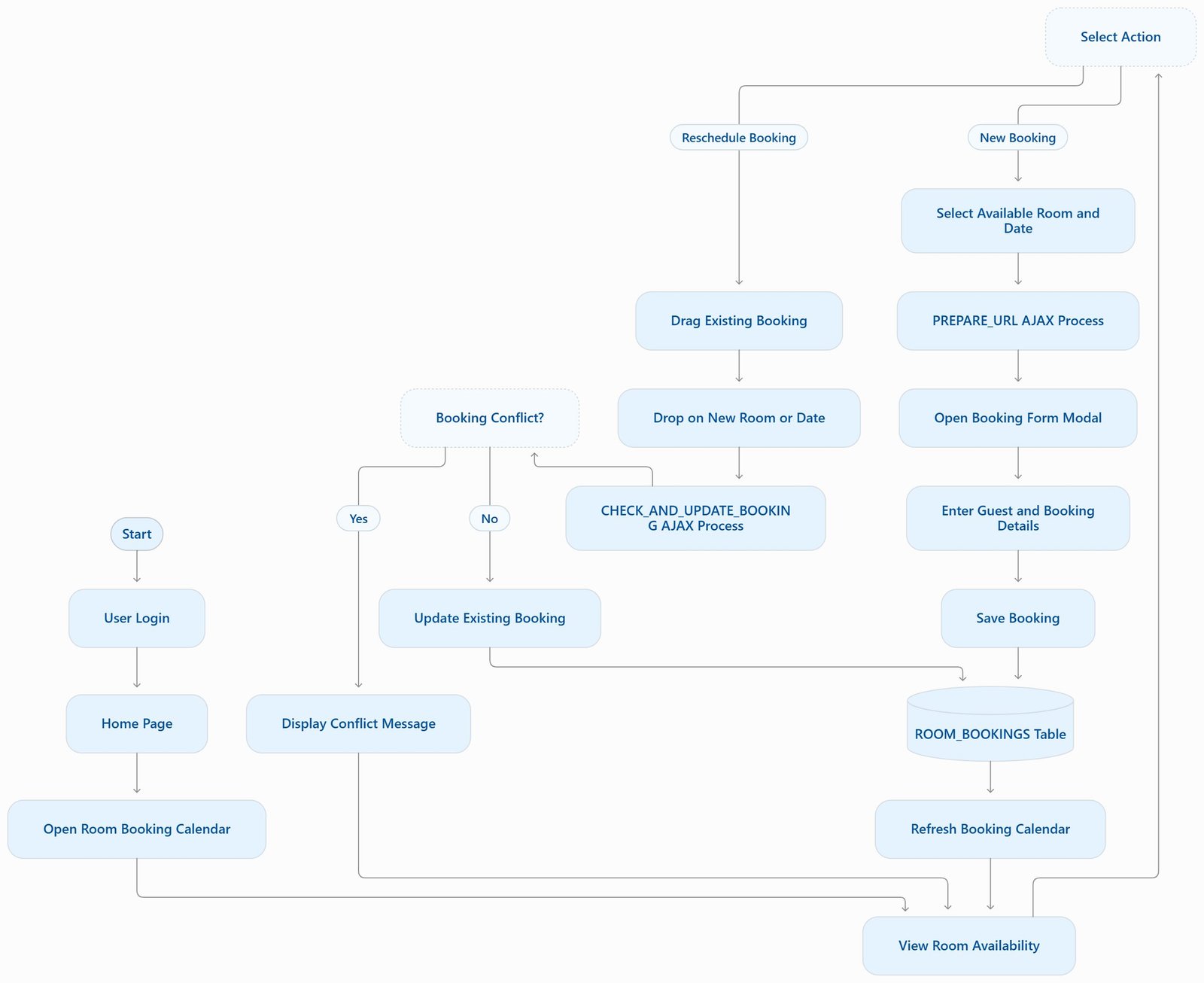
15. Complete Room Booking Workflow
The following diagram illustrates the overall booking process.
flowchart TD
    A[User Login] --> B[Home Page]
    B --> C[Open Booking Calendar]
    C --> D[View Room Availability]
    D --> E{Select Action}
    E -->|Available Date| F[Open Booking Form]
    E -->|Existing Booking| G[Drag and Drop Booking]
    F --> H[Enter Guest and Booking Details]
    H --> I[Save Reservation]
    I --> J[Database Update]
    G --> K[AJAX Validation]
    K --> L{Room Available?}
    L -->|Yes| M[Update Reservation]
    L -->|No| N[Display Conflict Message]
    M --> O[Refresh Calendar]
    J --> O
    N --> D
    O --> D
The workflow provides two primary ways to manage reservations: creating a new booking and rescheduling an existing booking.
16. Drag-and-Drop Rescheduling Workflow
The following sequence diagram explains how the browser and server communicate during drag-and-drop rescheduling.
sequenceDiagram
    actor User
    participant Calendar as APEX Booking Calendar
    participant JS as JavaScript
    participant AJAX as APEX AJAX Process
    participant DB as Oracle Database

    User->>Calendar: Select existing booking
    Calendar->>JS: Start drag operation
    User->>Calendar: Drop on another room/date
    Calendar->>JS: Trigger drop()
    JS->>AJAX: CHECK_AND_UPDATE_BOOKING
    AJAX->>DB: Check booking conflicts
    DB-->>AJAX: Validation result

    alt No booking conflict
        AJAX->>DB: Update booking
        DB-->>AJAX: Update successful
        AJAX-->>JS: Success response
        JS-->>Calendar: Refresh/update calendar
    else Booking conflict found
        AJAX-->>JS: Error response
        JS-->>User: Display conflict message
    end
17. Key Technical Highlights
This project demonstrates how Oracle APEX can be extended beyond traditional forms and reports.
The main technical highlights include:
1. Dynamic Content Region
A Native Dynamic Content region generates the room availability calendar using PL/SQL and HTML.
2. Custom JavaScript Integration
JavaScript handles calendar clicks, drag-and-drop events, and asynchronous communication.
3. AJAX Server-Side Processing
On-Demand processes handle URL preparation, booking validation, and reservation updates.
4. Native APEX Modal Dialog
The Booking Form opens as a modal dialog, providing a smooth user experience.
5. Server-Side Validation
Booking conflicts are checked before reservation updates are performed.
6. Custom CSS Styling
The application uses custom styling for booking blocks, available dates, responsive layouts, and dark mode.
7. Native APEX Form Processing
The Booking Form uses native form initialization and DML functionality.
18. Production Considerations and Possible Enhancements
The current implementation provides a functional foundation for hotel room reservation management. However, additional improvements can make it more suitable for a production environment.
Some recommended enhancements include:
-
Exclude the current booking ID when validating an existing reservation.
-
Use consistent date-range rules to avoid off-by-one-day errors.
-
Add database-level protection against concurrent overlapping reservations.
-
Add validation for check-out dates and invalid date ranges.
-
Display bookings that start before the selected calendar range but continue into it.
-
Add room categories and room-type filtering.
-
Add guest search and reservation history.
-
Introduce booking cancellation and status management.
-
Add email notifications for booking confirmation and changes.
-
Implement user roles and authorization schemes.
-
Add reporting for room occupancy and booking statistics.
-
Improve calendar performance for hotels with a large number of rooms and reservations.
These enhancements can extend the application into a more comprehensive hotel management solution.
19. Conclusion
Building a Dynamic Room Booking System in Oracle APEX 26.1 demonstrates how Oracle APEX can be used to develop interactive and business-oriented applications.
By combining Native Dynamic Content, PL/SQL, JavaScript, AJAX processes, HTML, and CSS, I created a visual room reservation interface that supports booking creation, availability monitoring, and drag-and-drop rescheduling.
The project also demonstrates how custom frontend functionality can work together with Oracle APEX server-side processing to deliver a more interactive application experience.
Oracle APEX provides the flexibility to build such solutions quickly while retaining the power of Oracle Database and PL/SQL.
Oracle ACE Associate Contribution
This article is part of my ongoing technical knowledge-sharing contribution to the Oracle community as I work toward the Oracle ACE Associate program.
Through this project, I aim to demonstrate practical Oracle APEX development techniques, including dynamic content generation, JavaScript integration, AJAX processing, server-side validation, and interactive user interfaces.
My goal is to share real-world implementation approaches, encourage knowledge exchange, and help other Oracle APEX developers build more effective and user-friendly applications.