Oracle Solutions We believe in delivering tangible results for our customers in a cost-effective manner

ASM Command-Line Utility (ASMCMD) – Complete Guide for Oracle DBAs
Introduction
Oracle ASM Command-Line Utility (ASMCMD) is a powerful and essential tool for Oracle DBAs and Grid Infrastructure administrators working with Automatic Storage Management (ASM).
ASMCMD provides a UNIX-like interface to manage ASM files and directories, making daily storage operations easier, faster, and more intuitive—especially in production environments where precision and safety matter.
What is ASMCMD?
ASMCMD is a command-line utility used to view, navigate, and manage files and directories inside ASM disk groups.
With ASMCMD, you can:
- Browse ASM disk groups
- Check space usage
- Monitor ASM clients
- View I/O statistics
- Manage aliases and directories
Before Oracle 10g Release 2, DBAs had to manage ASM mostly using OEM or SQL queries connected to the ASM instance. ASMCMD simplified this by offering filesystem-style commands similar to Linux.
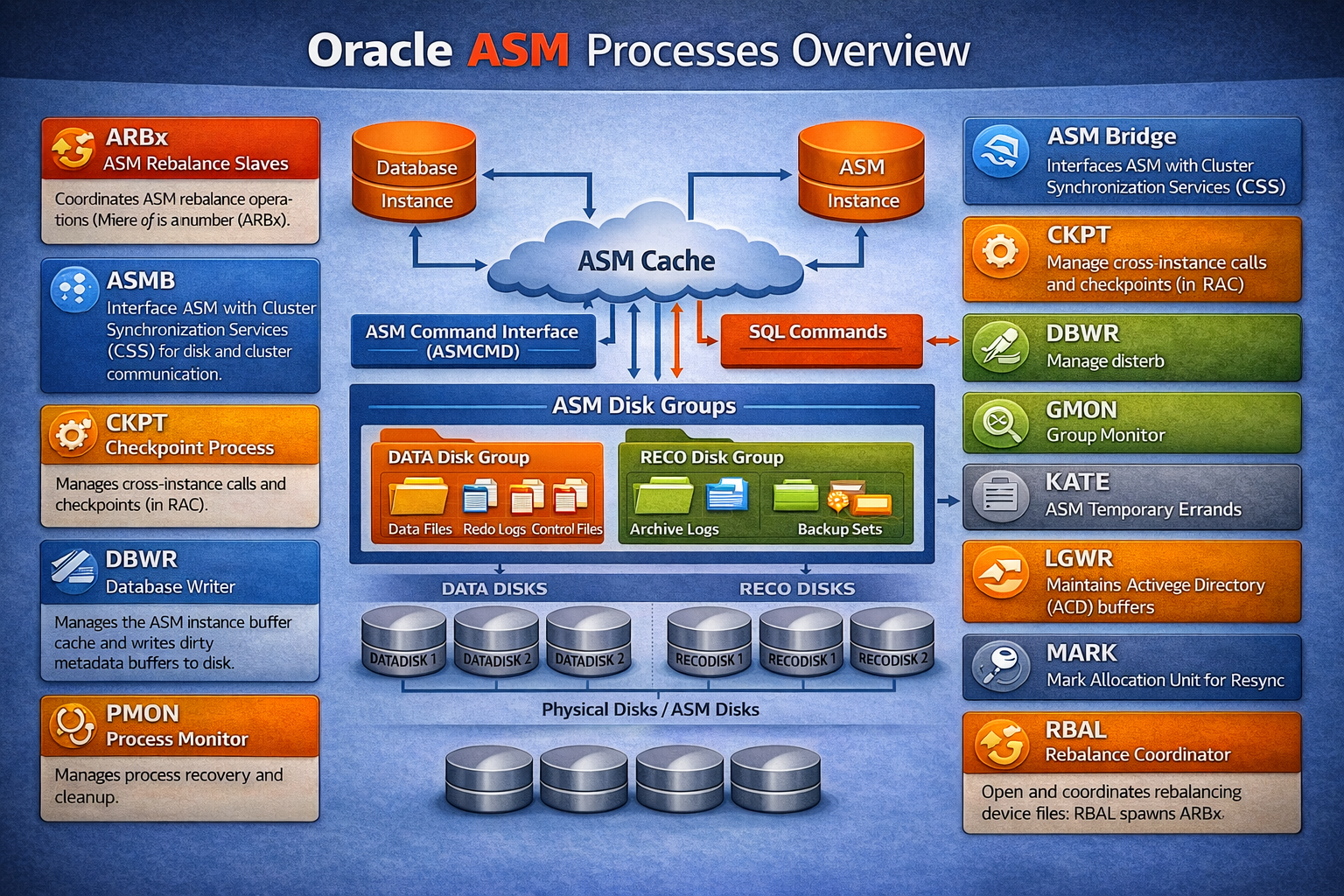
Oracle ASM Background Processes – Explained for DBAs
Oracle Automatic Storage Management (ASM) relies on multiple background processes to manage disk groups, metadata, rebalancing, synchronization, and communication with Oracle Clusterware. Understanding these processes is crucial when troubleshooting ASM alerts, rebalance operations, or storage-related performance issues.
ARBx – ASM Rebalance Slaves
The ARBx processes (where x is a numeric identifier) are slave processes responsible for executing disk rebalance operations. These processes redistribute extents across ASM disks whenever disks are added, dropped, or rebalanced.
TIP: A high number of active ARBx processes usually indicates an ongoing rebalance. Always monitor rebalance impact during business hours.
ASMB – ASM Bridge
ASMB acts as the communication bridge between ASM and Cluster Synchronization Services (CSS).
It provides:
- Disk and diskgroup information to CSS
- Heartbeat functionality
- ASM statistics updates
This process is critical for cluster-wide ASM coordination.
CKPT – Checkpoint Process
In ASM (especially in RAC), the CKPT process manages cross-instance coordination and metadata checkpoints, ensuring consistency across nodes.
DBWR – Database Writer (ASM)
The DBWR process in ASM writes dirty ASM metadata buffers from the ASM buffer cache to disk.
It does not write user data files, only ASM metadata structures.
GMON – Group Monitor
GMON handles disk group–level operations, including:
- Disk offline and drop activities
- Disk group compatibility updates
- Disk state transitions
This process plays a major role during disk failures and planned maintenance.
KATE – ASM Temporary Errands (Konductor)
KATE is responsible for onlining ASM disks.
It is started only when an offline disk is brought back online and runs within the ASM instance.
TIP: If disk onlining hangs, check KATE activity and ASM alert logs.
LGWR – ASM Log Writer
The ASM LGWR process maintains the ASM Active Change Directory (ACD) and flushes metadata change records to disk.
It ensures durability and recoverability of ASM metadata.
MARK – Mark Allocation Unit for Resync
The MARK process coordinates staleness tracking and resynchronization metadata when disks go offline in redundancy-enabled disk groups (NORMAL/HIGH).
This process runs in the RDBMS instance, not the ASM instance.
PING – Network Latency Monitor
The PING process measures network latency between cluster nodes.
Its functionality is similar to PING in RDBMS instances and supports cluster health monitoring.
PMON – Process Monitor
PMON manages:
- ASM background process cleanup
- Detection and recovery of failed processes
It ensures ASM instance stability.
PSP0 – Process Spawner
PSP0 is responsible for spawning and managing Oracle background processes within the ASM instance.
PZ9x – Parallel Query Slaves
The PZ9x processes are parallel execution slaves used when querying GV$ views to fetch instance-wide information efficiently.
RBAL – Rebalance Coordinator
RBAL:
- Discovers all ASM disks
- Opens device files
- Coordinates rebalance activities
- Spawns ARBx slave processes
RBAL is always active during rebalance operations.
SMON – System Monitor
In ASM, SMON also acts as a liaison with Cluster Synchronization Services (CSS).
It helps with:
- Node membership tracking
- Instance recovery
- Disk group consistency checks
VKTM – Virtual Keeper of Time
VKTM maintains the high-resolution system timer, ensuring precise time-based operations in ASM, similar to its function in RDBMS instances.
ASMCMD Modes of Operation
1. Interactive Mode
- Shell-like environment
- Best for live administration and troubleshooting
- Similar to SQL*Plus interactive usage
2. Non-Interactive Mode
- Single command execution
- Ideal for scripts and automation
Common ASMCMD Commands (File & Directory Management)
| Command | Description |
cd |
Change ASM directory |
du |
Disk usage (recursive) |
exit |
Exit ASMCMD |
find |
Locate ASM files |
help |
Display command help |
ls |
List contents |
lsct |
ASM clients |
lsdg |
Disk group details |
mkdir |
Create ASM directories |
pwd |
Current directory |
rm |
Remove ASM files |
mkalias |
Create alias |
rmalias |
Remove alias |
Disk Group Management Commands
| Command | Description |
|---|---|
chdg |
Modify disk group |
chkdg |
Check / repair |
dropdg |
Drop disk group |
iostat |
Disk I/O stats |
lsdsk |
List ASM disks |
md_backup |
Backup metadata |
md_restore |
Restore metadata |
rebal |
Rebalance disks |
mount / umount |
Mount / Dismount DG |
Running ASMCMD (Interactive Mode)
List Disk Groups
Checking ASM Directory & Files
ASM Disks Header and Mount Status
There are two important columns under V$ASM_DISK which are MOUNT_STATUS and HEADER_STATUS. These two columns are required when you add / remove ASM disks.
ASM Disk MOUNT_STATUS
- MISSING – Disk is known to be part of the ASM disk group, but no disk in the storage
- CLOSED – Disk is present in the storage system but is not being accessed by ASM
- OPENED – Disk is present in the storage system and is being accessed by ASM
- CACHED – Disk is present in the storage system, and is part of a disk group being accessed by the ASM instance. This is the normal state for disks in an ASM.
ASM Disk HEADER_STATUS
- UNKNOWN – ASM disk header has not been read
- CANDIDATE – Can be used
- INCOMPATIBLE – Version number in the disk header is not compatible with the ASM version
- PROVISIONED – Disk is not part of a disk group and may be added to a disk group
- MEMBER – Already member of a diskgroup
- FORMER – Once used, can be re-used
- CONFLICT – ASM disk was not mounted due to a conflict
Disk Group Information
ASM Clients Connected
Disk Usage in ASM
Discover Mounted & Dismounted Disk Groups
ASM Disk Details
ASMCMD Version
ASM I/O Statistics (Highly Useful in Production)
ASM SPFILE Location
Non-Interactive ASMCMD Usage
Rebalancing Disk Groups Using ASMCMD
Adding Disks to a Disk Group
ALTER DISKGROUP DATA_PROD ADD DISK ‘/devices/DATA1′,’/device/DATA2’;
Dropping Disks and Disk Groups
ALTER DISKGROUP DATA_PROD DROP DISK DATA1;
DROP DISKGROUP DATA_PROD INCLUDING CONTENTS;
Note:
- DROP DISKGROUP statements requires the instance to be in MOUNT state.
Rebalance Disk Group
- ASM rebalance a disk group automatically, whenever we add or remove disks form disk group.
- Disk groups can be rebalanced manually using the REBALANCE clause of the ALTER DISKGROUP statement.
- If the POWER clause is omitted the ASM_POWER_LIMIT parameter value is used.