Oracle Solutions We believe in delivering tangible results for our customers in a cost-effective manner
Part I — Understanding Hire to Retire (H2R)
1.1 What Is H2R?
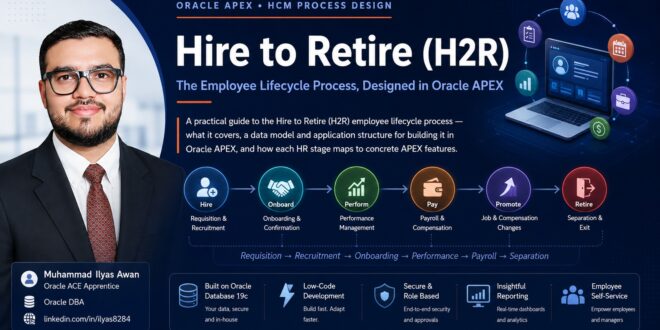
Hire to Retire (H2R) is the standard ERP/HCM name for the complete employee lifecycle process from the moment a position is requisitioned and a candidate is hired, through every change that happens during employment, to the employee’s eventual separation or retirement. It sits alongside other well-known end-to-end process names such as O2C (Order to Cash), P2P (Procure to Pay), and R2R (Record to Report), and like those, it is best understood as one continuous process rather than a set of disconnected HR transactions.
1.2 The End-to-End Employee Lifecycle
At a high level, every H2R implementation covers the same stages, whatever software runs underneath:
- Requisition and recruitment: Approving headcount and hiring against it
- Onboarding and confirmation: Converting an offer into an active, confirmed employee record
- Job and compensation changes: Transfers, promotions, and salary revisions over time
- Leave and attendance: The ongoing, highest-volume transaction in the whole process
- Performance management: Goals, appraisals, and ratings on a recurring cycle
- Payroll: Translating attendance, leave, and compensation into a monthly payment
- Separation: Resignation or termination, clearance, and full and final settlement
Requisition → Recruitment → Onboarding → Confirmation → Job & Performance → Payroll → Separation
1.3 Why Build H2R on Oracle APEX
Organizations that already run Oracle Database often build H2R directly in Oracle APEX rather than adopting a full HCM suite, for a few concrete reasons:
- The data already lives in Oracle Database no separate HCM platform or integration layer to license and maintain
- Low-code development means HR-specific workflow and approval rules can be built and changed quickly, in-house
- Employee self-service, manager approvals, and reporting all run on the same Universal Theme and authentication as other in-house APEX applications
- It is significantly cheaper to build and run than a commercial HCM suite for organizations that do not need every module a global suite offers
Honest scope note: An in-house APEX build is a strong fit for HR workflow, approvals, and self-service. For statutory payroll compliance across multiple countries, review whether a certified payroll engine or local statutory add-on is a better fit than reimplementing tax and labor-law rules from scratch.
Companion guides: This guide assumes the Oracle Database 19c, ORDS, and Oracle APEX 26.2 environment covered earlier in this series is already in place.
H2R is a process, not a page. Every screen in this guide exists to move one employee record through a lifecycle that is tracked, approved, and auditable end to end.
Part II — Designing H2R in Oracle APEX
2.1 Core Data Model
A workable H2R build rests on a small set of well-designed, effective-dated tables:
|
Entity |
Purpose |
|
EMPLOYEES |
Core master record: Employee name, employee number, date of birth, national ID, current status |
|
JOB_ASSIGNMENTS |
Effective-dated position, department, designation, grade, and reporting manager history |
|
REQUISITIONS |
Approved headcount requests that drive the recruitment pipeline |
|
CANDIDATES |
Candidate profiles and their application status against each requisition |
|
COMPENSATION |
Salary structure, allowances, and effective-dated compensation changes |
|
LEAVE_REQUESTS |
Leave entitlement, accrual balances, and approval history |
|
ATTENDANCE |
Daily time capture, often fed from a biometric device or mobile app through an ORDS REST endpoint |
|
APPRAISALS |
Review cycles, goals, ratings, and manager comments |
|
SEPARATIONS |
Resignation or termination requests, clearance checklist, and full and final settlement |
Effective-dating JOB_ASSIGNMENTS and COMPENSATION from day one matters more than almost any other design decision here retrofitting history tracking onto a table that only stores the current row is a painful, high-risk migration once real data is in it.
2.2 Application Structure
A practical H2R build in APEX groups naturally into these modules:
- Recruitment: Requisition approval, candidate pipeline, offer letter generation
- Onboarding: New hire checklist, document collection, asset issuance
- Employee 360: A single-page employee summary with tabs for Personal, Job, Payroll, Leave, and Performance
- Leave and Attendance: Leave application, approval queue, attendance register
- Payroll: Salary processing, payslip generation, bank file export
- Performance: Goal setting, appraisal forms, rating calibration
- Separation: Resignation workflow, clearance checklist, final settlement calculation
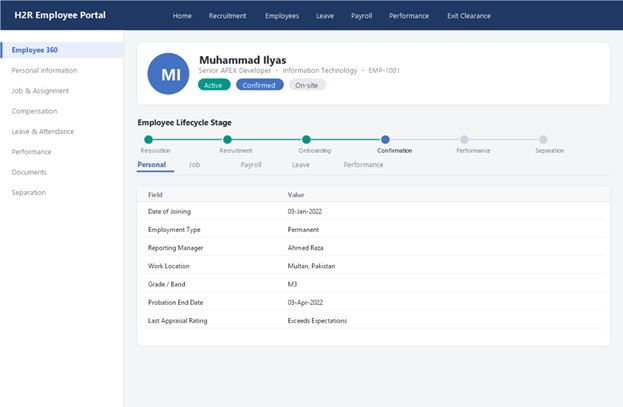
Figure 1 — The Employee 360 page, showing the lifecycle stage tracker and a tabbed employee record.
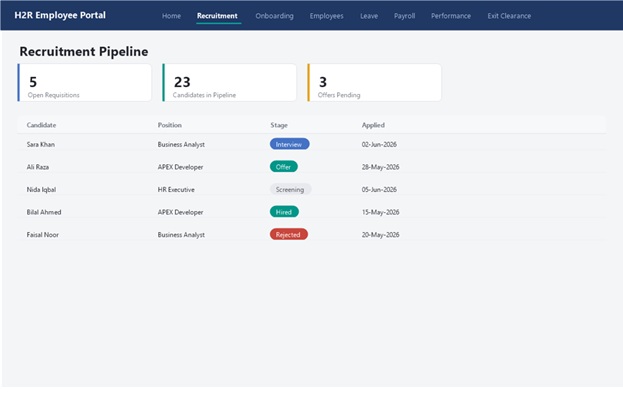
Figure 2 — Recruitment Pipeline, tracking candidates against open requisitions by stage.
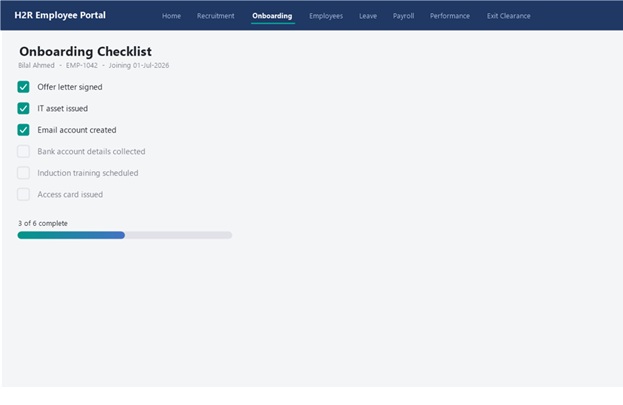
Figure 3 — Onboarding Checklist, tracking a new hire’s completion against a fixed set of onboarding tasks.
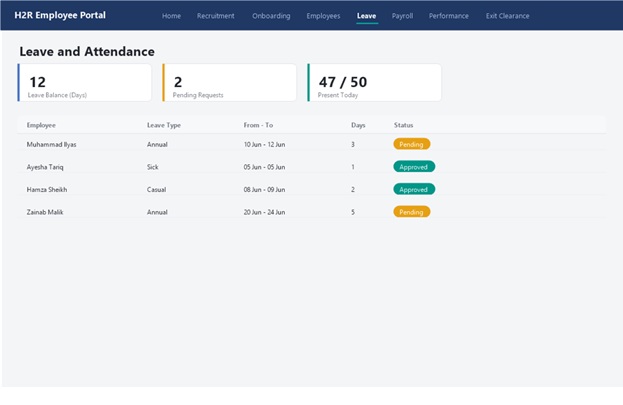
Figure 4 — Leave and Attendance, showing balances, pending requests, and today’s attendance at a glance.
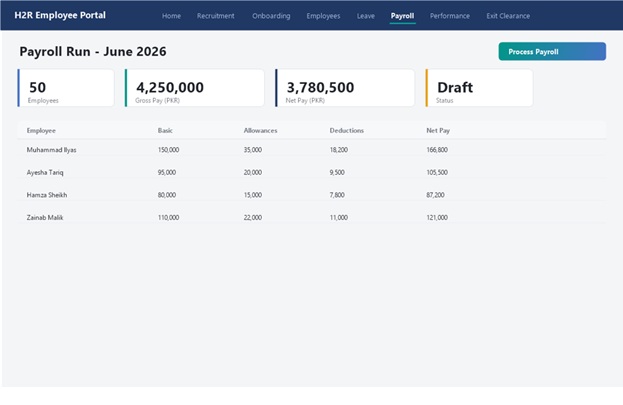
Figure 5 — Payroll Run, summarizing a monthly run before it is processed.
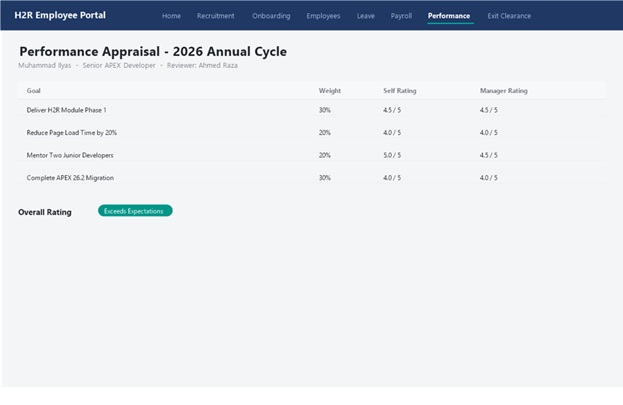
Figure 6 — Performance Appraisal, weighting goals and comparing self versus manager ratings.
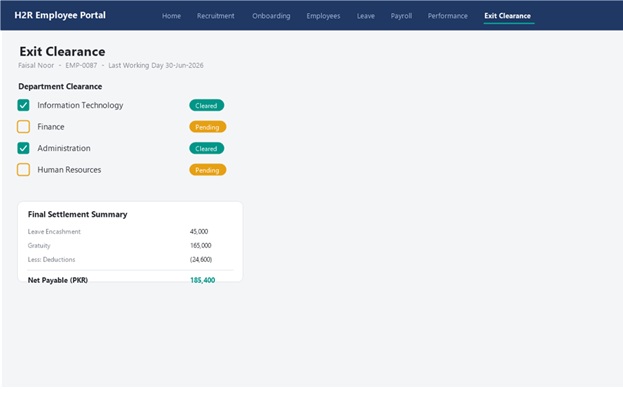
Figure 7 — Exit Clearance, tracking department sign-off alongside the final settlement calculation.
2.3 Mapping HR Stages to Oracle APEX Features
|
HR Stage |
Oracle APEX Approach |
|
Recruitment pipeline |
Interactive Grid with faceted search by requisition, stage, and status |
|
Approvals (offer, leave, exit) |
APEX Approvals, or a custom PL/SQL-driven approval table for finer control |
|
Employee self-service |
Card regions on the Universal Theme, restricted by Authorization Schemes to the signed-in employee’s own record |
|
Document generation |
Offer letters and payslips rendered to PDF via APEX_DATA_EXPORT or a PL/SQL-driven reporting service |
|
Attendance capture |
An ORDS REST endpoint accepting punches from a biometric device or mobile app |
|
Notifications and reminders |
APEX Automations combined with APEX_MAIL for pending-approval reminders |
|
Reporting and dashboards |
Interactive Reports and APEX Charts for headcount, attrition, and leave trends |
2.4 Approvals and Workflow
A small number of request types offers, leave, transfers, and exits account for almost all approval traffic in H2R. Model them through one generic approvals table keyed by request type and record ID, and route each request to the requester’s reporting manager fromJOB_ASSIGNMENTS, with delegate and escalation rules layered on top once the basic path is working. APEX Approvals gives you this out of the box for straightforward chains; fall back to a custom PL/SQL engine only where the approval logic genuinely needs branching that the built-in feature cannot express.
2.5 Security and Role-Based Access
Three roles cover most of an H2R application: HR Admin (full access), Manager (their reporting chain only), and Employee (their own record only). Enforce the manager and employee restrictions with a WHERE-clause row filter tied to the signed-in user’s employee ID, driven by Authorization Schemes rather than by hiding buttons alone the row-level restriction is what actually stops a manager from browsing another team’s records.
2.6 Integration Points
The most common integrations an H2R build needs are an ORDS REST endpoint for biometric attendance devices, a bank file export for payroll disbursement, and single sign-on for login. Organizations still running a legacy Oracle Forms-based payroll module can keep it in place during a phased migration see the Forms 12c guide in this series for the platform it runs on while APEX takes over the employee-facing workflow first.
Part III — Employee Lifecycle Walkthrough
Following one employee through the full process shows how the modules in Part II connect in practice.
1. Requisition and Approval
A department head raises a requisition for an open position. It routes for budget approval before recruitment can act on it nothing enters the pipeline without an approved requisition behind it.
2. Recruitment and Offer
Candidates are logged against the requisition, moved through interview stages on the recruitment Interactive Grid, and the selected candidate receives a system-generated offer letter.
3. Onboarding
Accepting the offer creates the initial EMPLOYEES and JOB_ASSIGNMENTS rows. The onboarding checklist tracks document collection and asset issuance before day one.
4. Confirmation
At the end of probation, the manager records a confirmation decision on the Employee 360 page, closing out the probation stage on the lifecycle tracker.
5. Job Changes
Transfers and promotions add new effective-dated rows to JOB_ASSIGNMENTS and COMPENSATION rather than overwriting the current one, preserving full history for reporting and audits.
6. Leave and Attendance
This runs continuously in the background: daily attendance flows in through the ORDS endpoint, and leave requests move through the same manager-approval chain used everywhere else.
7. Performance Appraisal
On the annual cycle, goals set earlier in the year are rated, and the outcome can feed directly into the next compensation revision.
8. Payroll
Each month, attendance, approved leave, and current compensation are combined into a payroll run, producing a payslip PDF and a bank file for disbursement.
9. Separation
A resignation or termination request opens a clearance checklist across departments (IT, Finance, Admin), and the settlement calculation closes out final dues before the employee record is marked separated.
Part IV — Practical Guidance
4.1 A Realistic Build Order
Build the foundation before the automation. Every later module depends on clean master data, so sequence the work accordingly:
Employee & Job Master Data → Leave & Attendance → Recruitment & Onboarding → Performance → Payroll & Separation
4.2 Common Pitfalls
- Treating payroll as just another APEX form, without a proper review of statutory tax and deduction rules
- Skipping effective-dating on job and compensation tables, then facing a costly re-model once real history needs to be reconstructed
- Running approvals as ad hoc email threads instead of a tracked, reportable approvals table
- Leaving document generation (offer letters, payslips) as an afterthought instead of designing it alongside the underlying data
- Deferring role-based visibility until late in the build, when it should shape the data model from the start
4.3 Where This Fits in the Series
This H2R application runs on the same Oracle Database 19c, ORDS, and Oracle APEX 26.2 stack installed earlier in this series, on either a physical Windows Server or a VirtualBox lab VM. Organizations migrating an existing Oracle Forms-based HR or payroll module can run it alongside Forms during a phased cutover, using the Forms series in this collection for the platform that legacy module runs on.
The Most Important Point
H2R succeeds or fails on the data model, not the screens. Get effective-dated job and compensation history right, get one tracked approvals mechanism instead of three ad hoc ones, and every module in Part II becomes a straightforward APEX build on top of a foundation that will not need to be re-modeled six months in.