Oracle Solutions We believe in delivering tangible results for our customers in a cost-effective manner
Part I — Understanding the Upgrade
1.1 Why Upgrade from 11g to 19c
Oracle Database 11g exited extended support years ago, which means no new security patches, no new bug fixes, and no support if something breaks. Oracle Database 19c is the long-term support release of the 12.2 code line, patched through at least 2027, and is the version most organizations should be running today if they have not already moved to 21c or 23ai. An 11g-to-19c upgrade is not optional forever; it is a question of doing it on your own schedule or being forced into it during an incident.
1.2 Supported Upgrade Paths
Oracle 19c accepts a direct upgrade from four source releases: 11.2.0.4, 12.1.0.2, 12.2.0.1, and 18c. That direct path from 11.2.0.4 is deliberate on Oracle’s part it exists specifically so 11g customers do not have to stop at 12c along the way. The catch is the version number: it has to be exactly 11.2.0.4, the terminal patch set of the 11g line.
Anything earlier 11.2.0.3, 11.2.0.1, or the 11.1 line has to be patched up to 11.2.0.4 first before 19c will even consider it a supported source.
11.2.0.4 (terminal patch set) → Direct Upgrade → Oracle Database 19c
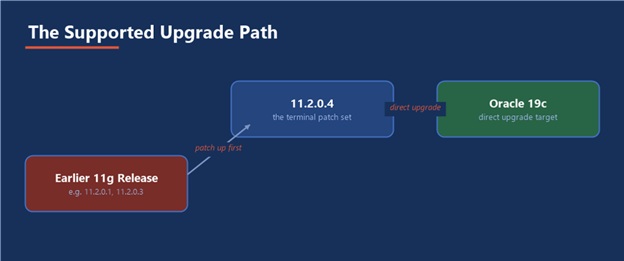
Figure 1 — Only 11.2.0.4 goes straight to 19c; anything earlier needs a stop first
1.3 Upgrade Methods
- AutoUpgrade: Oracle’s current recommended tool: a single Java utility that runs pre-checks, the upgrade itself, and post-upgrade steps from one config file
- DBUA (Database Upgrade Assistant): The graphical, wizard-driven tool, still fully supported and often preferred for a single, hands-on upgrade
- Manual command-line upgrade: Running the upgrade scripts directly, for full control or for environments AutoUpgrade and DBUA do not fit
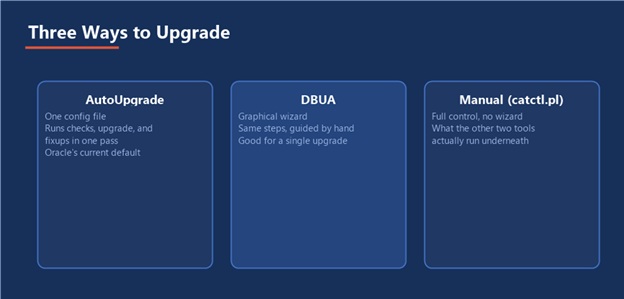
Figure 2 — Same underlying upgrade, three different levels of hand-holding
1.4 What Changes Architecturally
The upgrade is always out-of-place: the 19c software is installed into a brand-new Oracle Home, entirely separate from the 11g one, and the existing database is upgraded in place to run under that new home. Along the way, several defaults change that are worth knowing about before they surprise you: unified auditing becomes the standard auditing architecture, the password verification function tightens considerably, and Oracle’s direction across the entire 19c line points toward the multitenant (CDB/PDB) architecture, even though a traditional non-CDB database is still supported for this upgrade.
Out-of-place means safer, not free: Keeping the 11g Oracle Home intact during the upgrade gives you a real fallback, but it also means enough disk space for two full Oracle Homes side by side, planned for before you start, not discovered halfway through.
Part II — Pre-Upgrade Planning
2.1 Confirming the Starting Point
SELECT * FROM v$version; SELECT comp_name, version, status FROM dba_registry;
Confirm the source is exactly 11.2.0.4, and that every component in dba_registry shows VALID, not just the database version itself a component stuck in an old or invalid state is exactly what an upgrade will trip over first.
2.2 Running the Pre-Upgrade Tool
Every 19c Oracle Home ships a pre-upgrade information tool. Run it against the 11g database, using the new 19c JDK, before touching anything else:
$ORACLE_19C_HOME/jdk/bin/java -jar $ORACLE_19C_HOME/rdbms/admin/preupgrade.jar TERMINAL
2.3 Reading the Pre-Upgrade Report
The tool writes a report and a pair of fix-up scripts identifying exactly what needs attention before and after the upgrade:
- Invalid objects that need recompiling, and deprecated or obsolete initialization parameters that will stop the instance from starting under 19c
- Timezone file version gaps, since a mismatch between source and target timezone data affects every TIMESTAMP WITH TIME ZONE column
- A pre-upgrade fixup script (sql) to run before the upgrade, and a post-upgrade fixup script (postupgrade_fixups.sql) to run after
2.4 Backup Before Anything Else
RMAN> BACKUP DATABASE PLUS ARCHIVELOG; CREATE RESTORE POINT before_19c_upgrade GUARANTEE FLASHBACK DATABASE;
A guaranteed restore point is the fast path back if the upgrade goes wrong: FLASHBACK DATABASE to that point returns the database to its exact pre-upgrade state in minutes, far faster than a full RMAN restore, and both should exist before proceeding not one or the other.
2.5 Sizing and Compatibility
- SYSAUX and the undo tablespace both need real headroom the upgrade scripts generate substantially more undo and SYSAUX activity than a normal day
- The COMPATIBLE parameter only ever moves forward raising it after the upgrade is a one-way decision that forecloses ever going back to 11g on this database, so it is deliberately a separate, later step, not something the upgrade does for you automatically
Part III — Performing the Upgrade
3.1 Installing the 19c Oracle Home
Install the 19c software into a new, separate Oracle Home using the standard installer, software-only, with no database created yet the existing 11g database is what gets upgraded into this home, not a fresh one:
./runInstaller -silent -waitforcompletion oracle.install.option=INSTALL_DB_SWONLY ORACLE_HOME=/u01/app/oracle/product/19.0.0/dbhome_1
3.2 Upgrading with AutoUpgrade
A minimal config file describes the source and target, and AutoUpgrade drives the rest:
upg1.global.autoupg_log_dir=/u01/autoupgrade/logs upg1.sid=ORCL upg1.source_home=/u01/app/oracle/product/11.2.0.4/dbhome_1 upg1.target_home=/u01/app/oracle/product/19.0.0/dbhome_1 upg1.target_version=19 $ java -jar autoupgrade.jar -config upgrade.cfg -mode deploy
3.3 Upgrading with DBUA
Launched from the 19c Oracle Home, DBUA detects the existing 11g database, runs its own prerequisite checks, and walks through the same fundamental steps recompilation, component upgrade, timezone handling through a wizard interface rather than a config file:
$ORACLE_19C_HOME/bin/dbua
3.4 Manual Command-Line Upgrade
STARTUP UPGRADE; $ORACLE_19C_HOME/perl/bin/perl $ORACLE_19C_HOME/rdbms/admin/catctl.pl -n 4 catupgrd.sql STARTUP;
This is what both AutoUpgrade and DBUA are actually doing underneath catctl.pl runs the upgrade in parallel across the -n worker processes specified, and going manual only really pays off when a tool’s assumptions do not fit your environment.
3.5 Immediately After the Upgrade Completes
@?/rdbms/admin/utlrp.sql SELECT COUNT(*) FROM dba_objects WHERE status = ‘INVALID’;
All three methods run this recompilation step internally, but it is worth confirming directly: utlrp.sql recompiles every invalid object in parallel, and the invalid-object count above should land at, or very close to, zero before moving on.
Part IV — Post-Upgrade Validation
4.1 Verifying the Upgrade
SELECT * FROM v$version; SELECT comp_name, version, status FROM dba_registry; SELECT action_time, action, status, version FROM dba_registry_history ORDER BY action_time;
4.2 Updating Optimizer Statistics
EXEC DBMS_STATS.GATHER_DICTIONARY_STATS; EXEC DBMS_STATS.GATHER_FIXED_OBJECTS_STATS;
Stale dictionary and fixed-object statistics after a major version change are a common, avoidable source of the “everything is slower after the upgrade” complaint that follows almost every version jump.
4.3 New Defaults Worth Reviewing
- Unified auditing the default auditing architecture in 19c; decide deliberately whether to enable it rather than discovering its behavior by accident
- The default password verify function noticeably stricter than 11g’s, which can silently lock out an application account still using an old, now-rejected password on next rotation
- Optimizer and adaptive query features several behave differently between 11g and 19c; review the optimizer statistics preferences and any SQL plan baselines rather than assuming identical behavior
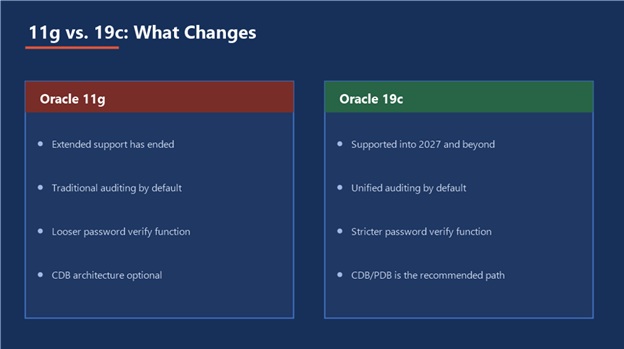
Figure 3 — What is genuinely different, side by side
4.4 Rolling Back If Needed
SHUTDOWN IMMEDIATE; STARTUP MOUNT; FLASHBACK DATABASE TO RESTORE POINT before_19c_upgrade; ALTER DATABASE OPEN RESETLOGS;
This only works while the guaranteed restore point from Part II still exists and COMPATIBLE has not been raised which is exactly why both of those decisions were called out as deliberate, separate steps earlier in this guide.
Keep the rollback window open on purpose: Agree on how many days production will run on 19c before the guaranteed restore point is dropped and COMPATIBLE is raised. Until that decision is made deliberately, you still have a way back; the moment it is made, you do not.
Part V — Practical Guidance
5.1 A Realistic Runbook
Backup & Restore Point → Pre-Upgrade Checks → Install 19c Home → Run the Upgrade → Post-Upgrade Fixups → Validate & Monitor
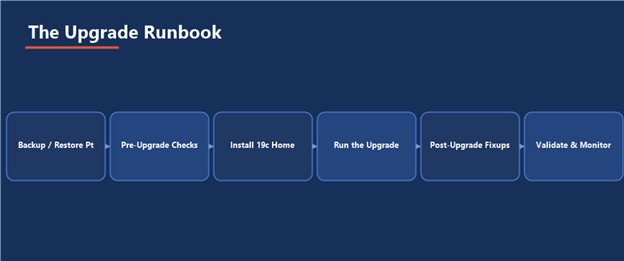
Figure 4 — The same six steps, every time, is what makes an upgrade boring instead of risky
5.2 Common Pitfalls
- Attempting the upgrade from an 11g release earlier than 11.2.0.4, instead of patching to the terminal release first
- Skipping the pre-upgrade tool and finding out about a deprecated parameter only when the instance refuses to start
- Raising COMPATIBLE the same day as the upgrade, closing the flashback rollback path before production has actually proven the new version stable
- Never gathering fresh dictionary statistics afterward, then spending days chasing a performance regression that is really just stale statistics
- Not testing application connectivity and password behavior against the new, stricter defaults before the upgrade reaches production
5.3 A Post-Upgrade Checklist
- v$version reports 19c, and every component in dba_registry shows VALID
- Invalid object count is at, or effectively at, zero after utlrp.sql
- Dictionary and fixed-object statistics have been refreshed
- Application connectivity, batch jobs, and reporting have all been tested end to end against the 19c instance
- A conscious decision has been made, and dated, for when COMPATIBLE will be raised and the guaranteed restore point retired
5.4 Where This Fits in the Series
The backup and restore point in Part II lean directly on the RMAN guide already in this series, and the very first thing to run against the upgraded 19c instance should be the routine from the Database Health Check guide a fresh baseline immediately after a major version change is exactly when that routine earns its keep the most.
The Most Important Point
An upgrade is not finished when the database opens on the new version it is finished when the application has run a full business cycle on it and someone has deliberately decided the rollback window can close. Everything between those two moments is where real problems, if there are any, actually show up.
- DB Upgradation Document
DB Upgradation Document