Oracle Solutions We believe in delivering tangible results for our customers in a cost-effective manner
Part I — Understanding Containerized Oracle Database
1.1 Why Run a Database in a Container
A container turns “install Oracle Database” into “run this image,” which is most valuable exactly where a full software install is overkill: a developer’s laptop, a CI pipeline that needs a disposable database per test run, or a training environment that gets torn down at the end of the day. The database engine itself does not change the same binaries, the same SQL, the same behavior only how it is packaged, started, and thrown away.
1.2 Images, Layers, and the Container Lifecycle
An image is a read-only template built from layered filesystem changes; a container is a running instance of that image with its own writable layer on top. Stopping a container does not delete it, and removing a container does not touch the image it was created from but anything written inside the container’s own writable layer, including database files that were not placed on a mounted volume, disappears the moment the container is removed.
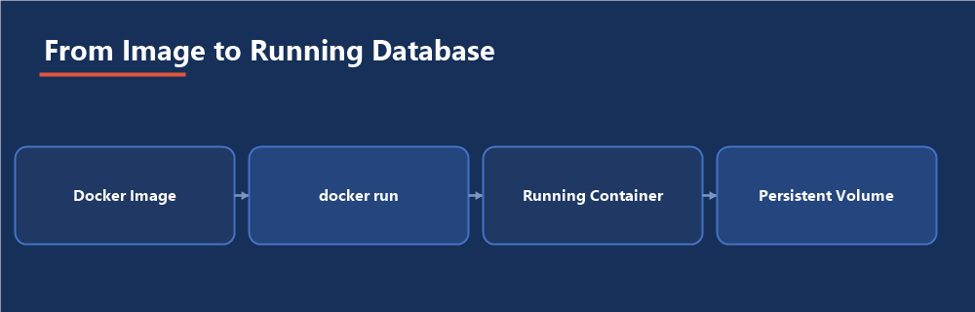
Figure 1 — The container is disposable; the volume is where the actual database lives
1.3 Oracle’s Official Images
- container-registry.oracle.com: Oracle’s own registry, hosting ready-to-pull Enterprise Edition, Standard Edition 2, and Free (XE) images, gated behind accepting Oracle’s license terms in the browser before the first pull
- The oracle/docker-images GitHub repository: Dockerfiles and build scripts that produce an image from installation media you supply yourself, useful when a specific patch level or edition isn’t available pre-built
1.4 Choosing 19c vs. 21c
19c is Oracle’s long-term support release, the safer default for anything resembling a production-like test environment, with support timelines that match what production actually runs. 21c is an innovation release with a shorter support window, worth reaching for specifically to test features it introduced ahead of their arrival in the next long-term release. For a disposable dev or CI container, either works; for a container meant to mirror what production will eventually run, match production’s version, not whichever image happened to be newest.
1.5 Free (XE) Images for Lightweight Testing
Oracle Database Free is a no-cost edition with the same SQL surface as Enterprise Edition, capped on CPU, memory, and data volume rather than feature set, which makes its container image the lightest option for a quick syntax check, a training exercise, or a CI job that only needs a real Oracle engine to validate against, not headroom for a production-sized dataset. Reach for Enterprise or Standard Edition 2 images instead the moment a test needs to exercise a feature or resource ceiling Free does not have.
The container doesn’t change what Oracle Database is: it changes how it is delivered and discarded. Every SQL statement, every init parameter, and every backup strategy question that applies to a traditional install still applies here.
Part II — Building a Custom Image
2.1 When to Build Your Own
Oracle’s pre-built images cover the common patch levels and editions, but not every situation: a specific one-off patch a project needs applied, a base OS image that has to match an organization’s hardened standard, or bundling site-specific setup scripts directly into the image instead of mounting them at run time all push toward building a custom image rather than pulling one as-is.
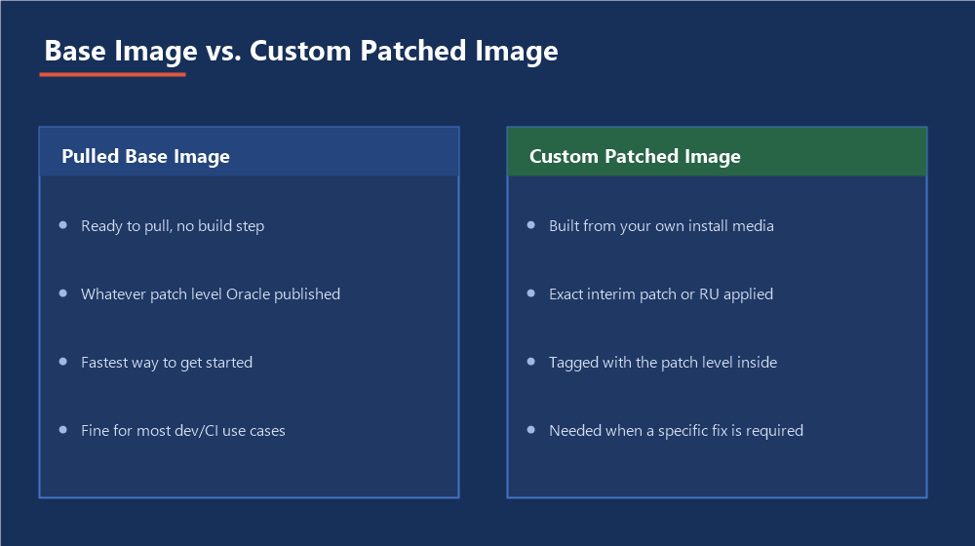
Figure 2 — Building your own image trades a little build time for exact control over what’s inside it
2.2 The oracle/docker-images Build Process
The repository’s build script takes the Oracle installation media you download yourself (Oracle’s license does not allow redistributing the binaries pre-packaged) and runs a multi-stage Dockerfile: an early stage installs the software and creates a seed database, and the final stage copies only what is needed to run it forward, keeping the shipped image smaller than the full build environment that produced it.
./buildContainerImage.sh -v 19.3.0 -e -i “LINUX.X64_193000_db_home.zip”
2.3 Applying Patches Inside the Image
A one-off interim patch or a Release Update not yet reflected in Oracle’s published images can be layered on by adding a build stage that runs OPatch against the installed home before the image is finalized. Treat that patched image the same way a patched on-premises Oracle Home would be treated tagged with the patch level applied, not left indistinguishable from the unpatched base.
2.4 Versioning and Tagging
A tag like latest is convenient and unreliable at the same time it moves underneath whoever is using it, which is exactly wrong for a database image a test suite depends on being stable. Tag images with the actual version and patch level they contain (19.3.0-ru2024jan, for example), and let CI pipelines and Compose files pin to that exact tag rather than floating on whatever the registry currently resolves as newest.
A floating tag is a silent version change waiting to happen: Pin every pipeline and Compose file to an explicit, immutable tag, the same discipline that already applies to pinning a specific Oracle patch level in a traditional environment.
Part III — Building and Running the Container
3.1 Pulling the Image
docker login container-registry.oracle.com docker pull container-registry.oracle.com/database/enterprise:19.3.0.0
3.2 Key Environment Variables
- ORACLE_SID and ORACLE_PDB: The container database and its first pluggable database name
- ORACLE_PWD: Sets the initial SYS, SYSTEM, and PDB_ADMIN password on first startup only; treat it as a temporary bootstrap value, not a long-term credential
- ORACLE_CHARACTERSET: The database character set, worth setting deliberately rather than accepting the default if the data ever has to match another environment
- ENABLE_ARCHIVELOG: Turns on archive log mode at creation time, needed if the container will ever be used to test backup and recovery procedures
3.3 Persisting Data with a Volume
Mounting a host directory or named volume at /opt/oracle/oradata is what separates a database that survives docker rm from one that doesn’t. Without it, deleting the container deletes the database along with it, silently, the first time someone runs a routine cleanup command.
3.4 Running and Connecting
docker run -d –name ora19c -p 1521:1521 -p 5500:5500 -e ORACLE_SID=ORCL19C -e ORACLE_PDB=ORCLPDB1 -e ORACLE_PWD=<initial_password> -e ENABLE_ARCHIVELOG=true -v oradata:/opt/oracle/oradata –shm-size=2g container-registry.oracle.com/database/enterprise:19.3.0.0 docker logs -f ora19c sqlplus system/<initial_password>@//localhost:1521/ORCLPDB1
The –shm-size flag matters more than it looks: Oracle uses /dev/shm for shared memory backing the SGA, and Docker’s tiny default there is a common reason a container database fails to start with an out-of-memory-looking error that has nothing to do with the host’s actual available memory.
Part IV — Networking, Compose & Kubernetes
4.1 Container Networking
On the default bridge network, a container gets its own internal IP that nothing outside the Docker host can reach directly; publishing a port with the -p flag maps a port on the host to a port inside the container, which is what makes 1521 (SQL*Net) and 5500 (EM Express over HTTPS) reachable from outside at all.
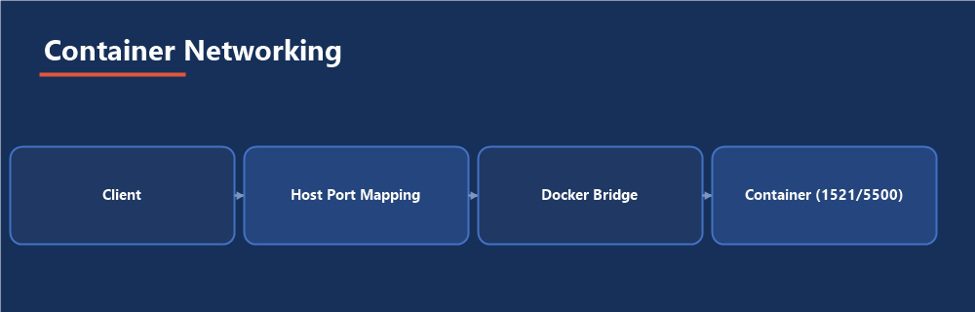
Figure 3 — Nothing reaches the container’s ports without an explicit publish mapping
4.2 Custom Initialization Scripts
Oracle’s images look for shell and SQL scripts under /opt/oracle/scripts/setup (run once, at database creation) and /opt/oracle/scripts/startup (run every time the container starts). Mounting a directory of setup scripts here is how a container image becomes a repeatable, pre-seeded test database rather than a blank one someone has to populate by hand after every rebuild.
4.3 A Multi-Container Stack with Compose
A realistic development stack rarely stops at the database ORDS (Oracle REST Data Services) fronting it with a REST API, and APEX static resources served alongside it, are common companions. Docker Compose describes all three as one file instead of three separate docker run commands to remember and keep in sync.
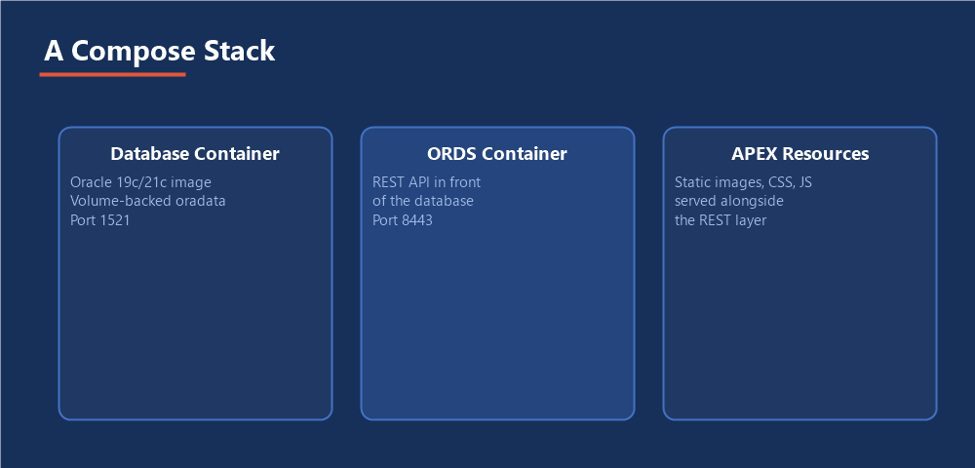
Figure 4 — One file, three services, started and torn down together
services: db: image: container-registry.oracle.com/database/enterprise:19.3.0.0 environment: ORACLE_PWD: ${ORACLE_PWD} volumes: – oradata:/opt/oracle/oradata ports: – “1521:1521” ords: image: container-registry.oracle.com/database/ords:latest depends_on: – db ports: – “8443:8443” volumes: oradata:
Note the password is passed through an environment variable resolved from the shell or an untracked .env file, not written into the Compose file itself the same rule as section 6.3, just enforced one layer earlier.
4.4 Running on Kubernetes
A database’s requirement for stable storage and a stable identity across restarts maps onto a StatefulSet, not a plain Deployment a StatefulSet gives each pod a persistent name and lets a PersistentVolumeClaim follow that specific pod across rescheduling, rather than binding storage to whichever pod happens to be scheduled next. A headless Service in front of the StatefulSet gives other pods in the cluster a stable DNS name to connect through, independent of which node the database pod is currently running on.
4.5 TLS for SQL*Net Between Containers
Plain SQL*Net between containers on the same host is common in dev and CI, but anywhere the traffic crosses a namespace, node, or trust boundary, wrapping the listener with TLS is worth the setup cost a wallet generated with orapki, mounted into the container alongside a TLS-enabled listener.ora, works the same way inside a container as it does on a traditional host. Store the wallet the same way any other secret is stored (see 6.3), never baked into the image alongside the certificate’s private key.
Part V — Resource Limits, Observability & What Doesn’t Fit
5.1 Sizing Inside cgroups
A –memory limit on the container is enforced by the kernel’s cgroup mechanism, but Oracle’s automatic memory management reads /proc/meminfo, which on older Docker/kernel combinations reports the host’s total memory rather than the container’s actual limit. The database can size its SGA against memory it will never actually be allowed to use, and get killed by the kernel’s OOM killer under load instead of failing gracefully. Setting explicit SGA and PGA targets sized comfortably under the container’s memory limit avoids relying on that detection working correctly.
5.2 What Doesn’t Work Well in a Container
- Real Application Clusters: RAC’s shared-storage and clusterware assumptions do not map cleanly onto container orchestration, and running it there is not how Oracle intends RAC to be deployed
- ASM: Automatic Storage Management expects raw or block device access that a typical container filesystem layer does not provide
- Large, latency-sensitive production OLTP: Not impossible, but the operational tooling, storage performance guarantees, and support posture around a traditional or cloud-managed install are far more mature than around a containerized one
5.3 Monitoring Container Health
Oracle’s images ship a health check script that a Dockerfile’s HEALTHCHECK instruction can call, so docker ps reports healthy or unhealthy rather than just running. docker logs and docker stats cover the rest: the alert log messages that would normally require shelling into a host are streamed to the container’s log output, and docker stats shows live CPU and memory against the container’s own configured limits, not the host’s totals.
5.4 Backup Considerations
Snapshotting the oradata volume while the database is open and writing is not a consistent backup by itself, the same way copying datafiles off a running host without RMAN or hot-backup mode is not. RMAN inside the container, or from a sidecar container with the Oracle client tools pointed at the same network, works exactly as it does anywhere else the backup destination is just another mounted volume or, as covered in the OCI Integration guide already in this series, Object Storage reached over the network.
5.5 Observability with Prometheus and Grafana
A sidecar exporter container (the community oracledb_exporter is the common choice) connects to the database with a read-only account, runs a set of SQL queries against V$ views on an interval, and exposes the results in Prometheus’s metrics format. Prometheus scrapes that endpoint on a schedule and stores the time series; Grafana queries Prometheus to render dashboards and fire alerts the same stack a container-native team already uses for everything else, extended to cover the database instead of treating it as a monitoring blind spot.
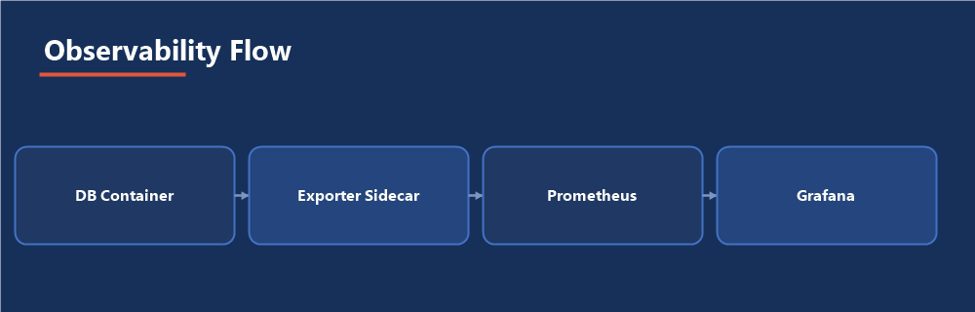
Figure 5 — The same observability stack the platform already runs, pointed at the database too
A container is not a backup strategy: The volume behind it needs the same RMAN discipline as any other Oracle Database, because a container that gets rebuilt without a tested backup is exactly as unrecoverable as a server that was reimaged without one.
Part VI — Practical Guidance
6.1 A Realistic Build Order
Choose or Build Image → Configure Env & Volumes → Run Container → Verify & Connect → Automate with Compose/K8s
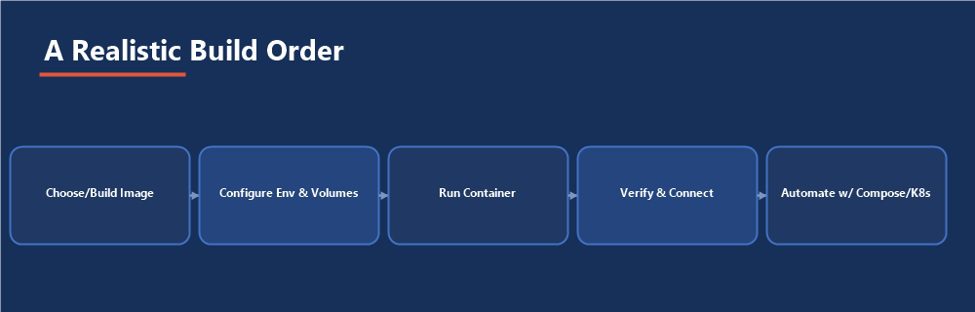
Figure 6 — Automation is the last step, once the manual version is proven to work
6.2 Where Containers Fit — and Where They Don’t
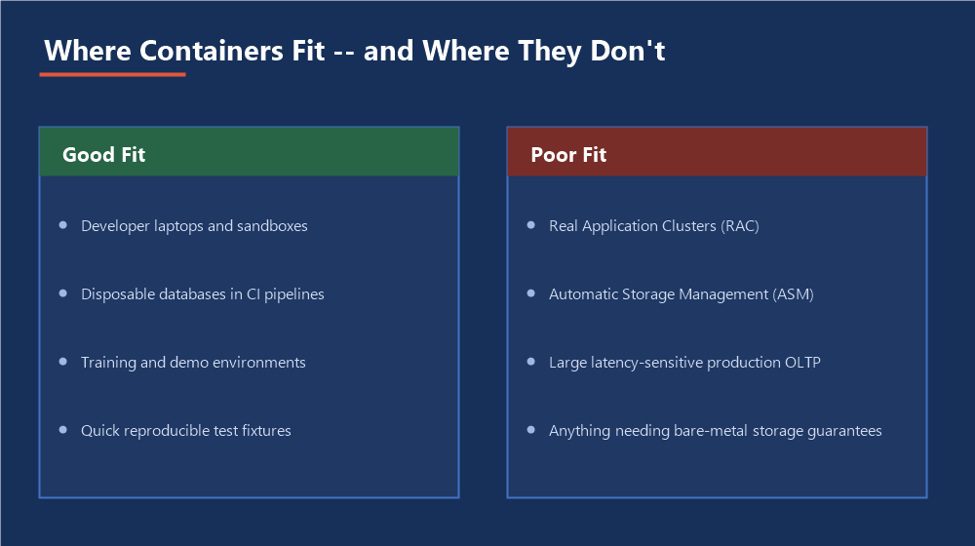
Figure 7 — The same technology, deliberately not reached for everywhere
6.3 Security Considerations
- Never bake ORACLE_PWD into a Dockerfile or commit it to source control pass it at run time from an untracked .env file, Docker secrets, or a Kubernetes Secret
- Rotate the password ORACLE_PWD sets immediately after first startup in anything beyond a fully disposable container
- Restrict which host ports are actually published a container running on a shared or internet-facing host has no more business exposing 1521 to the world than a traditional install would
6.4 Using Containers in CI/CD Pipelines
An ephemeral Oracle container that starts fresh for every pipeline run, gets seeded through the setup scripts from section 4.2, runs the test suite against it, and is torn down afterward gives every test run a known-clean database instead of one that has slowly accumulated state from every previous run. The trade is startup time: a fresh container needs a minute or two to complete database creation, which is why many pipelines instead start from a pre-built image with the schema and seed data already baked in from a custom build (Part II), skipping creation entirely.
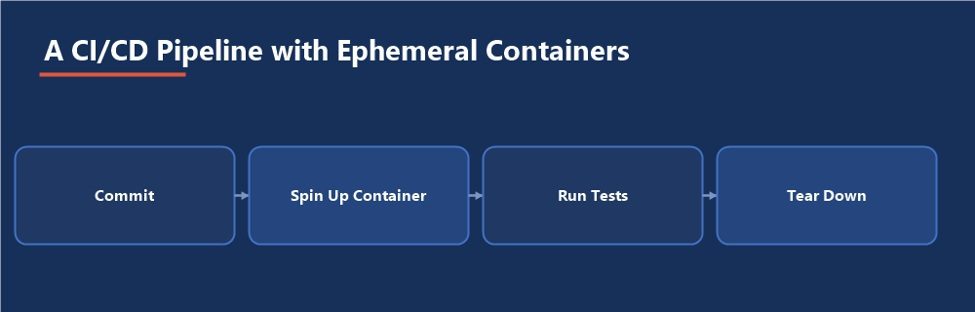
Figure 8 — Every run gets a database with no memory of the run before it
6.5 Common Pitfalls
- Running without a mounted volume, then losing the database the first time someone runs a routine container cleanup
- Leaving –shm-size at Docker’s default and then debugging a startup failure that looks like a memory problem but isn’t
- Sizing SGA and PGA against the host’s memory instead of the container’s actual –memory limit
- Floating on a latest tag for a custom image a pipeline depends on being stable
- Treating a volume snapshot as a backup without ever testing a restore from it
- Reaching for a container for a workload that actually needs RAC, ASM, or production-grade storage guarantees
6.6 A Readiness Checklist
- Database files are on a mounted volume, not the container’s writable layer
- –shm-size is set explicitly, sized for the SGA the container actually needs
- SGA/PGA targets are set explicitly, comfortably under the container’s memory limit
- Any custom image is tagged with its exact version and patch level, and every pipeline pins to that tag rather than latest
- The initial ORACLE_PWD has been rotated, and no password lives in a Dockerfile or committed Compose file
- A restore from the backup destination has actually been tested, not just a backup job that reported success
- The health check is wired up, and docker ps actually reports healthy, not just running, with Prometheus/Grafana or an equivalent watching the exported metrics
- The workload has been deliberately matched against section 6.2 nobody is quietly relying on RAC-, ASM-, or production-grade behavior from a container that was never meant to provide it
The Most Important Point
A container makes Oracle Database faster to stand up and easier to throw away; it does not make it a different database with different rules. Every habit that protects a traditional install sized memory, a mounted and backed-up data location, a tested restore, a watched health signal still has to be built in deliberately, because nothing about “it’s just a container” does that automatically.
- Ora DB in Docker Document
Ora DB in Docker Document