Oracle Solutions We believe in delivering tangible results for our customers in a cost-effective manner
Part I — Understanding Data Guard & High Availability
1.1 What Is High Availability, and Where Data Guard Fits
High availability is the discipline of keeping a database reachable through failures that would otherwise take it down a lost disk, a crashed host, an entire site going dark. Data Guard is Oracle’s answer at the database level: it maintains one or more synchronized copies of the primary database, called standby databases, ready to take over with minimal data loss and a controlled, well-rehearsed procedure rather than a panicked restore from last night’s backup.
1.2 Standby Database Types
- Physical standby: A block-for-block copy kept current by applying redo directly; the most common choice, and the focus of this guide.
- Logical standby: Redo is converted into SQL and applied as transactions, which allows the standby to stay open read-write for other objects while still receiving changes
- Snapshot standby: A physical standby temporarily converted to an updatable database for testing, then converted back and resynchronized from the redo it kept receiving the whole time
1.3 Protection Modes
- Maximum Protection: Zero data loss, guaranteed; the primary will not commit until the standby confirms the redo is safely received, and will stall rather than risk data loss
- Maximum Availability: Also targets zero data loss, but the primary keeps running on its own if the standby becomes unreachable, rather than stalling.
- Maximum Performance: The default; redo ships asynchronously, so the primary never waits on the standby at all, at the cost of a small, bounded amount of potential data loss
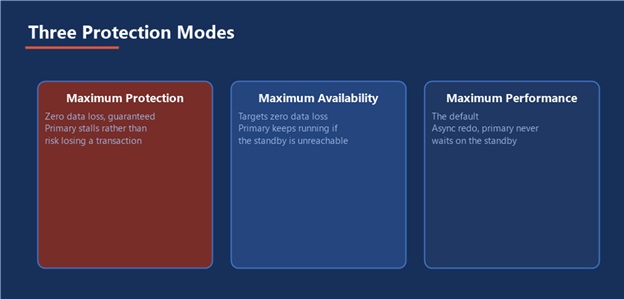
Figure 1 — How much the primary is willing to wait on the standby, by mode
1.4 Redo Transport and Apply
Primary Database → Redo Transport (LGWR / ARCH) → Standby Redo Logs → Redo Apply (MRP)
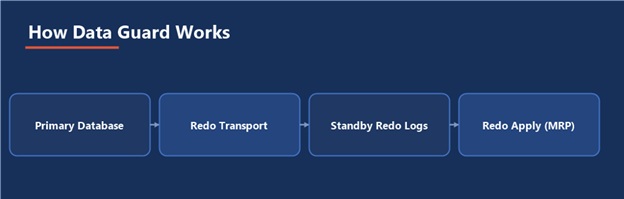
Figure 2 — Redo makes the same journey whether the standby is idle or about to become primary
Every change on the primary generates redo. Data Guard ships that redo to the standby, where it lands in the standby redo logs before a background process the Managed Recovery Process applies it, keeping the standby’s data files current with the primary in near real time rather than through periodic, batch-style refreshes.
A standby you have never failed over to is a hope, not a plan redo apply lag being zero proves the data is arriving. It proves nothing about whether the standby can actually take over production traffic when asked. Only a rehearsed switchover proves that.
Part II — Building a Physical Standby
2.1 Prerequisites
- The standby host runs the identical Oracle version and edition as the primary, with the same directory structure strongly recommended
- Reliable network connectivity between primary and standby, with listener and TNS entries resolvable in both directions
- The primary is running in ARCHIVELOG mode with FORCE LOGGING enabled, so that no change, including normally nologging operations, ever skips generating redo
2.2 Configuring the Primary
ALTER DATABASE FORCE LOGGING; ALTER SYSTEM SET LOG_ARCHIVE_CONFIG=’DG_CONFIG=(PRIMARY,STANDBY)’; ALTER SYSTEM SET LOG_ARCHIVE_DEST_2= ‘SERVICE=STANDBY ASYNC VALID_FOR=(ONLINE_LOGFILE,PRIMARY_ROLE) DB_UNIQUE_NAME=STANDBY’; ALTER SYSTEM SET LOG_ARCHIVE_DEST_STATE_2=ENABLE;
2.3 Creating the Standby with RMAN
The active duplicate copies the primary directly over the network, with no separate backup or staging step required:
RMAN> CONNECT TARGET sys/password@PRIMARY RMAN> CONNECT AUXILIARY sys/password@STANDBY RMAN> DUPLICATE TARGET DATABASE FOR STANDBY FROM ACTIVE DATABASE SPFILE SET DB_UNIQUE_NAME=’STANDBY’ SET LOG_ARCHIVE_DEST_2=’SERVICE=PRIMARY ASYNC VALID_FOR=(ONLINE_LOGFILE,PRIMARY_ROLE) DB_UNIQUE_NAME=PRIMARY’ NOFILENAMECHECK;
2.4 Starting Redo Apply
ALTER DATABASE RECOVER MANAGED STANDBY DATABASE DISCONNECT FROM SESSION;
2.5 Verifying the Standby
SELECT database_role, open_mode, protection_mode FROM v$database; SELECT status FROM v$archive_dest_status WHERE dest_id = 2;
A healthy standby reports PHYSICAL STANDBY for its role, MOUNTED for open mode, and a VALID archive destination status anything else means redo is not actually flowing yet.
Part III — The Data Guard Broker and Role Transitions
3.1 What the Broker Is For
The Data Guard Broker (accessed through the DGMGRL command line) manages the entire configuration as one unit every parameter change, every health check, every switchover and failover instead of running separate, easy-to-desynchronize commands by hand against each database. Everything in this section can technically be done without the Broker; almost nobody should choose to.
3.2 Creating a Broker Configuration
DGMGRL> CONNECT sys/password@PRIMARY DGMGRL> CREATE CONFIGURATION dg_config AS PRIMARY DATABASE IS ‘PRIMARY’ CONNECT IDENTIFIER IS PRIMARY; DGMGRL> ADD DATABASE ‘STANDBY’ AS CONNECT IDENTIFIER IS STANDBY; DGMGRL> ENABLE CONFIGURATION;
3.3 Switchover (Planned)
A switchover is a clean, no-data-loss role exchange, used for planned maintenance on the primary host both databases end the operation healthy, just with their roles reversed:
DGMGRL> SWITCHOVER TO ‘STANDBY’;
3.4 Failover (Unplanned)
A failover is what happens when the primary is actually gone and is not coming back on its own. The standby becomes the new primary, and depending on the protection mode and how much redo had already been received, some very recent transactions may not have made it the IMMEDIATE keyword tells the Broker not to wait for any further redo that will never arrive:
DGMGRL> FAILOVER TO ‘STANDBY’ IMMEDIATE;
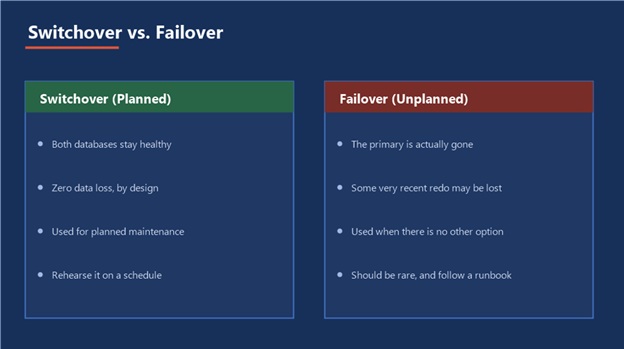
Figure 3 — Rehearse the left side often; the right side is what the runbook is for
3.5 Fast-Start Failover
Fast-Start Failover lets the Broker itself detect a primary outage and fail over automatically, within a configured threshold, instead of waiting for a human to notice and type the command. It requires an Observer process running independently of both databases, watching both sides so that a lost connection to the primary alone is never mistaken for the primary actually being down.
Switchover and failover are not the same risk: Practice switchover regularly, on a schedule, because it is safe and reversible. Failover should be rare enough that when it happens, the runbook not muscle memory from routine practice is what everyone follows.
Part IV — Monitoring and Tuning
4.1 Checking Redo Apply Lag
SELECT name, value, unit FROM v$dataguard_stats WHERE name IN (‘transport lag’,’apply lag’);
Transport lag measures how far behind the redo arriving at the standby is; apply lag measures how far behind the standby’s actual data is, since arrived redo still has to be applied. A widening apply lag with a flat transport lag almost always points at the standby’s own apply capacity, not the network between the two databases.
4.2 Key Monitoring Views
SELECT dest_id, status, error FROM v$archive_dest_status; SELECT sequence#, applied FROM v$archived_log ORDER BY sequence# DESC FETCH FIRST 10 ROWS ONLY; DGMGRL> SHOW CONFIGURATION; DGMGRL> SHOW DATABASE ‘STANDBY’;
4.3 Common Gaps and How to Resolve Them
- A network interruption leaves an archive log gap; once connectivity returns, the standby automatically requests the missing sequence range from the primary’s archived logs
- An I/O bottleneck on the standby shows up as apply lag climbing steadily even though transport lag stays flat the fix is on the standby’s storage, not the network
- A standby stuck in ORA-16191 or similar authentication errors usually traces back to a password file that is out of sync between primary and standby
4.4 Performance Tuning Notes
Redo transport in Maximum Performance mode is asynchronous by design and rarely the bottleneck; apply-side performance depends heavily on parallel recovery slaves, so review PARALLEL settings on the standby and confirm its I/O subsystem can genuinely sustain the primary’s peak redo generation rate, not just its average.
Part V — Practical Guidance
5.1 A Realistic Build Order
Prepare the Primary → Duplicate the Standby → Start Redo Apply → Create the Broker Configuration → Rehearse a Switchover
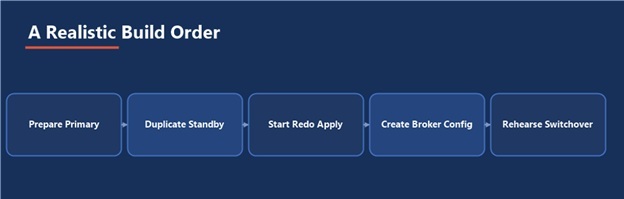
Figure 4 — The build is not done until the last step has actually happened
5.2 Common Pitfalls
- Forgetting FORCE LOGGING, so a nologging batch job on the primary silently creates a gap the standby can never apply
- Standing up a standby and never once rehearsing a switchover, so nobody actually knows how long the real procedure takes
- Letting the password file drift out of sync between primary and standby after a routine password change
- Choosing Maximum Performance by default without ever discussing the actual data-loss tolerance with the business
- Monitoring transport lag alone and missing a growing apply lag that is quietly eroding the actual recovery point
5.3 A Failover Readiness Checklist
- A documented, tested runbook exists for both switchover and failover, not just for switchover
- Transport lag and apply lag are both monitored, with alerting on a defined threshold, not checked manually
- The protection mode matches an actual, agreed data-loss tolerance, not just whatever the default happened to be
- A switchover has been rehearsed within recent memory, not just at initial build time
- Application connection strings use a service that follows the role, so a switchover or failover does not also require reconfiguring every client by hand
5.4 Where This Fits in the Series
Data Guard complements, and does not replace, the RMAN backup strategy already covered in this series a standby protects against hardware and site failure with near-zero recovery time, while RMAN backups protect against logical corruption and human error that Data Guard will faithfully replicate to the standby just as fast as it replicates everything else. Both belong in the same environment, and both deserve a place in the routine covered in the Database Health Check guide.
The Most Important Point
A standby with zero apply lag and a team that has never actually switched over to it is not high availability it is an expensive, unverified assumption. The switchover rehearsal is the product; the standby database is just the infrastructure that makes it possible.
- Data Guard & High Availability
Data Guard & High Availability