Oracle Solutions We believe in delivering tangible results for our customers in a cost-effective manner
Introduction
Oracle APEX makes it possible to build interactive business applications using SQL and PL/SQL while also allowing developers to extend applications with JavaScript, CSS and AJAX-based processes.
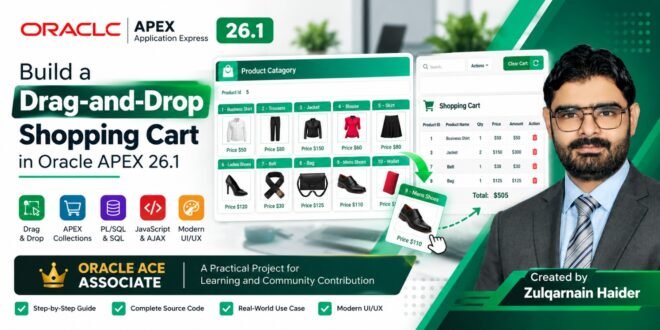
In this project, I built an interactive Product Catalog and Drag-and-Drop Shopping Cart using Oracle APEX.
The application allows users to:
- View products in a visual catalog
- Display product images dynamically
- Display product names and prices
- Select products by clicking
- Drag products into the shopping cart
- Store selected products in an APEX Collection
- Display cart contents using an Interactive Report
- Remove products from the cart
- Clear the entire cart
- Refresh the cart dynamically without a full page reload
The final interface contains a product catalog on the left and a shopping cart/report area on the right.
1. Final Application
The final application provides a simple shopping experience:
Product Catalog → Select/Drag Product → Add to Cart → Display Cart → Remove/Clear
The catalog dynamically displays products from the AUW_PRODUCTS table. The exported APEX page uses a PL/SQL region to generate the product cards and their Base64-encoded images. f47299_page_10
Main UI Components
The application contains:
- Product Catalog
- Product ID item
- Product cards
- Product image
- Product price
- Shopping Cart
- Interactive Report
- Clear button
- Drag-and-drop functionality
2. Application Architecture
The basic architecture is:
         AUW_PRODUCTS
                     │
                     ▼
             Product Catalog
                     │
          ┌──────────┴──────────┐
          │                     │
       Click                 Drag & Drop
          │                     │
          └──────────┬──────────┘
                     ▼
              P10_PRODUCT_ID
                     │
                     ▼
             ADD_TO_CART AJAX
                     │
                     ▼
             APEX_COLLECTION
                SHOPCART
                     │
                     ▼
             Interactive Report
                     │
          ┌──────────┴──────────┐
          │                     │
       Remove                 Clear
This architecture keeps the product source in the database while using an APEX Collection as a session-level shopping cart.
3. Product Catalog
The catalog is generated dynamically using PL/SQL.
The application reads products from:
AUW_PRODUCTSand generates HTML for each product.
The important query structure is:select '<div id="' || product_id || '" class="catdiv" draggable="true" ondragstart="drag_handle(event)"> <div class="catalog"> <div> <p class="pname"> ' || product_id || ' - ' || product_name || ' </p> <div class="prod_img" style="text-align: center"> <img id="' || product_id || '" src="data:image/png;base64, ' || apex_web_service.blob2clobbase64(product_image) || '" /> Price $' || list_price || ' </div> </div> </div> </div>' dragline from AUW_PRODUCTS;The export confirms that the application uses
APEX_WEB_SERVICE.BLOB2CLOBBASE64to convert the product image BLOB into Base64 content for the HTML image element. f47299_page_10This is useful when product images are stored directly inside the Oracle Database rather than on an external image server.
4. Why Use PL/SQL to Generate the Catalog?
Instead of manually creating ten HTML cards, the application generates them dynamically.
For example:
for r_products in c_products loop

    sys.htp.print(r_products.dragline);

end loop;
This means that if a new product is inserted into
AUW_PRODUCTS, the catalog can automatically display it.No additional HTML card needs to be manually created.
This is one of the advantages of combining:
Oracle Database + PL/SQL + APEX UI
5. Drag-and-Drop Functionality
The most interesting part of this application is the drag-and-drop functionality.
The page JavaScript contains three main functions:
function drop_over_handle(evt) {
    evt.preventDefault();
}
This allows the dragged element to be dropped over the target.
The drag handler stores the product ID:
function drag_handle(evt) {

    evt.dataTransfer.setData(
        "Text",
        evt.target.id
    );

}
When the product is dropped, the application retrieves the product ID:
function drop_handle(obj, evt) {

    evt.preventDefault(evt);

    var data =
        evt.dataTransfer.getData("Text");

    $x("P10_PRODUCT_ID").value = data;

    apex.server.process(
        "ADD_TO_CART",
        {
            pageItems: "#P10_PRODUCT_ID"
        }
    );

}
The exported application contains this drag/drop logic in the page-level JavaScript.
6. Click-to-Add Functionality
The application doesn’t require users to drag products.
Products can also be selected using a normal click.
$(".prodpic").click(function() {

    $("#cart").trigger("apexrefresh");

    $x("P10_PRODUCT_ID").value = this.id;

    apex.server.process(
        "ADD_TO_CART",
        {
            pageItems: "#P10_PRODUCT_ID"
        }
    );

});
This provides an alternative interaction model for users who don’t want to use drag-and-drop.
7. AJAX Process
When a product is selected, JavaScript calls the APEX On-Demand Process:
apex.server.process(
    "ADD_TO_CART",
    {
        pageItems: "#P10_PRODUCT_ID"
    }
);
The process is named:
ADD_TO_CARTThe exported page defines this as an On Demand Native PL/SQL process.
8. Adding Products to APEX Collection
The shopping cart is implemented using an Oracle APEX Collection called:
SHOPCARTThe process retrieves the selected product:
select p.rowid, p.*
from AUW_PRODUCTS p
where product_id = :P10_PRODUCT_ID
Then the product is added to the collection:
apex_collection.add_member(
    p_collection_name => 'SHOPCART',
    p_c001            => x.product_id,
    p_c002            => x.product_name,
    p_n001            => 1,
    p_n002            => x.list_price,
    p_n004            => x.list_price * 1,
    p_c010            => x.rowid
);
The exported application uses
SHOPCARTto hold selected products during the user’s session.9. Why APEX Collection?
An APEX Collection is useful for temporary session-based data.
For a shopping cart, it provides a convenient structure:
Product ID
Product Name
Quantity
Price
Amount
ROWID
The collection does not require creating a permanent shopping-cart table just to maintain temporary session selections.
This makes it suitable for prototypes, demonstrations and applications where cart information only needs to exist during the user’s APEX session.
10. Shopping Cart Interactive Report
The shopping cart is displayed using an Oracle APEX Interactive Report.
The report reads from:
APEX_COLLECTIONSusing:
SELECT
    c001 product_id,
    c002 product_name,
    SUM(n001) quantity,
    n002 list_price,
    SUM(n004) amount,
    'REMOVE' AS remove
FROM apex_collections
WHERE collection_name = 'SHOPCART'
GROUP BY
    c001,
    c002,
    n002
ORDER BY
    TO_NUMBER(product_id);
This query is part of the exported page configuration.
11. Cart Data Structure
The collection columns are mapped as follows:
Collection Purpose C001Product ID C002Product Name N001Quantity N002List Price N004Amount C010Product ROWID The Interactive Report exposes Product ID, Product Name, Quantity, List Price, Amount and Remove.
12. Removing a Product
The application also provides a remove operation.
The remove request is triggered through the report column:
REMOVEThe link passes the product ID back to Page 10.
The corresponding PL/SQL process searches the collection:
select seq_id, c001
from apex_collections
where collection_name = 'SHOPCART'
and c001 = :P10_PRODUCT_ID
Then deletes the matching collection member:
apex_collection.delete_member(
    p_collection_name => 'SHOPCART',
    p_seq             => x.seq_id
);
This logic is included in the page’s
remove product from cartprocess.13. Clear Shopping Cart
The application also contains a Clear button.
The button submits the page and executes:
apex_collection.truncate_collection(
    'SHOPCART'
);
This removes all products from the current shopping cart.
14. Initializing the Collection
Before the page is displayed, the application checks whether the collection exists.
if not apex_collection.collection_exists(
    'SHOPCART'
) then

    apex_collection.create_or_truncate_collection(
        p_collection_name => 'SHOPCART'
    );

end if;
This prevents errors when the user interacts with the cart for the first time.
15. Custom CSS
The default APEX presentation was enhanced with custom CSS.
The product cards use:
.catalog {
    background: #ffffff;
    position: relative;

    width: 145px;
    height: 168px;

    border: 1px solid #d9e2df;
    border-radius: 7px;

    float: left;
    margin: 2px;

    overflow: hidden;

    box-shadow:
        0 2px 7px rgba(0,0,0,0.08);

    transition: all 0.25s ease;
}
A hover effect was also added:
.catalog:hover {
    transform: translateY(-3px);

    border-color: #10b981;

    box-shadow:
        0 8px 20px rgba(16,185,129,0.18);
}
The exported page contains the complete custom CSS for the catalog, product image, region header and product ID item.
16. Product Image Styling
Each image is displayed inside a defined container:
.prod_img {
    padding: 4px;

    border: 1px dashed #b9c9c3;
    border-radius: 5px;

    width: 115px;
    height: 125px;

    background: #ffffff;

    position: absolute;

    left: 50%;

    transform: translateX(-50%);
}
This creates a consistent product-card layout regardless of the original dimensions of the product image.
17. User Experience
The final interface provides two different ways to add products:
Method 1 — Drag & Drop
Product
   ↓
Drag
   ↓
Shopping Cart
   ↓
ADD_TO_CART
Method 2 — Click
Product
   ↓
Click
   ↓
Product ID
   ↓
ADD_TO_CART
This makes the application more interactive than a conventional product report.
18. Technologies Used
Technology Purpose Oracle APEX 26.1.3 Application development Oracle Database Product data SQL Data retrieval PL/SQL Dynamic catalog + cart processing JavaScript Drag & Drop + AJAX APEX Collections Session shopping cart Interactive Report Cart display CSS UI/UX customization BLOB Product image storage Base64 Rendering database images 19. Key Oracle APEX Concepts Demonstrated
This project demonstrates several practical Oracle APEX concepts:
1. Native PL/SQL Region
Dynamic HTML is generated through PL/SQL.
2. APEX Collections
Temporary session-level shopping cart data.
3. On-Demand Process
AJAX request processing using:
apex.server.process()4. Page Items
The selected product is passed through:
P10_PRODUCT_ID5. Interactive Report
Used to display and manage shopping-cart information.
6. Dynamic Refresh
The cart region is refreshed using:
$("#cart").trigger("apexrefresh");7. JavaScript Integration
Browser drag-and-drop functionality is integrated with APEX.
8. Custom CSS
The default APEX UI is customized to create a modern product catalog.
20. What I Learned From This Project
One of the important lessons from this project is that Oracle APEX is not limited to traditional forms and reports.
By combining:
SQL
+
PL/SQL
+
JavaScript
+
CSS
+
APEX Collections
+
AJAX
developers can create highly interactive business applications.
The project also demonstrates how database-driven applications can dynamically generate their UI instead of hardcoding every product element.
21. Possible Real-World Extensions
This concept can be extended into a complete e-commerce or business application.
Possible improvements include:
Product Search
Search by Product Name
Search by Category
Search by Product ID
Product Categories
Men
Women
Shoes
Accessories
Electronics
Quantity Management
+
-
Quantity
Cart Total
Subtotal
Tax
Discount
Grand Total
Checkout
Cart
 ↓
Customer
 ↓
Address
 ↓
Payment
 ↓
Order
Database Tables
A production version could introduce:
PRODUCTS
PRODUCT_CATEGORIES
CUSTOMERS
ORDERS
ORDER_LINES
PAYMENTS
22. Project Flow
The complete application flow can be summarized as:
   USER
               │
               ▼
        PRODUCT CATALOG
               │
       ┌───────┴────────┐
       │                │
     CLICK            DRAG
       │                │
       └───────┬────────┘
               ▼
        P10_PRODUCT_ID
               │
               ▼
       APEX.SERVER.PROCESS
               │
               ▼
          ADD_TO_CART
               │
               ▼
        AUW_PRODUCTS
               │
               ▼
        APEX_COLLECTION
           SHOPCART
               │
               ▼
       INTERACTIVE REPORT
               │
       ┌───────┴────────┐
       │                │
     REMOVE            CLEAR
       │                │
       ▼                ▼
 Delete Member    Truncate Collection
23. Conclusion
This project demonstrates how Oracle APEX can be used to create an interactive, database-driven shopping experience using native APEX functionality combined with JavaScript and CSS.
The most important aspect of the project is not the shopping cart itself. It is the integration between different Oracle APEX capabilities:
PL/SQL → Dynamic HTML → JavaScript → AJAX → APEX Collection → Interactive Report
This architecture can serve as a foundation for more advanced Oracle APEX applications such as order management systems, procurement applications, POS systems, inventory applications and e-commerce solutions.
About the Author
Zulqarnain Haider is an Oracle APEX Developer focused on Oracle APEX, SQL, PL/SQL and enterprise application development.
His technical interests include:
- Oracle APEX
- Oracle Database
- SQL
- PL/SQL
- REST APIs
- Oracle EBS
- Enterprise Application Development
- Financial Applications
- UI/UX in Oracle APEX