 Oracle Solutions We believe in delivering tangible results for our customers in a cost-effective manner

Step-by-Step Guide to Apply Oracle E-Business Suite Database 19c Patch Set Update
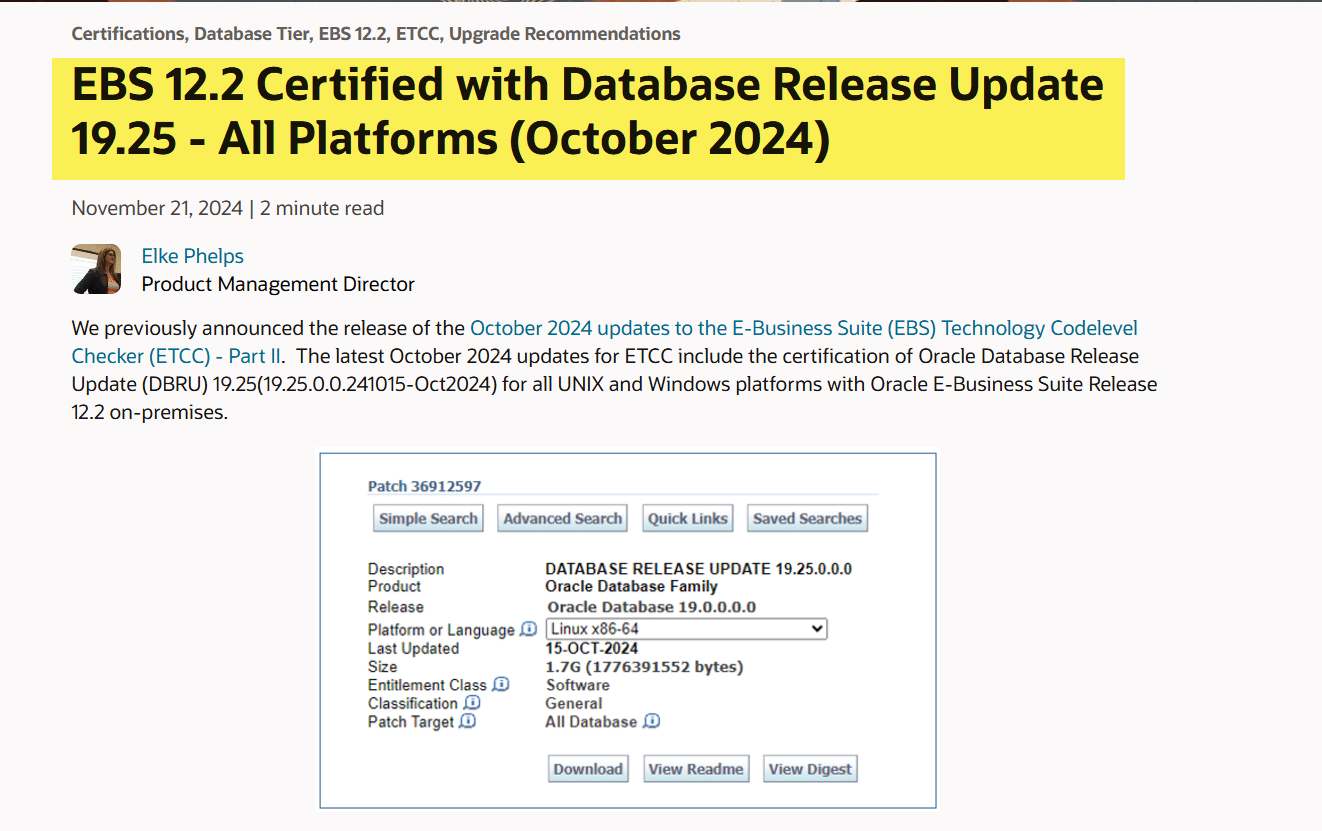
In this article, we will apply the latest Oracle Database Release Update (DBRU) 19.25 (19.25.0.0.241015-Oct2024) today, as it has been certified by Oracle.
What are Patch Set Updates (PSU)?
Oracle Database Patch Set Updates (PSUs) are quarterly cumulative updates designed to address critical security vulnerabilities, performance issues, and stability improvements in Oracle databases. These updates include fixes for both newly discovered and previously identified issues, ensuring your database environment remains secure and reliable. Unlike major upgrades, PSUs focus on enhancing existing functionality without introducing new features, making them simpler to apply with minimal disruption. They also help maintain compliance with Oracle’s recommended practices and security standards, ensuring optimal performance and protection for enterprise data.
For Latest PSU Certification with Oracle E-Business Suite R12.2.x Details Please refer to the link below for details.
Lastest PSU Certification 19c with Oracle EBS (OCT-2024)
Environment Details |
|
| Operating System | Oracle Enterprise Linux 8.9 |
| Database Version | 19c (19.19) |
| Application Version | Oracle E-Business Suite (12.2.12) |
If your environment is on 12c and want to upgrade to 19c, kindly refer to the Links below.
We will refer to the document Oracle E-Business Suite Release 12.2: Consolidated List of Oracle Database Patches and Bug Fixes (Doc ID 1594274.1) to download the latest PSU.
Download the Following Patches from Oracle Support highlighted in the Picture below

Oracle recommends that to use the latest released Latest OPatch which you can download from the Link below:

After downloading and copying the patches to the target environment, we will proceed with applying the PSU.
Step 1. Update OPatch
|
[oracle@ebs12214 ~]$ . ./env_prodCDB.env [oracle@ebs12214 ~]$ cd $ORACLE_HOME [oracle@ebs12214 19.0.0]$ cd OPatch [oracle@ebs12214 OPatch]$ ./opatch version OPatch Version: 12.2.0.1.37
OPatch succeeded.
[oracle@ebs12214 OPatch]$ cd /patches/DB_1925_patch/ [oracle@ebs12214 DB_1925_patch]$ unzip -qo p6880880_190000_Linux-x86-64.zip |
Backup current OPatch Directory
|
[oracle@ebs12214 ~]$ . ./env_prodCDB.env [oracle@ebs12214 ~]$ cd $ORACLE_HOME [oracle@ebs12214 19.0.0]$ mv OPatch/ OPatch_251124/ [oracle@ebs12214 19.0.0]$ |
Copy new OPatch to Oracle Home
|
[oracle@ebs12214 19.0.0]$ cp -pr /patches/DB_1925_patch/OPatch/ /u01/oracle/PROD/19.0.0 [oracle@ebs12214 19.0.0]$ cd OPatch [oracle@ebs12214 OPatch]$ ./opatch version OPatch Version: 12.2.0.1.44 OPatch succeeded. [oracle@ebs12214 OPatch]$ |
Shutdown Database and Listener
|
[oracle@ebs12214 OPatch]$ lsnrctl stop prodcdb [oracle@ebs12214 OPatch]$ sqlplus / as sysdba SQL*Plus: Release 19.0.0.0.0 – Production on Mon Nov 25 02:04:26 2024 Version 19.19.0.0.0 Copyright (c) 1982, 2022, Oracle. All rights reserved. Connected to: Oracle Database 19c Enterprise Edition Release 19.0.0.0.0 – Production Version 19.19.0.0.0 SQL> shu immediate Database closed. Database dismounted. ORACLE instance shut down. SQL> |
Take Backup of Oracle Home
Before Applying the PSU, It is recommended to take the Oracle Home Backup.
|
[oracle@ebs12214 ~]$ cd /u01/oracle/PROD/ [oracle@ebs12214 PROD]$ tar -cvf Oracle_HOME_25Nov24.tar $ORACLE_HOME |
Step 2. Apply Patch Set Update (PSU 19.25)
|
[oracle@ebs12214 PROD]$ cd /patches/DB_1925_patch/ [oracle@ebs12214 DB_1925_patch]$ unzip -qo p36912597_190000_Linux-x86-64.zip [oracle@ebs12214 DB_1925_patch]$ cd 36912597/ [oracle@ebs12214 36912597]$ opatch apply |

Post PSU Patch Configuration
Start Database and Listener
|
[oracle@ebs12214 ~]$ . ./env_prodCDB.env [oracle@ebs12214 ~]$ sqlplus / as sysdba SQL*Plus: Release 19.0.0.0.0 – Production on Mon Nov 25 02:25:40 2024 Version 19.25.0.0.0 Copyright (c) 1982, 2024, Oracle. All rights reserved. Connected to an idle instance. SQL> startup Total System Global Area 4294965864 bytes Fixed Size 9185896 bytes Variable Size 1207959552 bytes Database Buffers 3053453312 bytes Redo Buffers 24367104 bytes Database mounted. Database opened. SQL> exit Disconnected from Oracle Database 19c Enterprise Edition Release 19.0.0.0.0 – Production Version 19.25.0.0.0 [oracle@ebs12214 ~]$ lsnrctl start prodcdb |
Apply DataPatch
|
[oracle@ebs12214 ~]$ cd $ORACLE_HOME [oracle@ebs12214 19.0.0]$ cd OPatch [oracle@ebs12214 OPatch]$ ./datapatch -verbose |
Verify PSU
|
[oracle@ebs12214 OPatch]$ opatch lsinventory|grep 36912597 Patch 36912597 : applied on Mon Nov 25 02:17:02 PKT 2024 Patch description: “Database Release Update: 19.25.0.0.241015 (36912597)” [oracle@ebs12214 OPatch]$ SQL> select PATCH_ID,ACTION_TIME,STATUS,DESCRIPTION from registry$sqlpatch; |

Step 3. Apply OJVM Patch
Shutdown Database and Listener
|
[oracle@ebs12214 OPatch]$ lsnrctl stop prodcdb [oracle@ebs12214 OPatch]$ sqlplus / as sysdba SQL*Plus: Release 19.0.0.0.0 – Production on Mon Nov 25 02:04:26 2024 Version 19.19.0.0.0 Copyright (c) 1982, 2022, Oracle. All rights reserved. Connected to: Oracle Database 19c Enterprise Edition Release 19.0.0.0.0 – Production Version 19.19.0.0.0 SQL> shu immediate Database closed. Database dismounted. ORACLE instance shut down. SQL> |
Apply OJVM Patch
|
[oracle@ebs12214 DB_1925_patch]$ unzip -oq p36878697_190000_Linux-x86-64.zip [oracle@ebs12214 DB_1925_patch]$ cd 36878697/ [oracle@ebs12214 36878697]$ opatch apply
|

Post OJVM Patching
Start the Database and listener
|
[oracle@ebs12214 ~]$ . ./env_prodCDB.env [oracle@ebs12214 ~]$ sqlplus / as sysdba SQL> startup [oracle@ebs12214 ~]$ lsnrctl start prodcdb [oracle@ebs12214 ~]$ cd $ORACLE_HOME [oracle@ebs12214 19.0.0]$ cd OPatch [oracle@ebs12214 OPatch]$ ./datapatch -verbose |
Verify OJVM
|
[oracle@ebs12214 36878697]$ opatch lsinventory|grep 36878697
Patch 36878697 : applied on Mon Nov 25 02:44:37 PKT 2024 Patch description: “OJVM RELEASE UPDATE: 19.25.0.0.241015 (36878697)”
SQL> select PATCH_ID,ACTION_TIME,STATUS,DESCRIPTION from registry$sqlpatch;
|

Step 4. Apply Other Issue Patch as Per Document (Doc ID 1594274.1)
When using the AD Online Patching (adop) tool to patch Oracle E-Business Suite, you may see “PL/SQL ERROR 302” while compiling PL/SQL libraries or Oracle Forms. To fix this issue, apply Patch 36749043
|
[oracle@ebs12214 DB_1925_patch]$ unzip -oq p36749043_1925000DBRU_Linux-x86-64.zip [oracle@ebs12214 DB_1925_patch]$ cd 36749043/ [oracle@ebs12214 36749043]$ opatch prereq CheckConflictAgainstOHWithDetail -ph ./ [oracle@ebs12214 36749043]$ opatch apply |



One comment
Pingback: Oracle EBS ETCC OCT-2024 Update - Oracle Solutions