Oracle Solutions We believe in delivering tangible results for our customers in a cost-effective manner
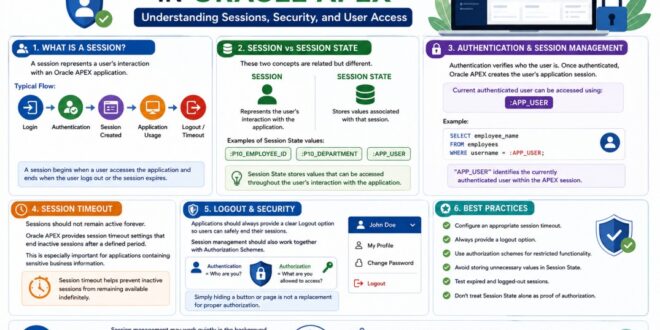
When a user logs into an Oracle APEX application, the application needs to remember that user while they move between pages. This is handled through session management.
A session maintains the context of a user’s interaction with the application, while Session State stores values such as page item and application item values.
Understanding this difference is important when developing and troubleshooting Oracle APEX applications.
In this blog, I’ll explain session management in Oracle APEX in simple terms and cover some practical concepts that every APEX developer should understand.
What Is a Session?
A session represents a user’s interaction with an Oracle APEX application.
A typical flow is:
Login → Authentication → Session Created → Application Usage → Logout/Timeout
During this period, APEX maintains the user’s application context and Session State.
A session begins when a user accesses the application and ends when the user logs out or the session expires
Session vs Session State
These two concepts are related but different.
Session: Represents the user’s interaction with the application.
Session State: Stores values associated with that session.
For example:
:P10_EMPLOYEE_ID
:P10_DEPARTMENT
:APP_USER
These values can be used in SQL, PL/SQL, validations, and other APEX components.
Session
│
├── User information
├── Application context
└── Session State
├── P10_EMPLOYEE_ID
├── P10_DEPARTMENT
└── AI_COMPANY_ID
Session State stores values that can be accessed throughout the user’s interaction with the application.
How Oracle APEX Manages a Session
A simplified session flow looks like this:
User
↓
Login
↓
Authentication
↓
APEX Session Created
↓
User Accesses Pages
↓
Session State Maintained
↓
Session Remains Active
↓
Logout / Timeout
↓
Session Ends
1. Authentication and Session Management
Authentication verifies who the user is. Once authenticated, Oracle APEX creates the user’s application session.
The current authenticated user can commonly be accessed using:
:APP_USER
For example:
SELECT employee_name
FROM employees
WHERE username = :APP_USER;
This is useful when applications need to display or filter information based on the logged-in user.
“APP_USER” identifies the currently authenticated user within the APEX session.
2. Session Timeout
Sessions should not remain active forever.
Oracle APEX provides session timeout settings that can end inactive sessions after a defined period. This is especially important for applications containing sensitive business information.
A good timeout balances security and usability.
Session timeout helps prevent inactive sessions from remaining available indefinitely.
3. Logout and Security
Applications should always provide a clear Logout option so users can safely end their sessions.
Session management should also work together with Authorization Schemes.
Remember:
Authentication = Who are you?
Authorization = What are you allowed to access?
Simply hiding a button or page is not a replacement for proper authorization.
Proper logout and authorization controls help protect application functionality and user data.
4. Managing Session State
Session management and Session State are closely connected.
Consider a page containing:
P10_VEHICLE_ID
P10_FROM_DATE
P10_TO_DATE
These values may be stored in Session State and used by reports or processes.
For example:
SELECT vehicle_id,
testing_date,
status
FROM vehicle_testing
WHERE vehicle_id = :P10_VEHICLE_ID
AND testing_date BETWEEN :P10_FROM_DATE AND :P10_TO_DATE;
The session provides the context in which these values are maintained.
5. Avoid Relying Only on Session Values for Security
One important lesson when working with sessions is that session values should not be treated as the only security mechanism.
For example, suppose a page contains:
P10_EMPLOYEE_ID = 1001
A developer should not assume that because the value is stored in Session State, the user is automatically authorized to access employee 1001.
The application should also verify whether that user has permission to access the requested record.
6. Session Management in Multi-User Applications
In a real-world Oracle APEX application, many users may be working at the same time.
For example:
User A → Session 101
User B → Session 102
User C → Session 103
Each user interacts with the application through their own session context.
This is particularly important in business applications where different users may have different:
Roles
Sites
Departments
Permissions
Data access
For example, an application might use a company or site value to filter data:
WHERE site_id = :AI_SITE_ID
This allows the application to provide users with the appropriate data based on their application context.
Best Practices
A few simple practices can make session management more reliable:
1. Configure an appropriate session timeout.
2. Always provide a logout option.
3. Use authorization schemes for restricted functionality.
4. Avoid storing unnecessary values in Session State.
5. Test expired and logged-out sessions.
6. Don’t treat Session State alone as proof of authorization.
Common Session Management Mistakes
Some common mistakes developers make include:
1. Confusing Session State with the session itself.
2. Setting excessively long session timeouts.
3. Not providing a clear logout option.
4. Relying only on client-side controls for security.
5. Assuming that a Session State value automatically proves authorization.
6. Not testing expired sessions.
7. Forgetting to protect sensitive pages with authorization schemes.
Session management may work quietly in the background, but it is an important part of every Oracle APEX application.
Understanding sessions, Session State, authentication, authorization, timeout, and logout helps developers build applications that are not only functional but also secure and reliable.
For me, understanding session management has also made debugging easier. When an application behaves differently for different users or an unexpected value appears, checking the session and Session State is often a good place to start.