Oracle Solutions We believe in delivering tangible results for our customers in a cost-effective manner
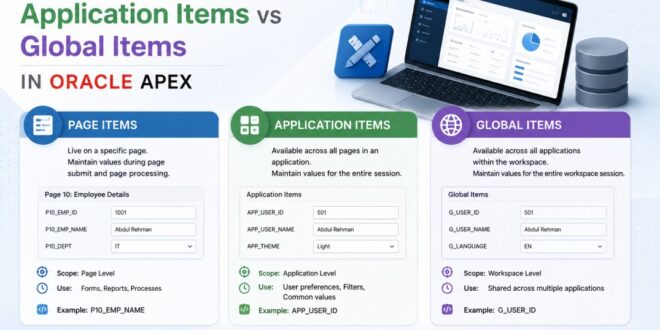
One of the first things every Oracle APEX developer learns is how to create Page Items. They’re everywhere—text fields, date pickers, select lists, checkboxes, and more. As applications become larger, you’ll also come across Application Items and Global Page Items.
At first, these three may seem similar because they all store values. But each serves a different purpose, and choosing the right one can make your application cleaner, easier to maintain, and more efficient.
In this blog, I’ll explain the difference between Page Items, Application Items, and Global Page Items in simple terms, along with practical examples and best practices.
Why Understanding Item Types Matters
Imagine building a large application with hundreds of pages.
Some values are needed only on one page, while others should be available throughout the application. Sometimes you want a search bar or notification icon to appear on every page.
Using the wrong type of item can lead to unnecessary complexity, duplicate code, and maintenance challenges.
Knowing which item to use helps you build scalable Oracle APEX applications.
- Page Items
Page Items are the most commonly used items in Oracle APEX.
They exist only on a specific page and are typically used to collect or display information entered by the user.
Examples include:
- Employee Name
- Date of Birth
- Department
- Search Keyword
- Customer ID
For example, on Page 10 you might have:
- P10_EMPLOYEE_ID
- P10_DEPARTMENT
These values are stored in Session State and are available only for that page unless you explicitly pass them elsewhere.
Example SQL:
SELECT employee_name,
department
FROM employees
WHERE employee_id = :P10_EMPLOYEE_ID;
When to Use Page Items
Use Page Items when:
- Collecting user input
- Filtering reports
- Submitting forms
- Running page-specific processes
- Displaying information on a single page
Advantages
- Easy to create and manage
- Page-specific
- Perfect for forms and reports
Page Items store values that are specific to a single page, making them ideal for forms, reports, and filters.
- Application Items
Application Items are different because they are available throughout the entire application.
Unlike Page Items, they are not tied to a specific page.
Suppose your application needs to store:
- Logged-in Company ID
- Current Financial Year
- User Role
- Default Currency
Instead of creating the same page item on every page, you can create one Application Item.
Example:
AI_COMPANY_ID
You can then use it anywhere.
Example SQL:
SELECT *
FROM employees
WHERE company_id = :AI_COMPANY_ID;
When to Use Application Items
Application Items are useful for:
- Logged-in user information
- Company or branch information
- Global settings
- Application-wide filters
- Frequently used values
Advantages
- Available across all pages
- Avoids duplicate page items
- Centralized value management
Application Items hold values that can be accessed from anywhere within the application.
- Global Page Items
Global Page Items are created on Page 0, also known as the Global Page.
Any region or item placed on Page 0 automatically appears on every page where its display conditions are met.
Common examples include:
- Search Bar
- Notification Bell
- User Profile
- Header Filters
- Company Logo
- Navigation Controls
For instance, if you create a search field:
P0_SEARCH
it can be displayed across multiple pages without recreating it each time.
When to Use Global Page Items
Global Page Items are ideal for:
- Header search bars
- Global navigation
- Notification areas
- Shared filters
- Common toolbar controls
Advantages
- Design once, use everywhere
- Consistent user experience
- Reduces repeated development effort
Items placed on Page 0 are shared across the application, providing a consistent interface.
Comparison at a Glance
|
Feature |
Page Items |
Application Items |
Global Page Items |
|
Scope |
Single page |
Entire application |
Multiple pages through Page 0 |
|
Used For |
Forms, reports, filters |
Shared values and settings |
Shared interface components |
|
Visible to Users |
Yes |
Usually No |
Yes |
|
Example |
P10_EMPLOYEE_ID |
AI_COMPANY_ID |
P0_SEARCH |
Each item type has a different purpose, and selecting the right one improves application design and maintainability.
Best Practices
- Use Page Items for Page-Specific Data
If a value is only needed on one page, create a Page Item instead of an Application Item.
This keeps your application simple and easier to manage.
Keep page-specific information within Page Items to avoid unnecessary complexity.
- Use Application Items for Shared Values
If the same value is required across multiple pages, store it once as an Application Item.
This avoids creating duplicate page items and simplifies maintenance.
Application Items centralize commonly used values and reduce duplication.
- Use Page 0 for Shared User Interface Components
Instead of copying the same search bar, logo, or notification region to every page, place it on Page 0.
This ensures a consistent user experience throughout the application.
Page 0 lets developers design common interface elements once and reuse them across the application.
- Choose the Simplest Option
Don’t use an Application Item or Global Page Item if a Page Item is enough.
Keeping each item limited to its intended scope makes your application easier to understand and maintain.
Selecting the right item type improves readability, maintainability, and long-term scalability.
Common Mistakes to Avoid
Some mistakes new Oracle APEX developers often make include:
- Creating Application Items for values used on only one page.
- Duplicating the same Page Item across many pages instead of using an Application Item.
- Rebuilding the same header or search bar on every page instead of using Page 0.
- Confusing Global Page Items with Application Items—they solve different problems.
Understanding these differences early can save time and make future enhancements much easier.
Although Page Items, Application Items, and Global Page Items all store values, they are designed for different purposes. Page Items are best for page-specific input, Application Items are ideal for values shared across the application, and Global Page Items help create a consistent interface by reusing components through Page 0.
From my experience working with Oracle APEX, choosing the right item type from the beginning makes applications more organized, easier to maintain, and simpler to scale as requirements grow. It’s a small design decision that can have a big impact on the overall quality of your application.