Oracle Solutions We believe in delivering tangible results for our customers in a cost-effective manner
One of the features I use frequently in Oracle APEX is Dynamic Actions. They make it possible to respond to user interactions without writing JavaScript for every small requirement.
A user changes a value, clicks a button, selects an option, or opens a page—and the application can respond immediately.
This makes Dynamic Actions one of the most useful declarative features in Oracle APEX.
What Is a Dynamic Action?
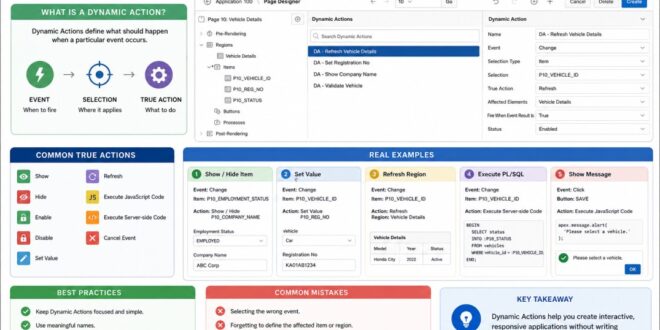
A Dynamic Action defines what should happen when a particular event occurs.
For example:
When the user selects a vehicle, refresh the vehicle details region.
A Dynamic Action generally consists of:
Event → Selection → True Action
For example:
Event: Change
Selection: P10_VEHICLE_ID
True Action: Refresh
Affected Region: Vehicle Details
Dynamic Actions allow developers to define interactive behavior using Oracle APEX’s declarative interface.
Common Events
Dynamic Actions can respond to many different events, including:
Change
Click
Page Load
Key Down
Key Up
Key Release
Focus
Blur
For example, a Change event is useful when a user selects a value from a Select List.
A Click event can be used for buttons.
The event determines when Oracle APEX should execute the Dynamic Action.
Common True Actions
Once an event occurs, APEX can perform different actions.
Some commonly used True Actions are:
Show
Hide
Enable
Disable
Set Value
Refresh
Execute JavaScript Code
Execute Server-side Code
Cancel Event
This makes Dynamic Actions useful for both simple UI changes and more advanced application logic.
Real Example 1: Show and Hide an Item
Suppose a form contains:
Employment Status
Employed
Unemployed
When the user selects Employed, we want to display:
Company Name
The Dynamic Action can be configured as:
Event: Change
Item: P10_EMPLOYMENT_STATUS
Condition: Value = EMPLOYED
True Action: Show P10_COMPANY_NAME
False Action: Hide P10_COMPANY_NAME
The field changes immediately without refreshing the page.
Dynamic Actions can change the visibility of page items based on user input.
Real Example 2: Set a Value
Suppose the user selects a vehicle and you want to automatically populate its registration number.
A Dynamic Action can use Set Value with a SQL statement:
SELECT registration_no
FROM vehicles
WHERE vehicle_id = :P10_VEHICLE_ID;
The registration number is then populated automatically.
Dynamic Actions can retrieve database values and populate related page items automatically.
Real Example 3: Refresh a Region
Imagine a report displaying vehicle details.
When the user changes:
P10_VEHICLE_ID
the report should immediately display information for the newly selected vehicle.
Configure:
Event: Change
Item: P10_VEHICLE_ID
True Action: Refresh
Affected Region: Vehicle Details
Only the required region is refreshed instead of the entire page.
Refreshing only the affected region provides a smoother user experience than reloading the entire page.
Real Example 4: Execute PL/SQL
Sometimes a requirement involves database-side logic.
For example, after selecting a vehicle, you may want to check whether it is already assigned.
A Dynamic Action can execute server-side PL/SQL:
BEGIN
SELECT status
INTO :P10_STATUS
FROM vehicles
WHERE vehicle_id = :P10_VEHICLE_ID;
END;
The result can then be displayed on the page.
Executing server-side PL/SQL through a Dynamic Action
Dynamic Actions can execute server-side logic without requiring a full page reload.
Real Example 5: Display a Message
Dynamic Actions can also provide immediate feedback.
For example:
apex.message.alert(“Please select a vehicle.”);
This can be executed when a user performs an action that requires a value.
Immediate feedback helps users understand what is required before continuing.
Dynamic Actions vs JavaScript
One question developers often ask is:
“Should I use a Dynamic Action or JavaScript?”
The simple answer is:
Use the declarative option when it is sufficient. Use JavaScript when you need custom behavior.
For example:
Show/Hide an item → Dynamic Action
Refresh a region → Dynamic Action
Set a simple value → Dynamic Action
Complex custom UI behavior → JavaScript
This keeps the application simpler and easier to maintain.
Best Practices
Keep Dynamic Actions Focused
Give each Dynamic Action a clear purpose rather than putting too many unrelated actions together.
Use Meaningful Names
Instead of:
DA1
use:
1. DA – Refresh Vehicle Details
2. Refresh Only What Is Required
3. Refresh the affected region instead of the entire page whenever possible.
4. Submit Required Items
5. When executing server-side code, make sure the required page items are submitted so the latest values are available in Session State.
6. Avoid JavaScript When APEX Can Do It
Always check whether a built-in True Action can solve the requirement before writing custom JavaScript.
Clear naming and focused actions make Dynamic Actions easier to understand and maintain.
Common Mistakes
1. Some common issues I have seen while working with Dynamic Actions include:
2. Selecting the wrong event.
3. Forgetting to define the affected item or region.
4. Not submitting required page items.
5. Refreshing the entire page unnecessarily.
6. Using JavaScript when a declarative action is available.
7. Creating too many Dynamic Actions for the same requirement.
Most of these problems can be avoided by keeping the logic simple and testing each action individually.
Dynamic Actions are one of the features that make Oracle APEX development fast and productive. They allow developers to build interactive pages without writing JavaScript for every requirement.
From showing and hiding fields to setting values, refreshing reports, executing PL/SQL, and providing user feedback, Dynamic Actions can handle a wide range of real-world requirements.
The key is knowing when to use them and when to move toward custom JavaScript or server-side logic.
For me, the biggest advantage of Dynamic Actions is simple: less code, faster development, and a better user experience.