Oracle Solutions We believe in delivering tangible results for our customers in a cost-effective manner
Modern applications exchange data in many different formats, and JSON (JavaScript Object Notation) has become one of the most common. Oracle APEX applications frequently work with JSON when consuming REST APIs, sending data to external services, or processing structured information.
When I started working with API integrations in Oracle APEX, understanding how to read and process JSON became an important part of development. Oracle provides several tools that make this easier, from SQL/JSON functions to the “APEX_JSON” and “APEX_WEB_SERVICE” packages.
What Is JSON?
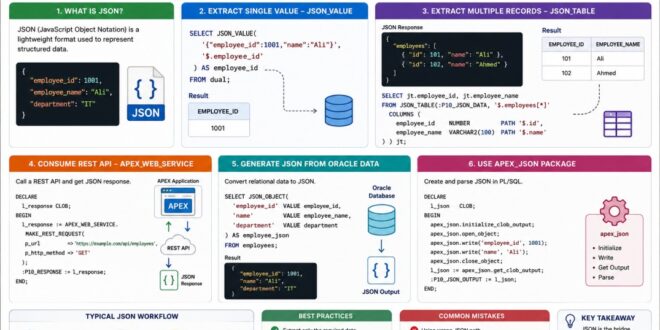
JSON is a lightweight format used to represent structured data.
A simple example is:
{
“employee_id”: 1001,
“employee_name”: “Ali”,
“department”: “IT”
}
Here, each property has a name and a value.
Oracle APEX can read this data and use it in reports, forms, PL/SQL processes, and API integrations.
JSON represents structured information in a simple format that can easily be exchanged between applications.
1. Extract Values with JSON_VALUE
When you need a single value from JSON, “JSON_VALUE” is a simple option.
For example:
SELECT JSON_VALUE(
‘{“employee_id”:1001,”name”:”Ali”}’,
‘$.employee_id’
) AS employee_id
FROM dual;
The result is:
1001
This is useful when you only need one specific value from a JSON document.
“JSON_VALUE” extracts a single scalar value from a JSON document.
2. Extract Multiple Records with JSON_TABLE
When JSON contains an array of records, “JSON_TABLE” is extremely useful.
For example:
{
“employees”: [
{
“id”: 101,
“name”: “Ali”
},
{
“id”: 102,
“name”: “Ahmed”
}
]
}
It can be converted into rows using:
SELECT jt.employee_id,
jt.employee_name
FROM JSON_TABLE(
:P10_JSON_DATA,
‘$.employees[*]’
COLUMNS (
employee_id NUMBER PATH ‘$.id’,
employee_name VARCHAR2(100) PATH ‘$.name’
)
) jt;
This is particularly useful when an API returns multiple records.
“JSON_TABLE” transforms structured JSON data into rows and columns that can be queried like a table.
3. Working with REST APIs
Oracle APEX applications often consume REST APIs.
The “APEX_WEB_SERVICE” package can be used to make HTTP requests and receive responses.
For example:
DECLARE
l_response CLOB;
BEGIN
l_response := APEX_WEB_SERVICE.MAKE_REST_REQUEST(
p_url => ‘https://example.com/api/employees’,
p_http_method => ‘GET’
);
:P10_RESPONSE := l_response;
END;
The response can then be processed using Oracle’s JSON functions.
This creates a common workflow:
API → JSON Response → JSON Processing → APEX Page/Report
Oracle APEX can consume REST APIs, receive JSON responses, and process the returned data.
4. Generate JSON from Oracle Data
JSON is not only used for receiving data. APEX applications may also need to send JSON to external systems.
Oracle SQL provides functions such as:
– “JSON_OBJECT”
– “JSON_ARRAYAGG”
– “JSON_OBJECTAGG”
For example:
SELECT JSON_OBJECT(
’employee_id’ VALUE employee_id,
‘name’ VALUE employee_name
) AS employee_json
FROM employees;
This converts relational database data into JSON.
Oracle SQL can convert relational data into JSON for use in APIs and external integrations.
5. Using APEX_JSON
Oracle APEX also provides the “APEX_JSON” package for generating and parsing JSON programmatically.
It can be useful when JSON processing requires more procedural control inside PL/SQL.
For example, developers can use it to create structured JSON responses or parse JSON objects in PL/SQL processes.
“APEX_JSON” provides PL/SQL-based functionality for generating and processing JSON data.
A Simple JSON Workflow
A typical API integration in Oracle APEX may look like this:
Request → REST API → JSON Response → Parse JSON → Store/Display Data
For example:
Oracle APEX
↓
REST API
↓
JSON Response
↓
JSON_TABLE / JSON_VALUE
↓
Report or Database Table
Understanding this flow makes API integration much easier to troubleshoot.
JSON connects Oracle APEX with external services by providing a structured format for exchanging data.»
Best Practices
1. Select Only Required Data
When processing large JSON responses, extract only the properties your application actually needs.
2. Validate API Responses
Don’t assume every API response will have the expected structure. Handle missing or unexpected values appropriately.
3. Use JSON_TABLE for Arrays
When an API returns multiple records, “JSON_TABLE” is usually more convenient than manually extracting every value.
4. Handle CLOB Responses Carefully
REST API responses can be large. Oracle APEX APIs may return JSON as a “CLOB”, so avoid unnecessary conversions that can cause datatype or buffer-size errors.
5. Keep API Logic Separate
For larger applications, keep API communication and JSON processing in reusable PL/SQL procedures or packages rather than repeating the same logic across multiple pages.
Efficient JSON processing makes API integrations easier to maintain, troubleshoot, and scale.»
Common Mistakes
Some common issues when working with JSON include:
– Using the wrong JSON path.
– Expecting a single value when the response contains an array.
– Not handling NULL or missing properties.
– Converting large JSON CLOBs unnecessarily.
– Assuming every API response has the same structure.
– Mixing API calls and page-specific logic throughout the application.
JSON has become an important part of modern Oracle APEX development, especially when applications communicate with REST APIs and external services.
Functions such as “JSON_VALUE” and “JSON_TABLE”, along with tools like “APEX_JSON” and “APEX_WEB_SERVICE”, provide developers with everything needed to consume, process, and generate JSON data.
From my experience, once you understand the basic flow of API → JSON → Processing → APEX, working with external integrations becomes much easier.
- The key is to understand the structure of the JSON first, then choose the right Oracle tool to process it.
JSON may look simple, but understanding how to work with it effectively can open the door to much more powerful Oracle APEX integrations.