Oracle Solutions We believe in delivering tangible results for our customers in a cost-effective manner
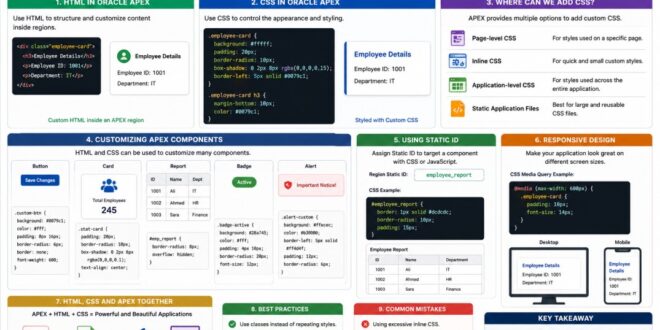
Oracle APEX provides many declarative components for building applications, but sometimes the standard options are not enough to achieve the exact look and feel we want.
This is where HTML and CSS become useful.
With HTML, we can structure and customize content, while CSS allows us to control colors, spacing, fonts, layouts, buttons, cards, and other visual elements.
HTML in Oracle APEX
HTML can be used to create custom content inside regions, cards, reports, and other APEX components.
For example:
HTML
<div class=”employee-card”>
<h3>Employee Details</h3>
<p>Employee ID: 1001</p>
<p>Department: IT</p>
</div>
This gives developers more control over how information is presented.
HTML can be used to create custom structures and content when standard APEX components are not sufficient.
CSS in Oracle APEX
CSS controls how HTML elements look.
For example:
.employee-card {
padding: 20px;
border-radius: 10px;
box-shadow: 0 2px 8px rgba(0,0,0,0.15);
}
.employee-card h3 {
margin-bottom: 10px;
}
This can transform a simple HTML structure into a more polished UI.
CSS provides control over the appearance, spacing, layout, and visual presentation of APEX components.
Where Can We Add CSS?
Oracle APEX provides different options for adding custom CSS, such as:
1. Page-level CSS
2. Inline CSS
3. Application-level CSS
4. Static application files
For a style used on only one page, page-level CSS may be appropriate. For styles used throughout the application, application-level CSS or static files are usually better.
APEX provides multiple locations for adding CSS depending on whether the styling is page-specific or application-wide.
Customizing APEX Components
HTML and CSS can be used to customize many parts of an application, including:
1. Buttons
2. Cards
3. Reports
4. Forms
5. Regions
6. Badges
7. Alerts
8. Navigation elements
For example, a status badge can be created with:
HTML
<span class=”status-active”>Active</span>
and styled using:
.status-active {
padding: 5px 10px;
border-radius: 15px;
font-weight: bold;
}
Custom HTML and CSS can improve the visual presentation of application data.
Using Static IDs
One useful APEX technique is assigning a Static ID to a region or component.
For example:
employee_report
CSS can then target that component:
#employee_report {
border-radius: 10px;
padding: 15px;
}
Static IDs make custom styling more reliable and easier to maintain.
Static IDs provide a reliable way to target specific APEX components with CSS.
Responsive Design
An application should work well on different screen sizes.
CSS media queries can help adapt the interface:
@media (max-width: 600px) {
.employee-card {
padding: 10px;
}
}
This allows the design to respond to smaller screens such as mobile devices.
CSS media queries help adapt custom designs to different screen sizes.
HTML, CSS, and APEX Together
A powerful APEX application often combines all three:
APEX → Application Logic
HTML → Structure
CSS → Presentation
For example:
User
↓
Oracle APEX
↓
HTML Structure
↓
CSS Styling
↓
Responsive User Interface
This combination allows developers to keep APEX’s declarative development approach while having greater control over the user interface.
Best Practices
1. Use Classes Instead of Repeating Styles
2. Create reusable CSS classes rather than adding the same styling repeatedly.
3. Use Meaningful Static IDs
4. Give components clear Static IDs when they need to be targeted with CSS or JavaScript.
5. Keep CSS Organized
6. Avoid putting large amounts of CSS directly into individual regions. Reusable styles are easier to maintain when organized properly.
7. Don’t Over Customize
8. APEX already provides a strong UI framework. Custom CSS should enhance the application rather than make it unnecessarily difficult to maintain.
9. Test Different Screen Sizes
10. Always check custom designs on desktop, tablet, and mobile screens.
Common Mistakes
Avoid:
1. Using excessive inline CSS.
2. Repeating the same CSS in multiple places.
3. Depending heavily on generated APEX HTML IDs.
4. Ignoring responsive design.
5. Overriding APEX theme styles without understanding their impact.
6. Adding custom styling without considering future maintenance.
HTML and CSS give Oracle APEX developers an additional level of control over application design. While APEX provides powerful built-in components and themes, custom HTML and CSS can help create interfaces that better match specific business and design requirements.
From simple badges and buttons to custom cards and responsive layouts, even a small amount of well-written CSS can make a noticeable difference.
The goal is not to replace APEX’s declarative features, but to extend them where customization adds real value.
APEX provides the foundation; HTML and CSS help shape the experience.